
Written by Tobias Gundry
Credit packs let clients book into classes with your studio without committing to a recurring subscription.
Credit packs are prepaid credits for selected classes to be used within a specified period with your studio. Unlike memberships which renew at set intervals, credit packs don’t renew or automatically refill. Which makes them a great option for casual members who may not be able to commit to the regular schedule that memberships cater for.
Packs are also a great way for clients who already have a membership subscription to buy additional services, such as adding private one-on-one classes in addition to their weekly classes membership.
Creating a Credit Pack in Clovo
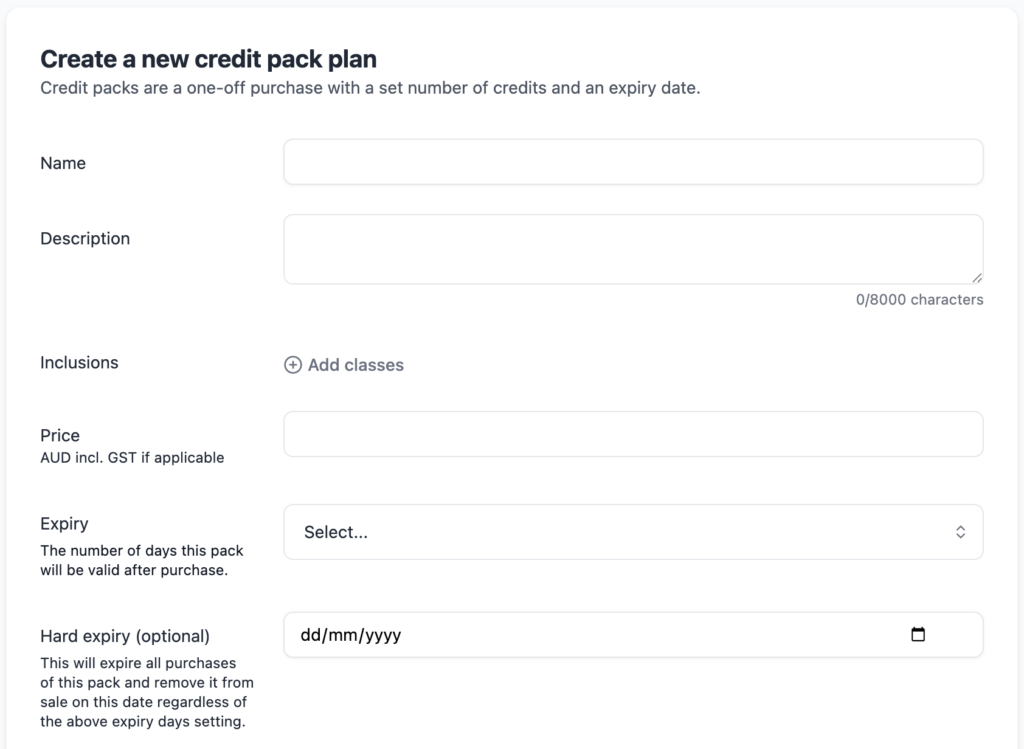
To create a credit pack in Clovo, from your studio dash at https://studio.clovo.au, expand the ‘Products’ dropdown in the lefthand side navigation menu, click into ‘Packs’, then ‘Add Pack’.
Basic Details
Give your pack a name and description, and set a price including GST if applicable.
Expiry
Set when new purchases of this pack should expire. The expiry is calculated starting from the date of purchase. If needed, you can easily extend the expiry date on a per-client basis following purchase, where needed at your discretion.
You can optionally set a hard expiry date. This gives you an option to expire all credit packs of this type on a given date, rather than a relative number of days from the purchase date. This is a great option for special deals such as opening specials. If you set hard expiry, the pack will also be removed from sale on the expiry date, in addition to all purchases being expired.
Setting inclusions
Credit packs let you sell prepaid credits to clients that can be used to book classes at your studio. Which classes and how many of each is up to you.
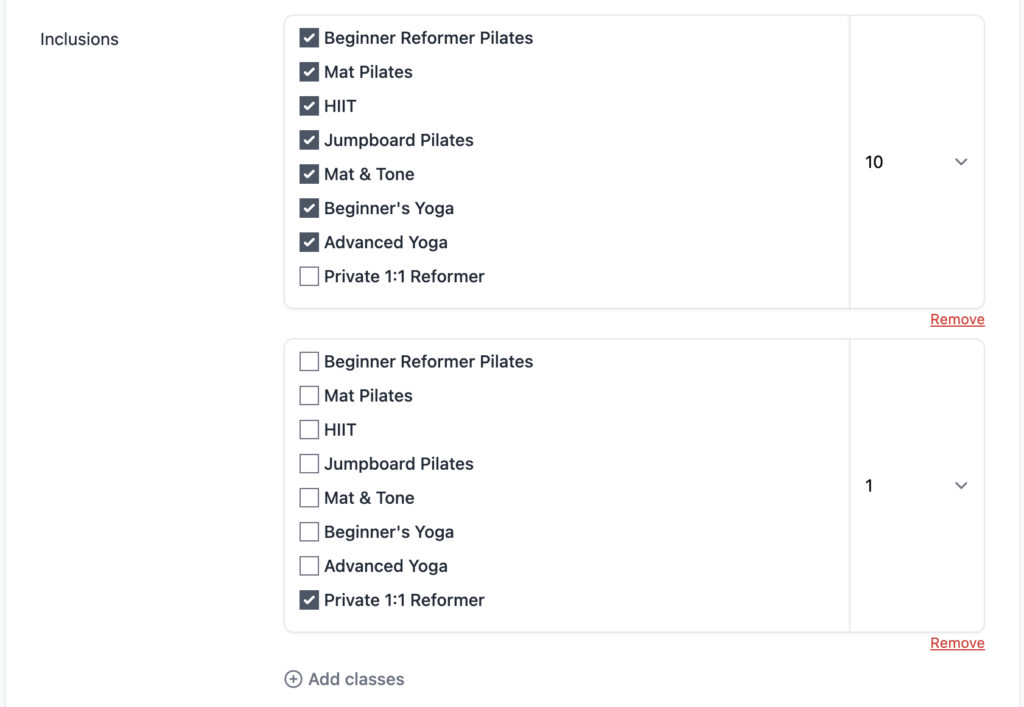
To set these inclusions click ‘Add Classes’ on the create or edit screen. Class inclusions are added in groups that let you set how many of each class on that row is included.
For example, if you want to create a pack that gives 10 credits to attend any of your classes, you would create a single group, tick all classes, and set the quantity to 10.
However, if you wanted to also include a private one-on-one reformer session to the pack in addition to the 10 classes, but restricting bookings of that class type to a single class, you would then add an additional group of inclusions, tick only the ‘Private 1:1 Reformer’ class type, and set the quantity to 1.
With this configuration, your pack will now let your client book any 10 of your regular classes, but only 1 private one-on-one reformer class.
Credit Pack FAQs
Credit Pack Expiry
- Credit packs expire the number of days from the purchase date that you specify or when all credits have been redeemed, whichever comes first.
- You can extend the expiry date of a purchased credit pack.
- Hard expiry sets a date that all packs of that type will expire regardless of purchase date. Packs with a hard expiry will also be removed from sale on that date.
- Clients cannot book for classes past the expiry date of their pack.
-
Location in Clovo
-
Estimated Time To Complete
15 -
Information For
Studio Owner -
Platform Components
Clovo Studio, Clovo iOS, Clovo Android -
Last Updated
February 18, 2026 -
Need more help?
Get in touch hello@clovo.au
