
Written by Tobias Gundry
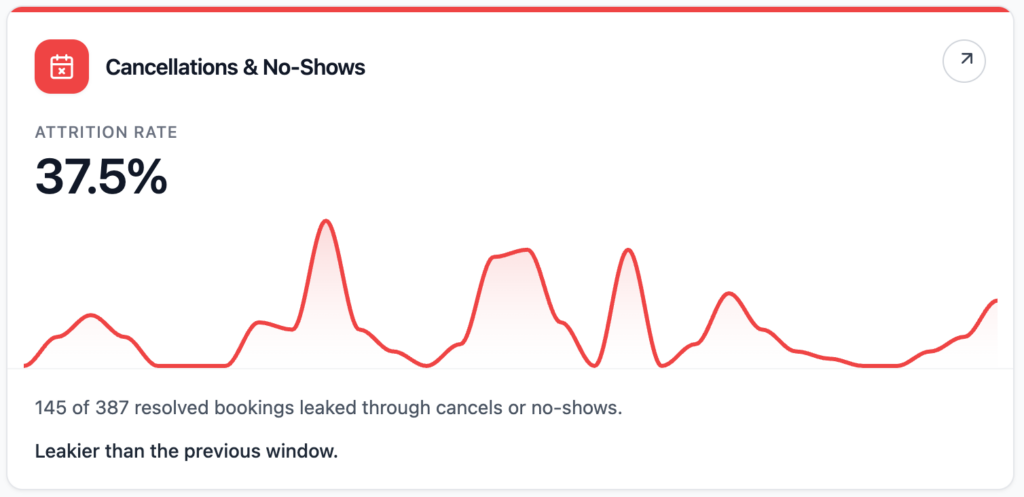
The Cancellations & No-Shows report shows where booked demand is being lost before or during class.
Where To Find It
Open Reporting, then select Cancellations & No-Shows.
Why This Report Matters
Every cancellation or no-show can affect room energy, waitlist movement, revenue potential, and the experience for customers who wanted a spot. This report helps you see whether attendance loss is isolated or becoming a pattern.
It is especially useful when classes look busy on the timetable but the room feels quieter than expected.
How To Read It
- Attrition rate shows the share of resolved bookings that became cancellations or no-shows.
- Cancellations shows bookings cancelled in the window.
- No-shows shows bookings that stayed active but did not receive a check-in.
- Resolved bookings shows bookings that have either been cancelled or belong to classes that have already happened.
- Late cancels are cancellations made within 24 hours of class start.
- Early cancels are cancellations made with more notice.
- Leakiest classes shows classes where the highest share of spots slipped away.
What The Number Means
A lower attrition rate means more booked demand is holding through to class. A higher rate means more bookings are being lost through cancellations or no-shows.
Late cancels and no-shows are often the most important to review because they are harder to recover. If those numbers rise, consider reminder timing, waitlist settings, cancellation policies, timetable fit, and whether certain classes or times are creating more attendance friction.
How Clovo Calculates It
Clovo looks at customer bookings for scheduled classes in the past 30 days that have already resolved. A booking is counted as lost if it was cancelled or if the class has passed and the booking has no check-in.
Late cancels are cancellations made within 24 hours of the class start. The report compares the current attrition rate with the previous 30 days.
-
Location in Clovo
-
Estimated Time To Complete
15 -
Information For
Studio Owner -
Platform Components
Clova Studio, Clova iOS, Clova Android -
Last Updated
April 29, 2026 -
Need more help?
Get in touch hello@clovo.au
