
Written by Tobias Gundry
👻 Ghost Alert is Clovo’s built-in retention tool. It looks for changes in client behaviour that may suggest someone is drifting away, giving your team time to reconnect before they go quiet.
A Ghost Alert is a prompt to check in, not a guarantee that a client will leave. Use your knowledge of the client alongside the information Clovo provides.
How Ghost Alert works
- Signals — Clovo notices retention-related changes in a client’s bookings, membership or app activity.
- Alerts — related signals are brought together into a Ghost Alert for your team.
- Actions — staff can reach out, create a follow-up task or mute the alert.
Turn on Ghost Alert
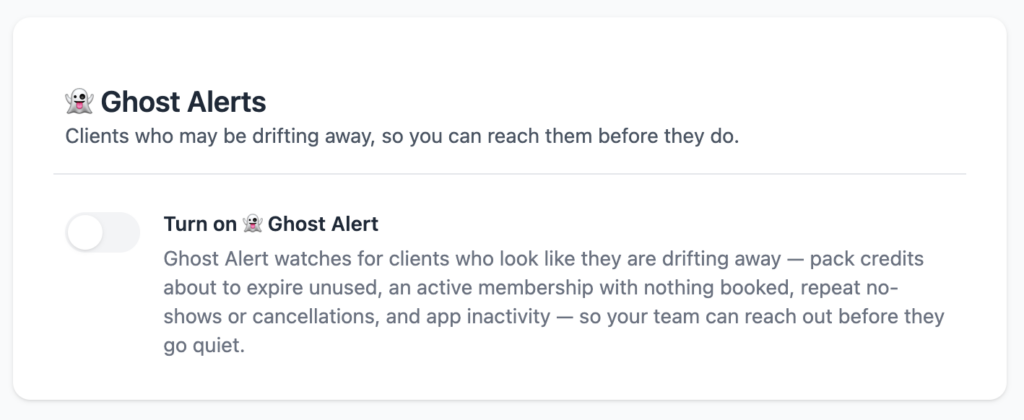
- In Clovo Studio, open Settings.
- Find 👻 Ghost Alert.
- Turn the switch on.
Only studio owners and staff with setup access can turn Ghost Alert on or off. Clovo reviews current retention signals each morning, calculates Ghost Scores and creates alerts when the feature is on.
What Ghost Alert watches for
- Credits expiring — a pack expires within the next seven days and still has unused credits.
- Nothing booked — a client has an active membership but no future live bookings.
- Repeated no-shows — three or more no-shows in the last 30 days.
- Repeated cancellations — three or more client-initiated cancellations in the last 30 days.
- App inactivity — a client with a live membership has not opened the Clovo app for more than five days.
- Retention signal — in-app behaviour suggests the client may be considering leaving.
Clovo deliberately keeps the exact in-app behaviour behind a Retention signal private. Staff will only see the general signal and a short explanation.
Understand the Ghost Score
Each eligible client receives a Ghost Score based on the mix of recent signals Clovo can see. More meaningful signals carry more weight than everyday behaviours.
- Low — no current signs of concern.
- Elevated — one or more early retention signals are present.
- Higher — the current signals suggest a stronger risk of the client drifting away.
- Processing — Clovo has not calculated the client’s score yet. This normally updates during the next morning review.
The score appears on the client profile and throughout the Ghost Alert screens. It is visible to studio staff only and should be treated as a guide rather than a prediction.
Find your Ghost Alerts
- Go to Operations > Ghost Alerts to view all alerts and filter by Unactioned, Actioned or All.
- The five most recent unactioned alerts appear on your main dashboard.
- Open a client profile and choose the Ghost Alerts tab to review that client’s history.
Staff who have the Ghost Alert notification enabled receive one daily push and email digest while unactioned alerts remain. The digest is sent again each day until someone actions the alerts.
Action an alert
Open an alert to see the client, the signals Clovo detected and any actions already taken. Choose the response that fits the situation:
- Reach out — review the client’s contact details and send a prefilled email from Clovo.
- Create staff task — create a follow-up task linked to the client and the Ghost Alert.
- Mute — mark the alert as actioned without contacting the client. Clovo records who muted it and when. Muting cannot be undone.
The first action moves the alert from Unactioned to Actioned, but your team can still record additional actions afterwards. An open alert does not close automatically when the client’s behaviour changes, so action or mute it once your team has reviewed it.
Use Retention data
Under Operations > Ghost Alerts > Retention data, open Members with nothing booked to see clients with a live membership and an empty diary. The report includes membership details and each client’s last booking, and you can export it as a CSV for further follow-up.
Retention data remains available even when Ghost Alert notifications are switched off, so you can use the report for your own retention checks at any time.
-
Location in Clovo
-
Estimated Time To Complete
15 -
Information For
Studio Owner -
Platform Components
Clova Studio, Clova iOS, Clova Android -
Last Updated
July 27, 2026 -
Need more help?
Get in touch hello@clovo.au
