
Create a free trial for a new client

Tobias Gundry
Updated
Create a trial when you want a new client to try your studio before committing to a paid plan.
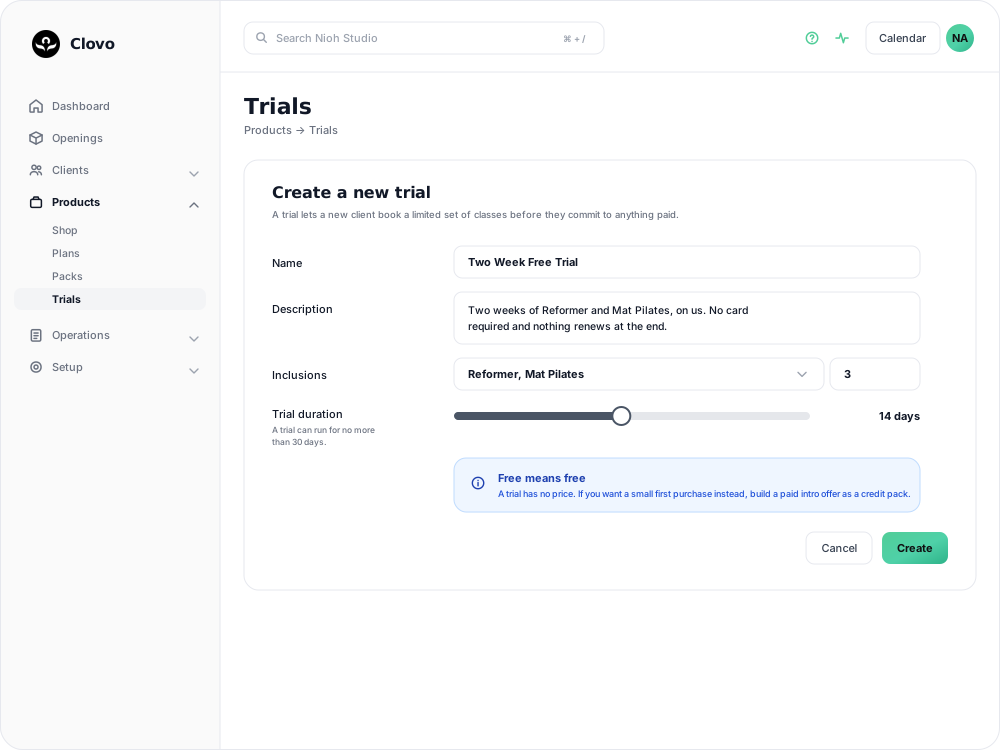
Create the trial
- Open Products → Trials.
- Select Add trial.
- Enter the trial name and description, then use Add class allowance row to group the included classes. Choose an allowance for each row: 2 of any, for example, lets clients mix and match those classes for two bookings across the trial. New rows show Choose allowance until you select a number or Unlimited. Trials are free; there is no price to set.
- Set the trial length between 3 and 30 days.
- Save the trial, then make it available to clients through your normal sales or booking flow.
Choose an intro offer instead
If you want to charge a small first purchase rather than give access for free, create a paid intro offer. Set up a credit pack with a special introductory price and a small number of credits, then mark it as a Special offer and Single Purchase.
Keep the offer clear
- Tell clients exactly when the trial ends and what they can book.
- Use a paid intro offer when you want a client to make a small commitment before joining a membership.
- Review your active trials regularly and remove offers you no longer want to sell.
Related articles
Create a paid introductory offer with a credit pack
Use a paid intro offer when you want a new client to make a small first purchase before choosing a membership.
Prevent repeat intro purchases with Blocked Purchasers
Block a client from buying a credit pack, including clients who bought your intro offer on another platform before moving to Clovo.