
Prevent repeat intro purchases with Blocked Purchasers

Tobias Gundry
Updated
Use Blocked Purchasers to stop a particular client buying a credit pack. This is useful when they have already bought your introductory offer outside Clovo.
The block applies to that pack through the app, landing page, gifts, and point of sale. It leaves anything the client has already bought unaffected and does not block them from other packs.
Moving to Clovo from another platform
If clients have already purchased your intro offer on another platform, add them to the equivalent pack’s Blocked Purchasers list in Clovo, or ask the Clovo team to do this as part of your migration. This prevents those clients from buying their intro pack again after the move.
Give the migration team your list of previous intro-offer purchasers and identify the Clovo pack they should be blocked from buying. Arrange this before making the offer available to clients in Clovo. If you are adding blocks yourself, make sure the clients have been added to your studio first, then follow the steps below for each client.
Keep Single Purchase enabled on your introductory offer to prevent repeat purchases recorded in Clovo. Use Blocked Purchasers for clients whose earlier purchase was on your previous platform.
Block a client from buying a pack
- Open Products → Packs and select the pack.
- Select Blocked Purchasers.
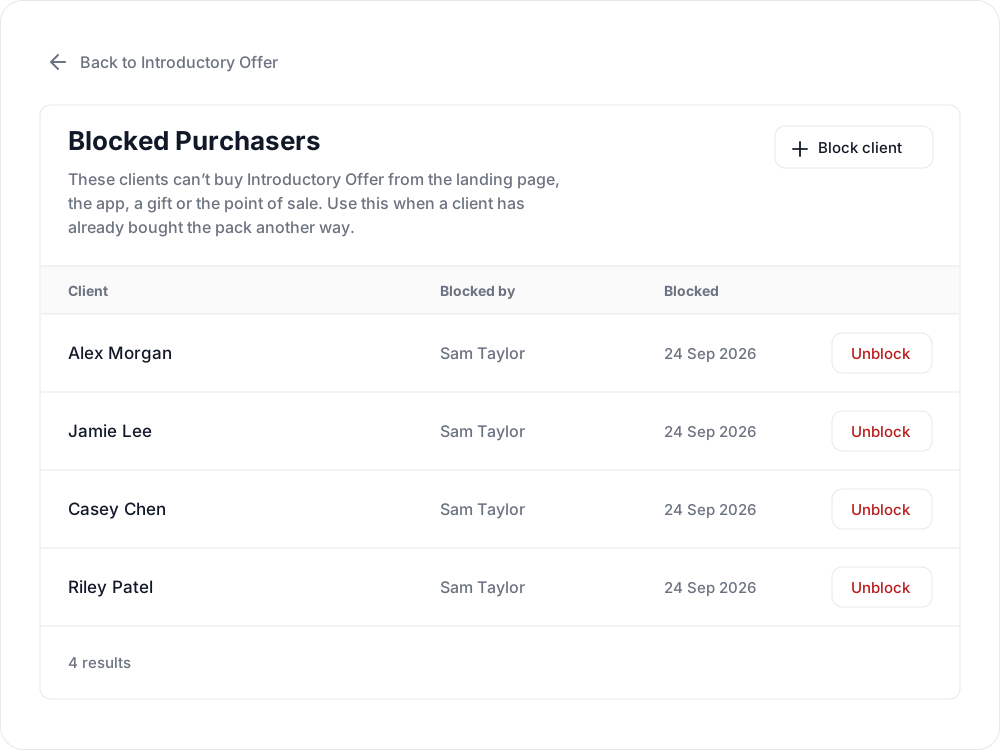
- Select Block client.
- Search for and choose the client. Check their email address to make sure you select the right person.

- Select Block client to save. The client appears in the pack’s Blocked Purchasers list.
Clients marked already blocked cannot be selected again.
Remove a block
Open the pack’s Blocked Purchasers list, select Unblock beside the client, and confirm. This removes the manual block for that pack. If Single Purchase is enabled and the client has already bought the pack in Clovo, that purchase restriction still applies.
Related articles
Create a paid introductory offer with a credit pack
Use a paid intro offer when you want a new client to make a small first purchase before choosing a membership.
Create a free trial for a new client
Create a trial when you want a new client to try your studio before committing to a paid plan.
Credit packs in Clovo
Credit packs let clients book into classes with your studio without committing to a recurring subscription.
Give your clients free credits to book any of your classes, with Super Credits
Give clients free classes with Super Credits. Use them for rewards, make-goods, or other studio-approved credits.