
Leave a review for Clovo

Tobias Gundry
Updated
Your honest review helps other studio owners and app users decide whether Clovo is right for them. Share what has worked well and what could be better, in your own words.
If you leave one review, please choose Capterra. It is our preferred place for studio owners and staff to share their experience of using Clovo to run their studio.
Review Clovo on Capterra
Leave a Clovo review on Capterra.
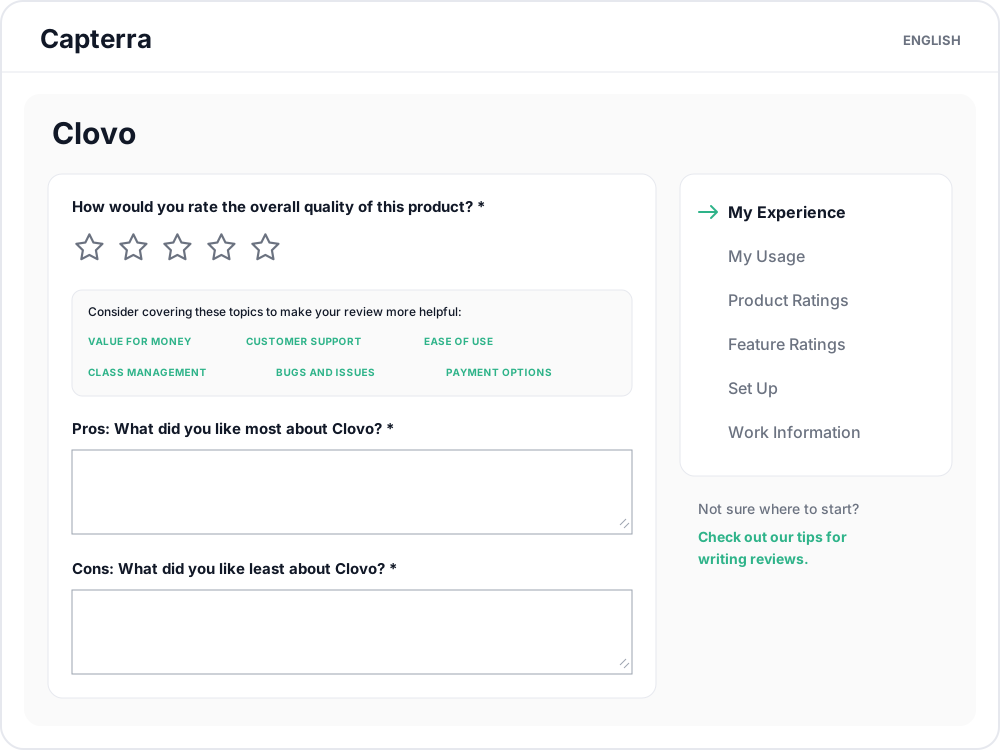
- Choose a rating that reflects your experience.
- Describe what you liked most and least about Clovo. Specific examples, such as managing bookings, taking payments or getting support, help other studios understand your experience.
- Add your overall experience, a review title and the requested contact details.
- Select Continue and follow Capterra’s remaining questions to submit your review.
Review Clovo on Google
Leave a Clovo review on Google.
Sign in to your Google account if prompted, choose your rating and write about your experience with Clovo before posting. This link is for reviewing Clovo itself; feedback about a class or instructor belongs with your studio.
Review the Clovo app
Please include a written review as well as a star rating. A few sentences about how you use the app, what works well or what needs improvement give other people context and help us understand your feedback.
Apple App Store
Write a Clovo review on the App Store.
Open the link on your iPhone or iPad. If the review form does not open, find Ratings & Reviews on Clovo’s App Store page and tap Write a Review. Choose your rating, add a title and write your feedback, then submit it.

Google Play
Open the link in the Play Store on your Android device and tap Write a review under the star rating. Choose your rating, add your written feedback and tap Post. If the review option is missing, check that you are signed in with the Google account you used to download Clovo.
Give us a chance to help
If you are not satisfied with Clovo, please give us a chance to put things right by emailing hello@clovo.au. Tell us what happened and what you need help with so we can work through it with you.
You are welcome to leave an honest review whether or not you contact us.
Related articles
What does the customer journey look like?
See the customer journey in the Clovo app: finding your studio, exploring, signing up, purchasing a pack, booking a class, and receiving confirmation and reminders.
How to manage your studio from an iPad
Use the Clovo iPad app to manage classes, clients and staff tasks, or run a self-serve check-in kiosk.
Get started in the Clovo app when your studio moves to Clovo
Your studio now takes bookings through Clovo and has already set up your account. Download the app, find your studio, then sign in with a code sent to your email or set a password with a reset.
Track attendance by checking-in clients on your phone or desktop
Check clients in to record who attended a class in addition to who booked.