
View the reason clients gave for cancelling a membership

Tobias Gundry
Updated
Clients cancelling a recurring membership in the iOS or Android app choose Reason for cancelling before they confirm. You can read their answer in Clovo Studio to understand why they left.
- Go to Clients → Browse and open the client’s profile.
- Open the membership they cancelled or have scheduled to cancel.
- Find Cancellation reason in the membership details. If they chose Other, their written explanation appears beneath it.
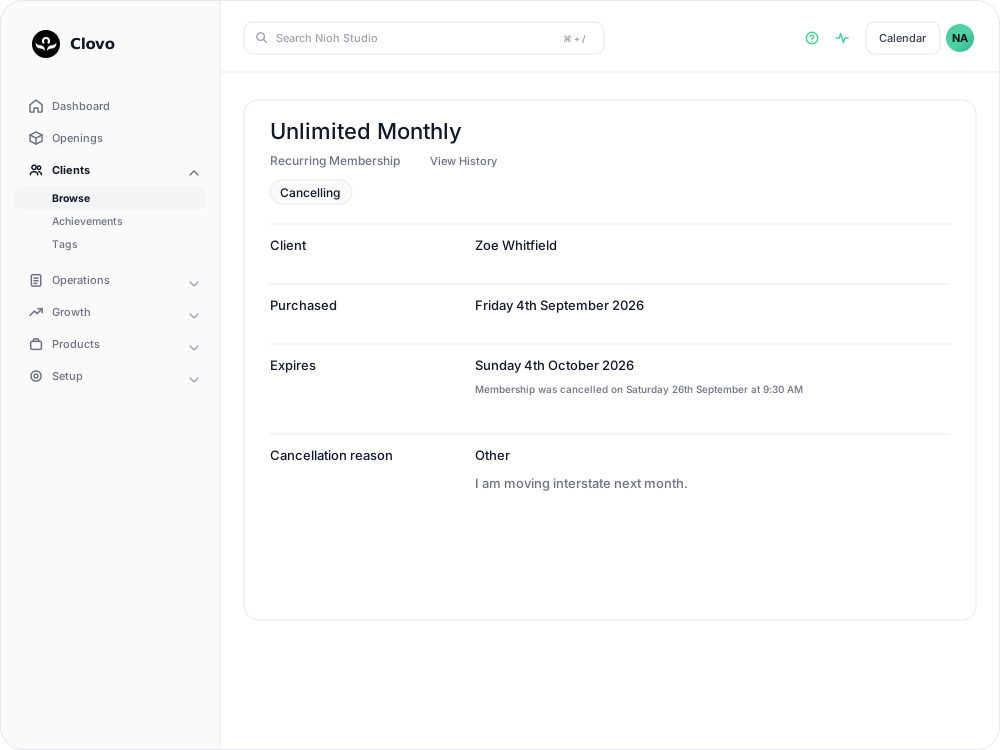

If the row is missing, no reason was collected. This can happen with older cancellations or older app versions. Packs and trials do not ask for a reason.
Staff also record a reason when cancelling a recurring membership on a client’s behalf, so the answer may have been entered by your team.
Related articles
Cancel a client membership
Cancel a client’s membership, pack or trial from their profile, and know when their access ends, what happens to their bookings, and how to end a membership on the spot.
Change a client’s membership plan
Move a client to another recurring plan at their next renewal, and know when the new price and allowance begin.
Offer recurring memberships by creating a membership plan
Fill in the membership plan form — inclusions, price, billing period and contract — and know what changes for current members when you edit a plan later.
Set a minimum membership term and cancellation notice period
Write a membership contract, set a minimum term and cancellation notice period, and understand when a membership can end.