
Include classes and appointments in one membership

Tobias Gundry
Updated
A membership can include both classes and appointments. Give each its own allowance so members can book their classes and use a facility without drawing from the same pool.
For example, a Pilates studio could offer this weekly membership:
| Inclusion | Weekly allowance |
|---|---|
| Reformer Pilates | 3 classes |
| Mat Pilates | Unlimited classes |
| Massage chair | 3 appointments, 30 minutes each |
Prepare the classes and massage chair
Have your Reformer and Mat Pilates classes set up before creating the plan.
In Setup > Appointments, turn on Enable appointments and create an appointment type named Massage chair. Add a 30-minute duration and its price.
Create a facility calendar for the chair and publish the times clients can book. Adding the chair to a membership gives members an allowance; the calendar still needs available times.
Add the class allowances
Open Products → Plans and select Add Plan, or Create membership plan if this is your first plan. Enter a name and description that explain the combined offer.
Under Inclusions, create two separate rows:
- Select Add class allowance row, tick Reformer Pilates and choose 3 of any. Leave Mat Pilates unticked on this row.
- Add another class allowance row, tick Mat Pilates and choose Unlimited. Leave Reformer Pilates unticked on this row.
Keeping the classes on separate rows gives members three Reformer bookings as well as unlimited Mat bookings. Putting both classes on a single 3 of any row would give them only three bookings shared between the two.

Add the massage-chair allowance
- Under Appointment inclusions, select Add appointment inclusion.
- In Appointments and lengths, select Massage chair — 30 minutes.
- Enter 3 in Number included.

The allowance is three separate 30-minute appointments. It does not give members 90 minutes to divide into other lengths. If you also offer a longer massage-chair appointment, leave that length unselected unless you want the same allowance to cover it.
If Appointment inclusions is missing, check that Enable appointments is on under Setup > Appointments. If the 30-minute option is missing, add that duration to the appointment type first.
Set weekly billing and save
Set your membership Price and choose Weekly for Billing period. This example gives members three Reformer classes and three massage-chair appointments each week, with unlimited Mat Pilates alongside them.
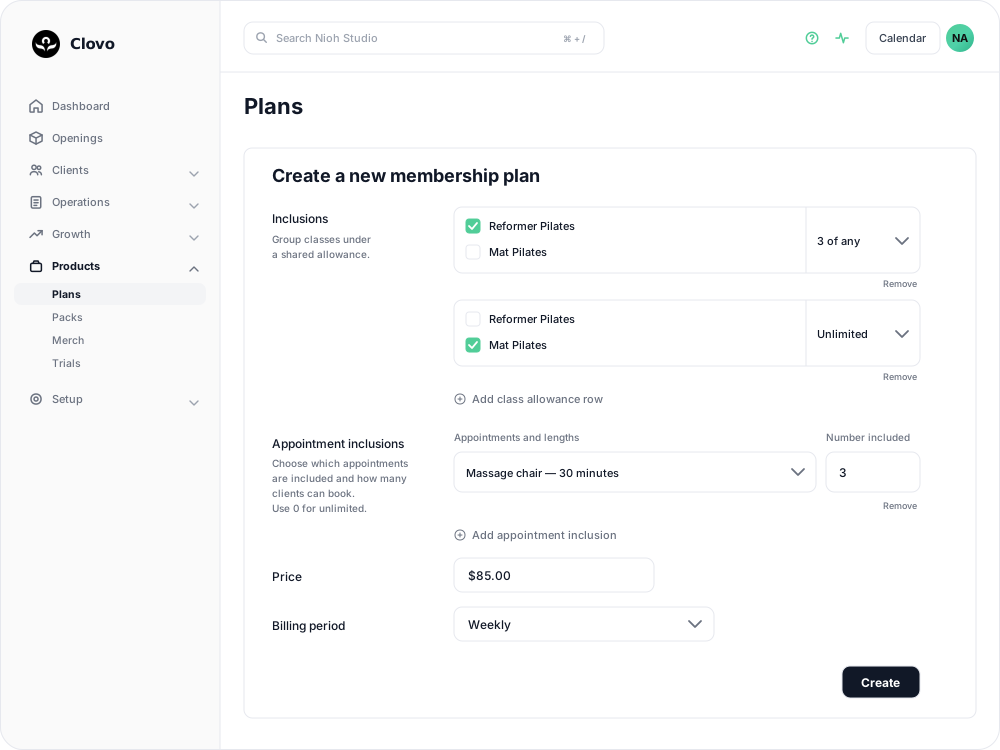
Complete any other plan options, then select Create. See Create a membership plan for pricing, contracts and the other fields.
You can also add appointment inclusions to an existing editable plan. Review the affected members on Review plan update before selecting Confirm update now: inclusion changes apply to current members immediately. Plans with introductory pricing cannot be edited; create a new plan for those offers.
How members use the inclusions
Members book Reformer and Mat Pilates through your class timetable. For the chair, they choose an appointment time, select 30 minutes and choose this membership as their payment option.
A massage-chair booking uses the appointment allowance, leaving their Reformer and Mat allowances separate. Requests awaiting staff approval reserve an appointment from the allowance too.
In the iPhone app, members can open Appointment allowances from Upcoming appointments and select their plan to see the included appointments and remaining allowance.
Related articles
Offer recurring memberships by creating a membership plan
Fill in the membership plan form — inclusions, price, billing period and contract — and know what changes for current members when you edit a plan later.
Appointments in Clovo
Bring private sessions, room bookings and wellness appointments into Clovo, with flexible availability, staff approval and payments.
Create appointment types, lengths and prices
Define the services clients can book, including duration, price, cancellation terms and preparation instructions.
Send appointment forms and rebooking reminders
Send preparation instructions after confirmation, request a form after a visit and prompt clients to book their next appointment.