
Track the usage of memberships and packs

Tobias Gundry
Updated
Clovo counts every credit a client spends against the allowance it was booked under. The usage panel shows how much of the current period is gone, itemises what each credit was spent on, and lets you correct a balance when a class was attended off the books or a credit needs to go back.
Find a client’s usage
Open Clients, select the client, and look at the Current Plan or Current Pack card at the top of their profile. It shows the plan name, the billing period, a status pill and the dates of the current period, then one usage bar for each group of classes the plan covers. Below the bars, the card gives Next renews, Current period ends or Expires with the date, and the Renewal price or Pack price beside it. A service that was paid for outside Clovo shows Payment and No automatic charge instead.
Make Changes opens the membership itself, where the same bars appear under Usage along with the dates of the period you are looking at. The Purchases card further down the client’s profile lists their other memberships and packs, past and present, so you can open an older one the same way.
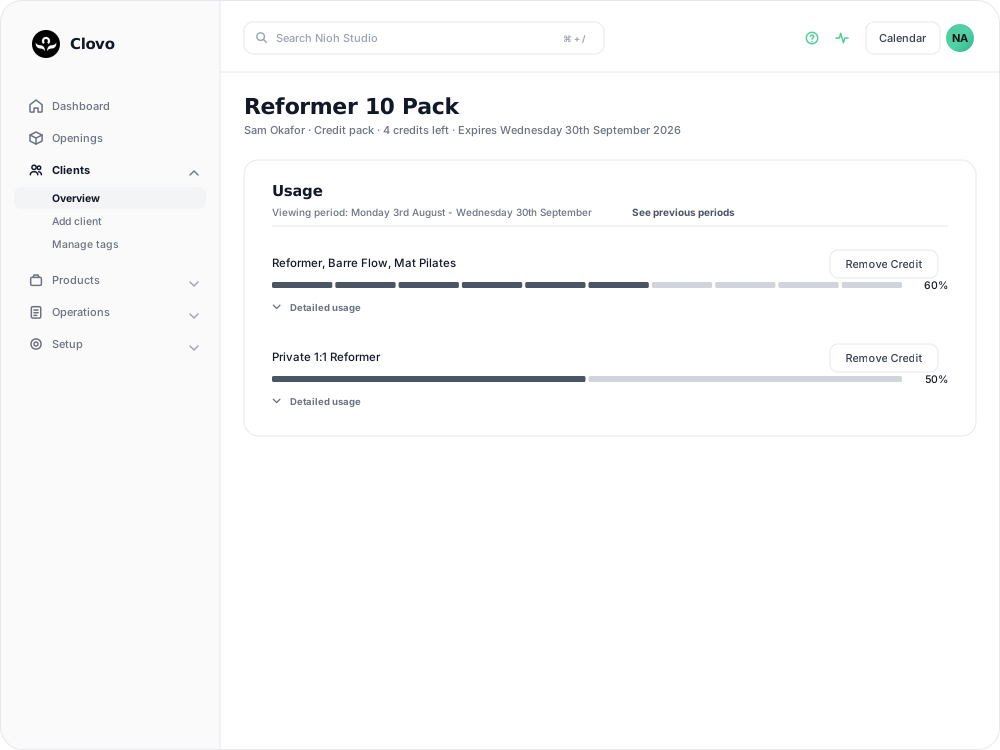
Read the usage bar
Each group of classes in the plan gets its own bar, headed with the allowance
and the classes it covers. The bar has one segment per credit: filled segments
are credits used, grey segments are credits still available, and the figure at
the right-hand end is the percentage used. A group with an unlimited allowance
has nothing to count down, so it shows the number used followed by / ∞.

See what each credit was spent on
Detailed usage beneath a bar lists every credit taken from that group. Open it when a client queries their balance. Each line names the class, the date and time and the location, with the date the booking was made underneath, and the client’s cancellation reason where they chose one.
Three kinds of line read differently:
- A credit that was returned when the booking was cancelled is struck through, with the date it went back.
- A credit forfeited under a penalty policy carries a Penalty tag, names the policy that caused the forfeiture, and says whether the class was cancelled late or marked as a no-show.
- A credit deducted by hand reads Credit manually deducted by with the staff member’s name and the date.
A class pack or trial booking can forfeit its credit even when the rule is set to Charge Penalty Fee. Financial penalties only apply to bookings made with an auto-renewing membership billed through Stripe. See Set up late cancellation and no-show penalties to check the outcome for a booking.
Correct a client’s balance
Remove Credit at the top of a group deducts one credit — for a class the client attended without a booking, for instance. Clovo asks Are you sure? This will deduct a credit from the user before it goes through. The button is unavailable once every credit in that group has been used.
Return on a line in Detailed usage gives that credit back, confirming with Are you sure? This will give the user an additional credit. Returning a credit that came from a booking leaves the line in place, struck through and marked as returned. Returning one you had deducted by hand takes the line off the list. Either way, Clovo returns you to the membership page afterwards rather than back on the client’s profile.
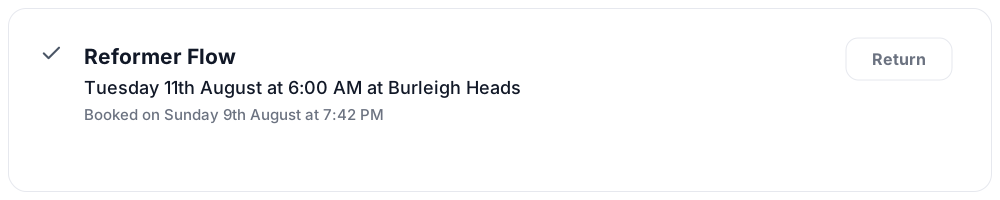
Both actions are recorded. View History on the membership page lists them by date, naming the staff member who deducted or restored the credit.
When usage reads higher than the allowance
An amber note above the bars — This usage may look unusual because this period has more used credits than the plan currently allows. This can happen after a plan allowance is changed — appears when the client has spent more credits than the allowance now permits. A change to a plan’s class allowances applies to the current period straight away, so a client who had already booked under the larger allowance can sit above the new one until their next period begins. Nothing needs to be corrected; the count comes back into range at the next period.
Look back at earlier periods
Under Usage on the membership page, See previous periods opens Previous periods, which lists each past period’s Start Date, End Date and Allowance Used as a percentage. Selecting a period opens the same usage panel for it, detailed lines and all, which is where to look when a client asks about a month that has already closed.
What your clients see
In the Clovo app, a client looking at a credit pack they hold gets a Detailed Usage section showing how many classes are left out of the pack’s allowance for each group of classes, or Unlimited classes where the allowance has no limit. A recurring membership shows what it renews for and the renewal date instead, and a pack notes that it will not renew on its own.
Related articles
Deactivate a pack or membership plan
Remove a credit pack or membership plan from future sales while letting clients who already have it keep using it.
Share a secret deal with a promo code
Create a code that unlocks a private plan or pack, so clients can claim the offer themselves instead of you granting access one person at a time.
How to offer secret deals on your plans and packs
Mark a membership plan or credit pack as a secret deal, grant access to the clients you choose, and remove it again.
Prevent repeat intro purchases with Blocked Purchasers
Block a client from buying a credit pack, including clients who bought your intro offer on another platform before moving to Clovo.