
Blocking a membership when a payment fails

Tobias Gundry
Updated
By default, a member can keep booking classes while a failed renewal payment is being recovered. If you’d rather pause a member’s access until they’ve paid, you can turn on Block membership on a failed payment.
This applies only to renewal payments on automatically renewable memberships. It never affects first-time purchases, credit packs, or other one-off payments.
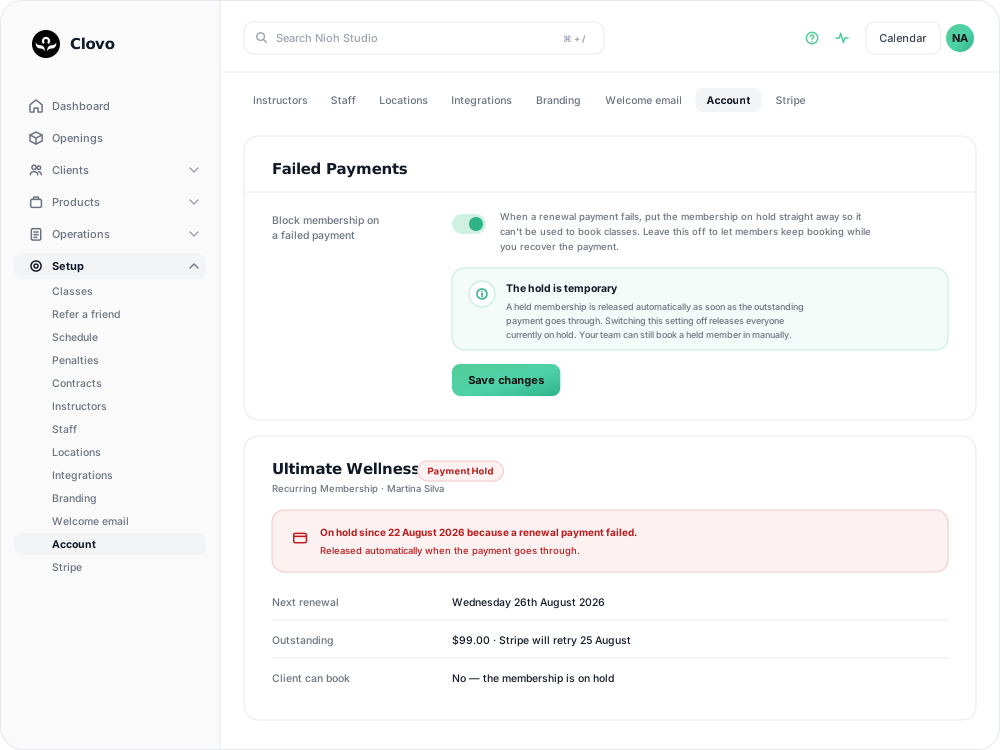
How To Turn It On
- Go to Setup → Payments and scroll to the Failed Payments card.
- Switch on Block membership on a failed payment.
- Save changes.

If any members already have an unresolved failed renewal when you turn this on, they’ll be put on hold immediately.
What Happens When It’s Turned On
As soon as a renewal payment fails, the member’s membership is put on hold.
- The member can no longer use that membership to book classes. They’ll see a message letting them know a payment didn’t go through.
- The membership shows a red Payment Hold badge wherever it appears in your dashboard, so your staff can see at a glance why the member can’t book. Hovering it tells you the date the hold started.
- Staff can still book the member into a class manually as a complimentary booking, if needed.
The hold restricts bookings; it does not cancel, refund, or remove the membership. The membership becomes usable again when the payment arrives.
How The Hold Is Released
Clovo releases the hold automatically:
- It’s released automatically the moment the outstanding payment goes through — whether the client pays via the payment link or Stripe successfully retries the charge.
- If you switch the setting back off, every membership currently on hold in your studio is released at once.
If you want the client to resolve the hold before Stripe’s next retry, send them a payment link from Operations → Failed Payments.
Common Questions
Does this affect new sign-ups or credit pack purchases? No. Only renewal payments on automatically renewable memberships can trigger a hold.
Can staff still let a held member into a class? Yes — staff can manually book a held member in as a complimentary booking.
What does the member see? A message explaining that a payment didn’t go through and that the membership will be usable again once the outstanding payment is made.
If I turn the setting off, does anything need cleanup? No — every membership currently on hold is released automatically as soon as you turn the setting off.
Related articles
Change the address shown on invoices
Choose your business address or a studio location as the From address on new client invoices and receipts.
Wait for BECS Direct Debit payments to clear before issuing plans
BECS Direct Debit payments do not clear immediately. They usually take a few business days to reach your studio and can still fail after the client has checked out.
Record an external payment for a client
Use Offline Purchase to record a membership or credit pack paid for outside Clovo, and set when that access expires.
Let clients book a class without a membership or pack
Turn on Direct Purchase when you want a client to book one class without first buying a membership or credit pack.