
Change the subdomain of your landing page

Tobias Gundry
Updated
Every studio on Clovo gets a landing page as standard. Your landing page lives at a subdomain like yourstudio.clovo.app, and you can change this subdomain at any time to better match your brand name.
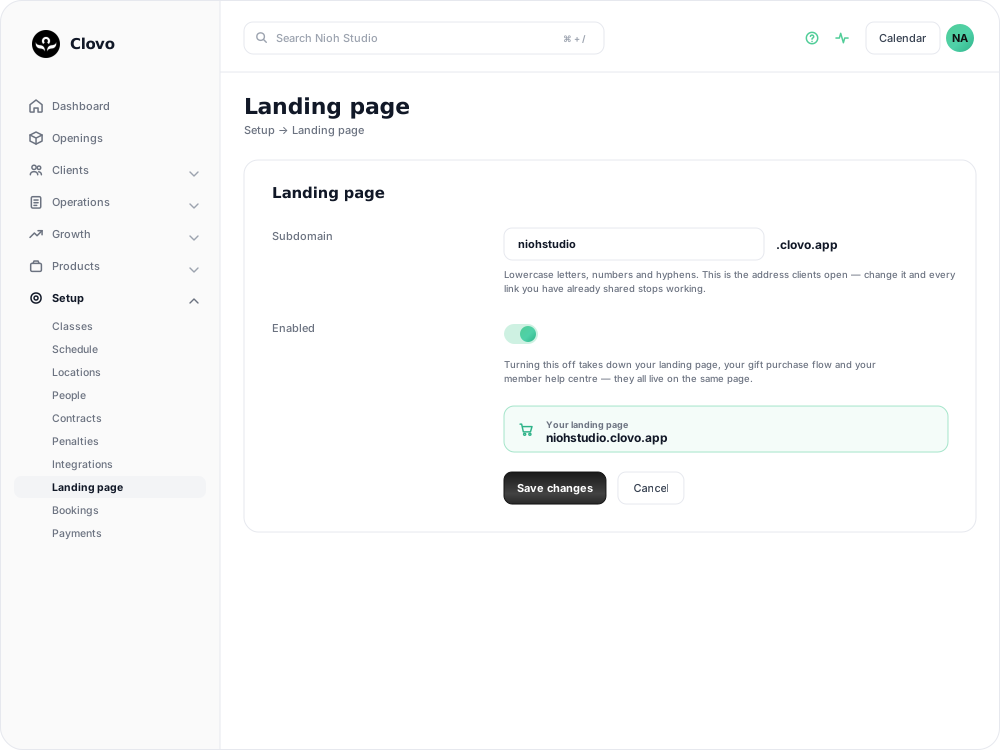
How to change your subdomain
- In Clovo Dashboard, go to Setup → Landing page.
- Edit your Subdomain to your preferred name — lowercase letters, numbers and hyphens only.
- Select Save changes.
Your landing page address is that subdomain followed by .clovo.app. Set it to niohstudio and the page lives at niohstudio.clovo.app.
Tips for choosing a subdomain
- Keep it short and memorable — use your studio name or a recognisable abbreviation
- Avoid special characters — stick to letters and numbers for maximum compatibility
- Match your brand — use the same name clients would search for on social media
What your landing page includes
Your Clovo landing page displays your studio branding, class timetable, and product listings (memberships, credit packs, and trials). Clients can browse your offerings and make purchases directly from the page without needing to install the app. For more about landing pages, see browser-based bookings and payments with landing pages.
Related articles
Add a Meta pixel and Google tags to your landing pages
Connect Meta and Google to your Clovo landing pages, publish your studio privacy policy, set up optional Google Ads conversions, and understand visitor consent and reporting.
Give your clients branded support
Every Clovo studio has a member-facing help centre, live right now, with no setup required. It sits on your landing page, it’s written in your studio’s voice, and it wears your branding.
Enable browser based bookings and payments with landing pages
Clovo landing pages are designed to make it easy for potential clients to browse your offerings, book classes, and purchase memberships or credit packs — all from a web browser without needing to install the app.
Changing the order that plans, packs and trials show in your apps and landing pages
Choose which packs, plans and trials appear first in the Clovo app and landing pages, so you can highlight your best-value or featured products.