
Enable browser based bookings and payments with landing pages

Tobias Gundry
Updated
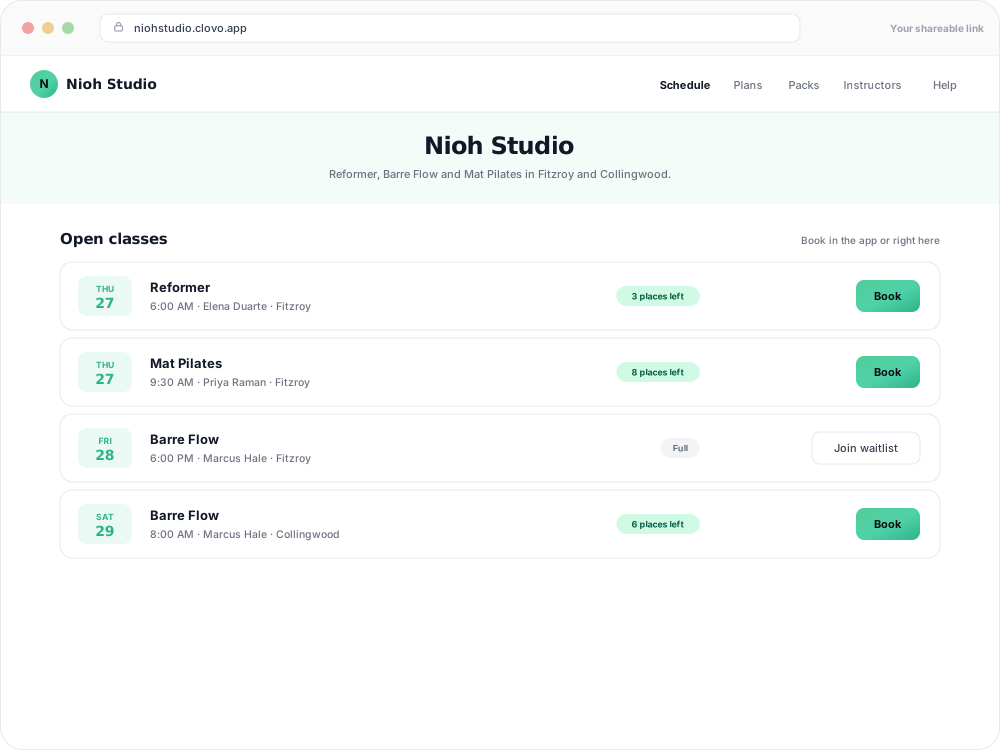
Clovo landing pages are designed to make it easy for potential clients to browse your offerings, book classes, and purchase memberships or credit packs — all from a web browser without needing to install the app.
Why use landing pages?
Landing pages bridge the gap between your marketing and your booking system. When a potential client discovers you on Instagram, Google, or through a friend’s referral, they can click through to your landing page and immediately see your timetable, pricing, and products. There’s no friction of downloading an app first — they can sign up and purchase on the spot.
What’s included on your landing page
- Studio branding — your logo, colours, and description
- Class timetable — a live view of your upcoming classes
- Products — your memberships, credit packs, and trials with pricing
- Sign-up and purchase flow — clients can create an account and buy directly from the page
Enabling your landing page
Landing pages are enabled by default for every Clovo studio. You can enable or disable yours at any time under Setup → Landing page. Your landing page URL follows the format yourstudio.clovo.app — you can change the subdomain to match your brand.
Using your landing page link
Share your landing page link anywhere you want potential clients to be able to book:
- Instagram bio and link-in-bio tools
- Facebook page
- Google Business Profile
- Email signatures and newsletters
- Your own website (as a link or button)
Related articles
Change the subdomain of your landing page
Every studio on Clovo gets a landing page as standard. Your landing page lives at a subdomain like yourstudio.clovo.app, and you can change this subdomain at any time to better match your brand name.
Create custom pages on your landing page
Add your studio story, FAQs or first-visit information to your landing page, save drafts and publish when you’re ready.
Add a Meta pixel and Google tags to your landing pages
Connect Meta and Google to your Clovo landing pages, publish your studio privacy policy, set up optional Google Ads conversions, and understand visitor consent and reporting.
Give your clients branded support
Every Clovo studio has a member-facing help centre, live right now, with no setup required. It sits on your landing page, it’s written in your studio’s voice, and it wears your branding.