
Take appointment payment after staff approval

Tobias Gundry
Updated
Choose Staff approval when you want to review an appointment request before charging the client's saved card. The requested time is reserved while it awaits a decision, and the client is told the appointment is not yet confirmed.
Choose approval when creating the calendar
- Open Appointments and choose New calendar.
- Choose the resource and either booking style.
- Under Should bookings be confirmed and paid immediately, or require your approval first?, select Staff approval.
- Complete the calendar details and select Create calendar.
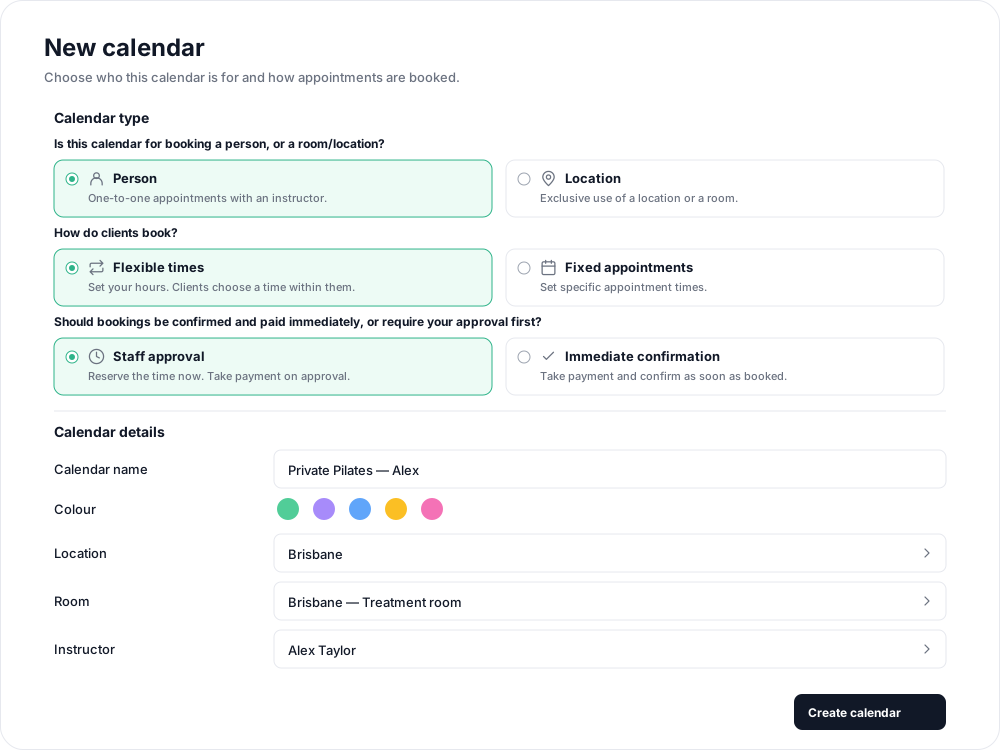

Confirmation mode is fixed when a calendar is created. To offer approval-based bookings alongside an existing immediate-confirmation calendar, create a separate calendar.
Review and approve a request
Open the request from Appointments in the dashboard. Use List to find upcoming appointments across calendars, then open the booking marked Awaiting approval.
Review the client, appointment, time, price and payment method. Select Approve to proceed, or Reject if you cannot accept it. You must approve before the appointment starts.
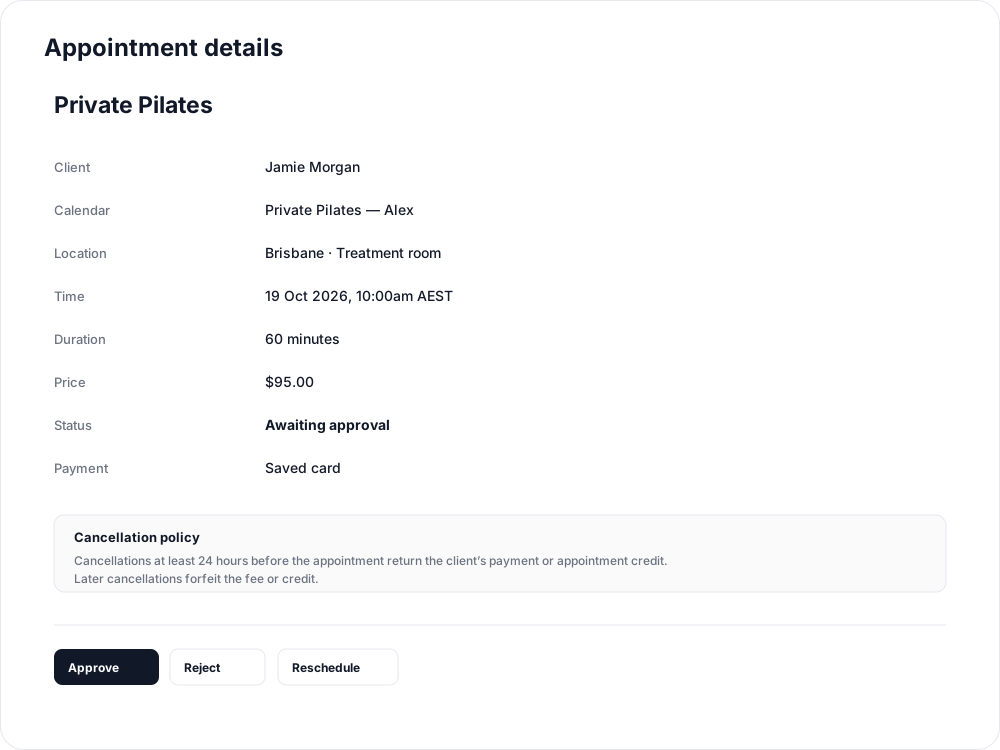
With a saved card, payment is taken on approval. With an eligible pack or plan, the request reserves its appointment allowance and eligibility is checked again when approved. A rejection releases the time and reserved credit.
Assigned staff can also decide requests in Admin > Appointments in the iPhone app, or use Approve appointment / Reject appointment in their email and confirm on the page that opens.
Use the payment option that matches your intention
When staff book for a client, choose Charge saved card or an eligible pack or plan to retain the approval step. Enter card details takes payment and confirms immediately, including on a staff-approval calendar. Use it only when you are ready to confirm.
A client booking on the studio website can save a card and then submit Request appointment; saving the card does not itself submit the booking or charge for the request.
If the booking shows Processing payment, wait for the outcome and use Check payment result in its details. A pending payment is not a confirmed appointment. If it shows Payment failed, the time has been released; arrange a new booking with the client.
A request that reaches its start without approval shows Request expired. It can no longer be approved, so arrange another time if the client still needs the appointment.
Related articles
Appointments in Clovo
Bring private sessions, room bookings and wellness appointments into Clovo, with flexible availability, staff approval and payments.
Book an appointment on behalf of a client
Choose a client, select an available appointment and take payment or submit it for staff approval.
Create an appointment calendar for a facility
Make an infrared sauna, massage chair or similar facility bookable through a room/location calendar.
Create an appointment calendar for a room or location
Let clients reserve a room or an entire location, and assign staff to manage its appointments.