
Create an appointment calendar for a facility

Tobias Gundry
Updated
For a facility such as an infrared sauna or massage chair, use a Location calendar tied to the room or space clients reserve. Clovo uses the same room/location controls for these bookings.
Prepare the facility and appointment
Open the correct studio location under Setup > Locations, select Manage rooms and facilities, then Add to create the facility's bookable space. Choose a name clients will recognise, such as Infrared sauna or Massage chair 1.
In Setup > Appointments, enable appointments and add an appointment type, such as Infrared sauna session. Add its lengths and prices. If clients need preparation instructions, enable After booking message on the appointment type.
Create its calendar
- Open Appointments and choose New calendar from All calendars, or use the + beside Calendars.
- Select Location. Choose Fixed appointments for exact sessions or Flexible times for a choice of starts within your opening hours.
- Choose Immediate confirmation or Staff approval.
- Name the calendar, choose a colour and select the facility's Location and Room.
- Choose the staff Manager, add any Additional managers, and select Create calendar.
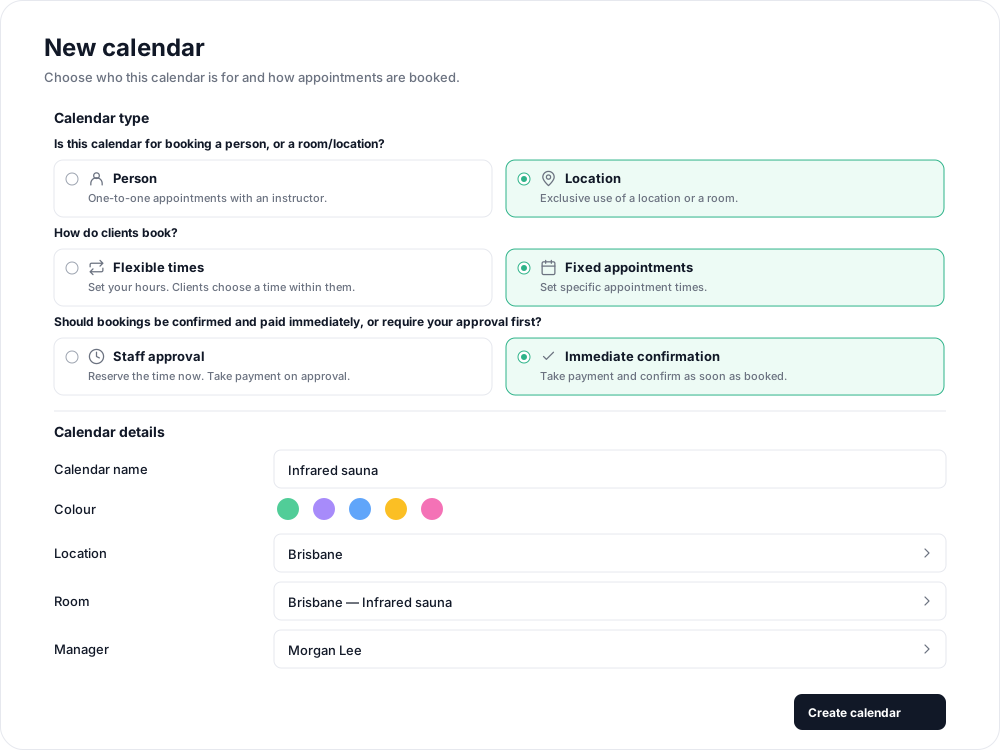
Choose the facility's room rather than Whole location unless the booking really should reserve your entire location.
Publish sessions
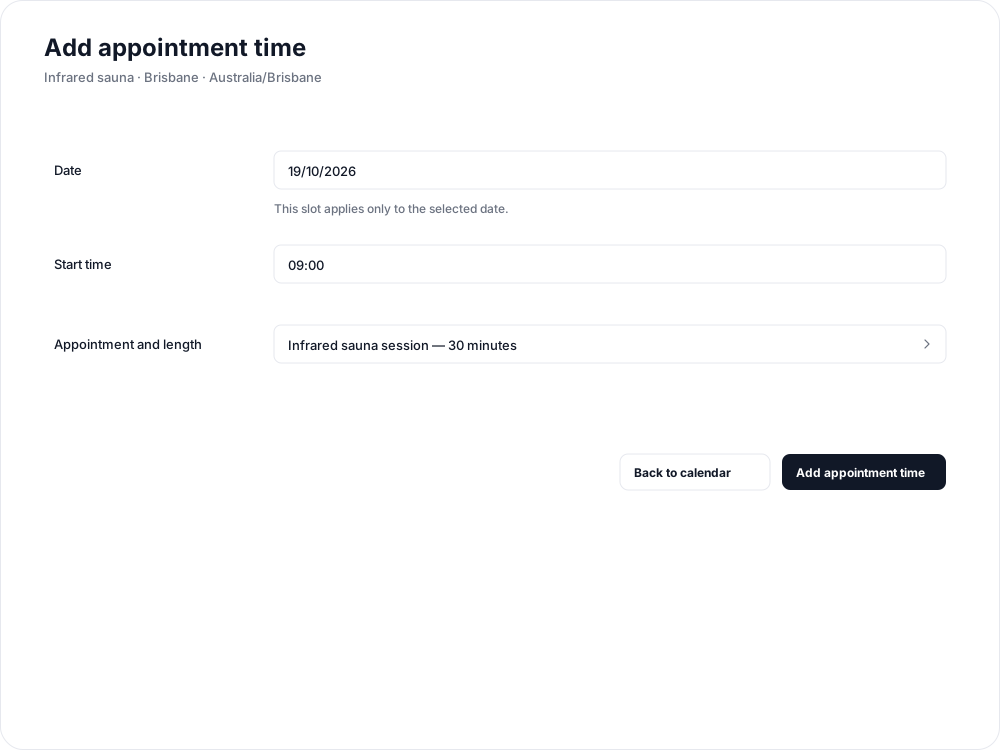
For fixed bookings, select a time in the calendar grid. Set the date and Start time, select the session under Appointment and length, then select Add appointment time. For example, offer a 30-minute sauna session at 9:00, 9:45 and 10:30 to leave 15 minutes between sessions.
For flexible bookings, add an hours window and select the facility's appointment type. In Calendar settings, set Time between appointments to leave any preparation time you need.

A booking reserves the selected space for exclusive use. If two chairs can be booked independently, give each its own room and calendar so reserving one does not reserve the other. Use a person calendar instead if the appointment must also reserve a particular instructor.
Repeat the schedule to offer these times in future weeks, and enable reminders if clients should receive a prompt before arriving.
Related articles
Appointments in Clovo
Bring private sessions, room bookings and wellness appointments into Clovo, with flexible availability, staff approval and payments.
Book an appointment on behalf of a client
Choose a client, select an available appointment and take payment or submit it for staff approval.
Create an appointment calendar for a room or location
Let clients reserve a room or an entire location, and assign staff to manage its appointments.
Create an appointment calendar for an instructor
Offer one-to-one sessions with an instructor, choose a booking style and publish their available times.