
Add introductory pricing to an existing membership offer

Tobias Gundry
Updated
To offer introductory pricing on a membership you already sell, create a replacement plan and deactivate the original. Introductory pricing must be set when a plan is created.
Existing members stay on their original membership, with the same pricing, billing and inclusions. Deactivating the original plan stops new purchases; it does not cancel their memberships or give them introductory pricing.
1. Create the replacement plan
- Go to Products → Plans and select Add Plan.
- Copy the original plan’s name, description, inclusions and contract terms into the new plan. Set Price to the normal ongoing amount and choose the same Billing period.
- Turn on Introductory pricing. Enter the Introductory price and Introductory length. For example, a weekly plan with a length of 3 charges the introductory price for the first three weeks, then the normal price automatically.
- Review What a new member pays, explain the offer in the description, and select Create.
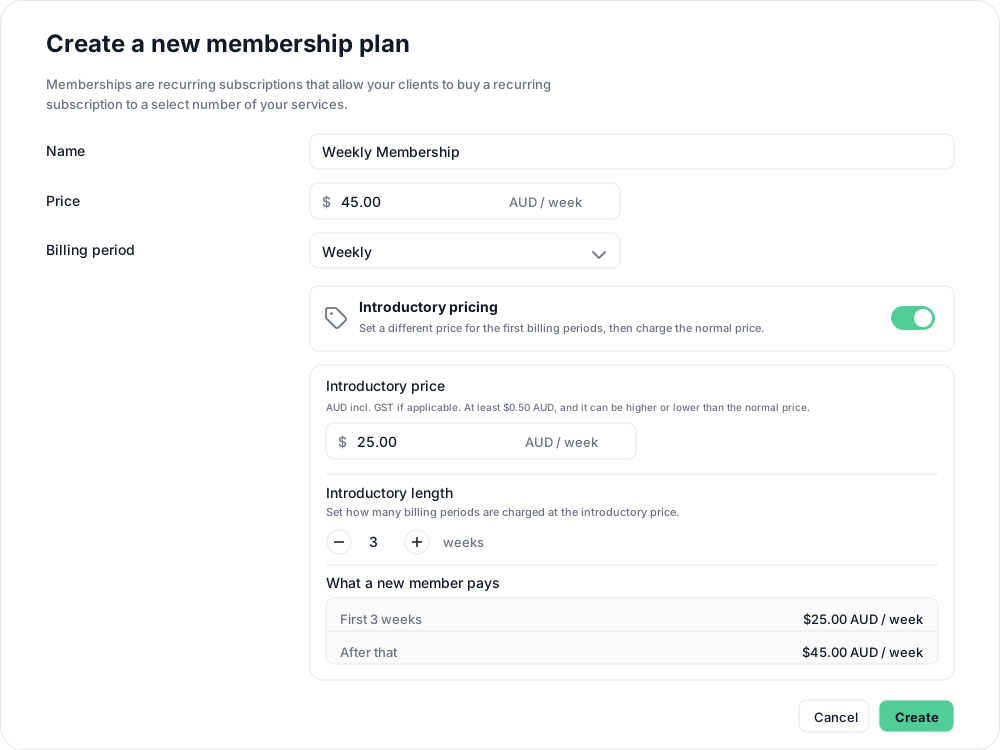
Introductory plans become read-only once created and cannot use Automatic pause. See Set up introductory pricing for more detail.
2. Stop selling the original plan
Once the replacement is ready to purchase, open the original plan under Products → Plans, select Deactivate, and confirm. Deactivation cannot be undone.

New purchases now use the replacement plan and receive its introductory pricing. The original is no longer for sale in the client app or on your landing page, while existing members continue as before. Update any purchase links you share to point to the replacement.
Existing members can choose to cancel under their current terms and buy the replacement as a new membership to receive the offer. You do not need to move or cancel anyone’s membership for this change.
Related articles
Book classes with multiple memberships and credit packs
Clients can hold multiple memberships, credit packs, or both. See how they choose which pass to use for each class in the Clovo iPhone app.
Cancel a client membership
Cancel a client’s membership, pack or trial from their profile, and know when their access ends, what happens to their bookings, and how to end a membership on the spot.
Include classes and appointments in one membership
Build a weekly Pilates membership with 3 Reformer classes, unlimited Mat Pilates and 3 massage-chair appointments of 30 minutes each.
Offer recurring memberships by creating a membership plan
Fill in the membership plan form — inclusions, price, billing period and contract — and know what changes for current members when you edit a plan later.