
Set up introductory pricing on a membership

Tobias Gundry
Updated
Introductory pricing lets a membership start at a different price before continuing at its normal price. Use it for a lower starting price, or a higher first payment that includes a setup or joining fee.
For example, a weekly membership could cost $25 a week for the first three weeks, then $45 a week from the fourth week onwards. Clovo changes the price automatically; you do not need to move the member to another plan.
Before you create the plan
Introductory pricing is set when you create a membership plan. The whole plan becomes read-only once saved, including its name, description, price and class inclusions. To change the offer later, create a new plan and deactivate the old one if you no longer want to sell it.
The introductory price can be higher or lower than the normal price, from $0.50 to $10,000 AUD. The length must be at least one billing period. It cannot be combined with Automatic pause.
If you want a one-off pack of classes before a client chooses a membership, use a paid introductory credit pack instead.
Set the price and length
- Go to Products → Plans and select Add Plan, or Create membership plan if this is your first plan.
- Fill in the name, description and class inclusions. See Create a membership plan for those settings.
- Enter the ongoing amount in Price and choose the Billing period.
- Turn on Introductory pricing.

- Enter Introductory price. This is the amount charged for each introductory billing period.
- Set Introductory length to the number of billing periods at that price. For three discounted weekly payments, choose Weekly and a length of 3.
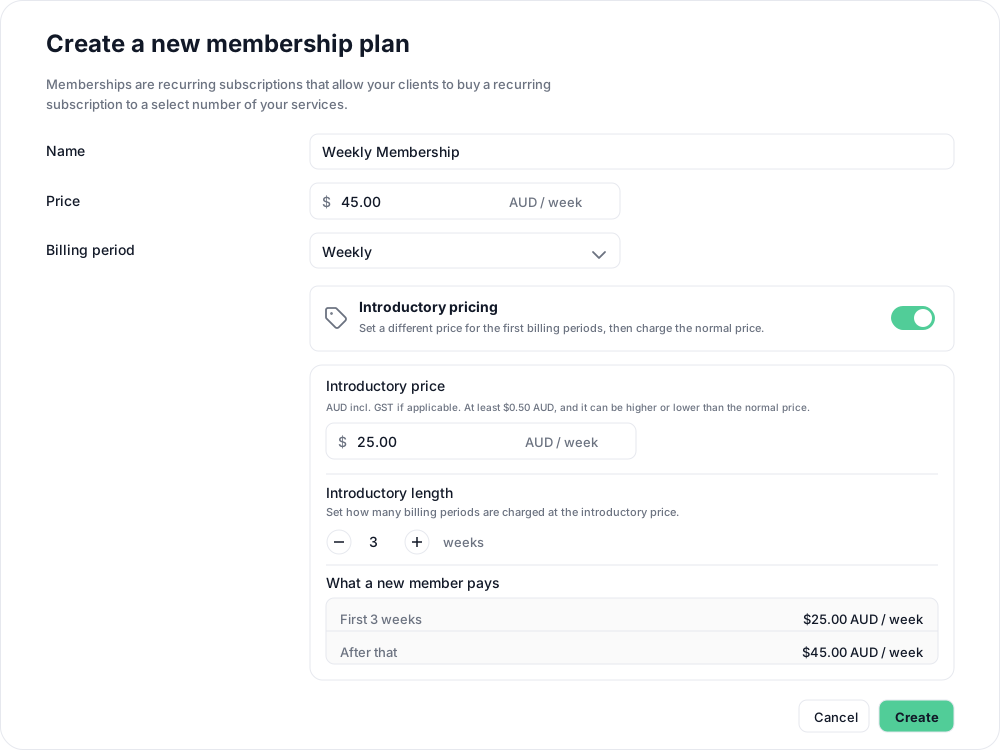
- Read What a new member pays. Confirm both prices and how long the first price lasts.

- Explain both prices and the introductory length in the description, review the class inclusions, then select Create.
Managing a member during introductory pricing
Each member starts their introductory period when they buy the plan. They keep the plan’s class inclusions when the price changes.
Open the membership from the client’s profile to see when introductory pricing ends. Until then, pauses, plan changes and billing changes are unavailable, including changing the start or renewal date. Cancellation remains available, subject to any minimum term and cancellation notice on the plan.
An introductory plan is bought as a new membership. You cannot move an existing membership onto one through Change Plan. Once a member’s introductory period ends, you can manage pauses, billing and changes to a regular plan as usual.
Related articles
Automatically pause a membership after a set number of billing periods
Set a membership plan to pause its memberships on their own after a set number of paid billing periods, for a fixed number of weeks or indefinitely.
Change a client’s membership plan
Move a client to another recurring plan at their next renewal, and know when the new price and allowance begin.
Change a membership start date
Move a membership start date back so classes a client took before their purchase went through count against the period they attended.
Charge a setup or joining fee with introductory pricing
Include a one-off setup or joining fee in the first membership payment, then charge the normal price from the next renewal.