
Set a minimum membership term and cancellation notice period

Tobias Gundry
Updated
A membership plan can ask members to accept a contract when they join, with an optional minimum contract term and cancellation notice period. Together, these settings determine when the membership can end and how many further payments are due after cancellation is requested.
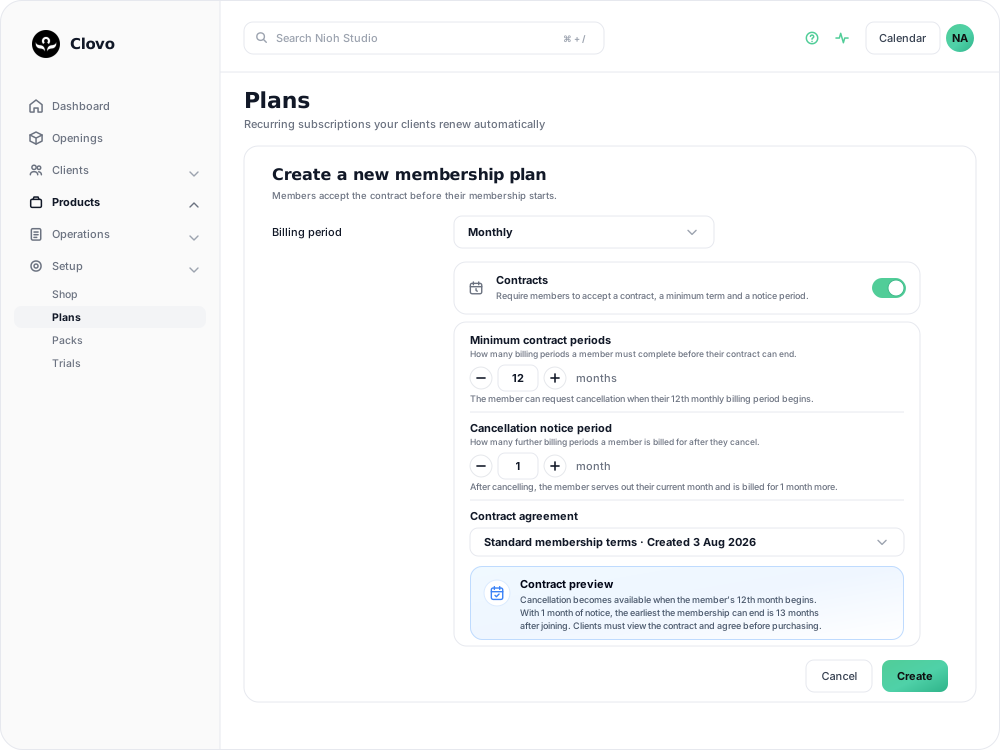
Decide the terms before you create the plan
Set the contract terms before you create the plan. Once the plan is saved, every field in its Contracts section is read-only — the switch, minimum term, notice period, contract agreement and signature setting. This applies even if nobody has bought the plan yet.

Everything else about a plan — its name, price, description and class inclusions — can still be edited later. Only the contract details lock.
To offer different terms, create a second membership plan. Members already on the first plan keep the terms they agreed to.
Choose a contract agreement
Membership contracts live in the Membership Contracts tab under Setup → Contracts, separately from plans, so one piece of wording can be used by several plans. Create and save the agreement first, then select it in the plan's Contract agreement field. See Create and manage membership contracts for the contract form, signature setting and rules for changing or deleting an agreement.
Set the terms on a plan
Minimum terms and notice periods take effect on membership plans that renew, so create or open a membership plan rather than a credit pack or trial.
- Go to Products → Plans and select Add Plan.
- Choose the Billing period first. Both contract settings are counted in billing periods, and they stay unavailable until a period is chosen.
- Turn on Contracts.
- Set Minimum contract periods — how many billing periods a member must complete before their contract can end.
- Set Cancellation notice period — how many further billing periods a member is billed for after they cancel.
- Choose an existing Contract agreement, or leave the picker on Create a new contract and type the wording in place.
- Read the Contract preview, then create the plan.
The Contract preview summarises when cancellation becomes available and the earliest date the membership can end. Check that summary before you create the plan.
Either number can be left at zero. With both at zero, members still accept the contract wording, but the contract does not delay cancellation.
When a membership can end
Cancellation becomes available when the final period starts
A member is billed for the period they are currently in, and cancelling ends their membership at the end of that period. They can therefore request cancellation once the last committed period has begun, because their membership remains active through the end of it.
On a monthly plan with a minimum of 12 periods, a member who joins in January can request cancellation from the start of December. Their membership runs to the end of December and they pay 12 months in total. Waiting until December had finished would charge them for a thirteenth month.
Until then, the member sees why they cannot cancel and how much of the term is left.
Notice is counted in whole billing periods, and bills one more
Notice is counted in whole billing periods, and the membership ends at the end of a billing period.
A member who cancels always serves out the period they are in. Each period of notice adds one further period on top of that, billed as normal.
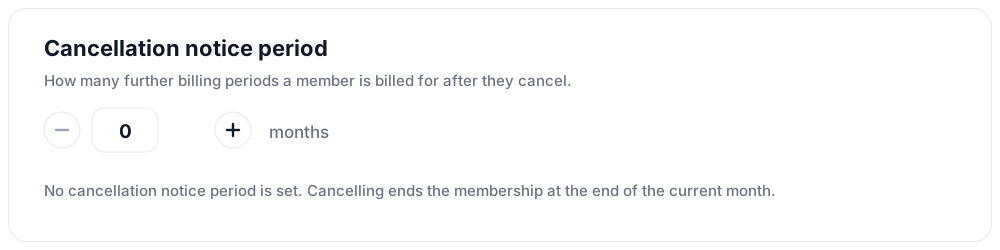
So on a monthly plan with one period of notice, a member who cancels on 3 March finishes their March period, is billed once more for April, and their membership ends when April does.
Members see this stated in days at the point of cancelling, measured against their real billing dates, along with the exact date their membership will end.
The two settings add up rather than overlap
The minimum term gates the cancellation request. The notice period is then applied on top of it. Notice is not served during the minimum term.
A monthly plan with a 12-period minimum and 1 period of notice works out like this:
| Monthly plan, 12-period minimum, 1 period of notice | |
|---|---|
| Earliest a member can request cancellation | The start of their 12th month |
| Months billed before that request | 11 |
| Months billed after it | 2 — the 12th month, plus 1 month of notice |
| Earliest the membership can end | 13 months after joining |
| Total paid | 13 months |
What members see before they buy
The purchase screen shows the plan’s terms. Members must open the contract text and agree to it before the purchase completes, and draw a signature as well if the contract asks for one.
What they accepted is then kept on their profile. See See what a member agreed to when they joined for the acceptance record, and for the paper copy to take when staff key an acceptance in on a studio device.
Cancelling a membership under contract
The app applies the plan’s terms. A member cannot cancel in the app until their final committed period begins. Once cancellation is available, the notice period is added to their end date.
Staff can approve an earlier exit. On the Cancel Membership screen, Clovo shows the plan’s contract terms and how much of the minimum term remains. Staff can still confirm the cancellation when the studio has agreed to end the membership early.
A staff cancellation ends the membership at the end of the current billing period without adding the notice period. If the notice period should still apply, ask the member to cancel from their own account or agree on an end date before staff confirm the cancellation.
Before cancelling on a member’s behalf, check the terms shown on the screen and confirm what they expect to pay. See Cancel a client membership for the full cancellation flow, including what happens to bookings after the end date.
Common questions
Can I add a contract to a plan I have already created? No. Create a new plan with the terms you want. You can keep selling the original plan alongside it, or deactivate it so only the new one is available.
Can I shorten a member's minimum term? Not by editing the plan. Your team can cancel the membership from the client's profile at any point regardless of the term, which is how an early exit is handled.
Does a paused membership serve out its minimum term? No. The term is measured in billing periods, and a paused membership is not billing. Time spent paused pushes the earliest cancellation date out by the same amount. See Pause a client membership.
Can two plans share one contract? Yes. Write the contract once in the Membership Contracts tab under Setup → Contracts and select it on each plan. Each plan still sets its own minimum term and notice period, so check that the wording matches the terms of every plan that uses it.
When cancelling a recurring membership, clients choose Reason for cancelling in the final app step before tapping Confirm. Choosing Other requires 10–1,000 characters. Staff can view the reason on the membership.
Related articles
Track the usage of memberships and packs
Read the usage panel on a client’s membership or credit pack, see what each credit was spent on, and correct a balance when it needs fixing.
Cancel a client membership
Cancel a client’s membership, pack or trial from their profile, and know when their access ends, what happens to their bookings, and how to end a membership on the spot.
Change a client’s membership plan
Move a client to another recurring plan at their next renewal, and know when the new price and allowance begin.
Offer recurring memberships by creating a membership plan
Fill in the membership plan form — inclusions, price, billing period and contract — and know what changes for current members when you edit a plan later.