
Change when a membership renews

Tobias Gundry
Updated
A member may ask to move their payment to the day after they get paid, or you may want memberships that began on different days to renew on the same day. Moving the renewal date can also change how much they pay for the period in between.
Clovo makes that second part explicit: nothing is charged until you have seen a preview of the exact amount.
Open the billing schedule
- Open the client, then open the membership you want to change.
- On the Next renewal row, click Change billing schedule.
Note the row above it: Change start date is a different thing. That edits when the membership is recorded as having begun, not when money moves. If you want the payment to move, you want Change billing schedule.
Pick the outcome first
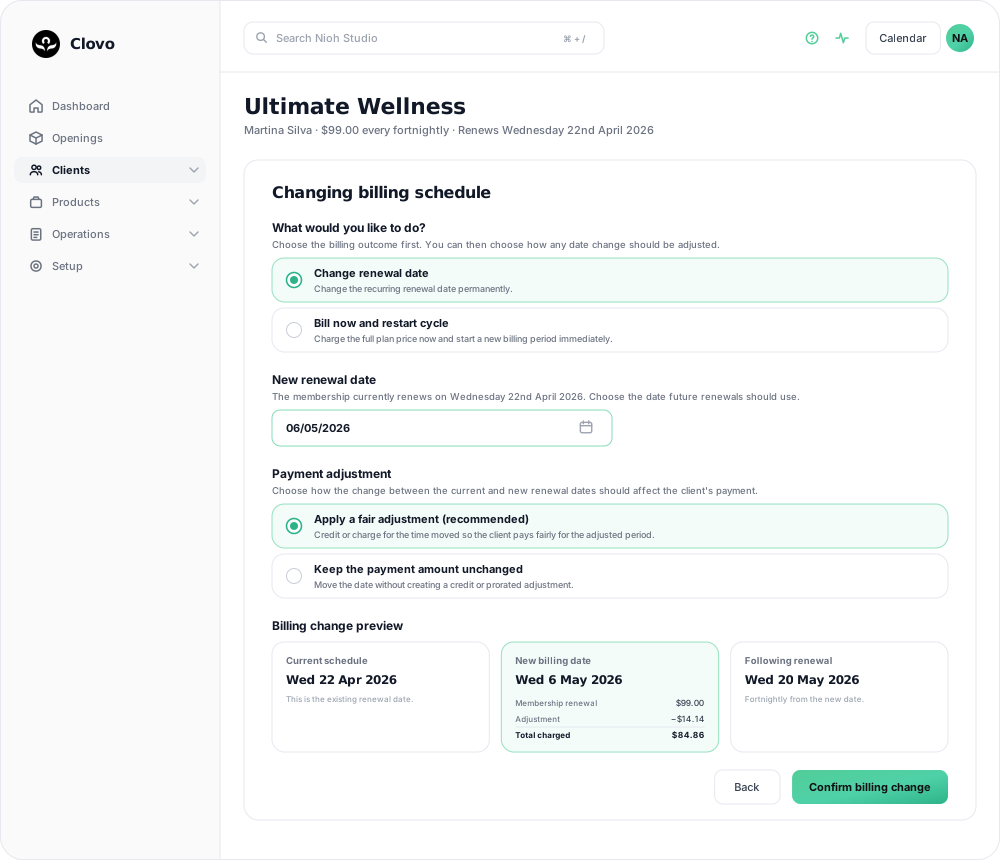
Change renewal date moves the recurring renewal permanently. The member is not charged today; the date they renew on shifts, and every renewal after it follows from the new date.
Bill now and restart cycle charges the full plan price immediately and starts a fresh billing period from today. Use this when a member wants to reset rather than shift — after a long gap, say, or when they have changed plan and want a clean start.
Choose the new date
Clovo tells you the date the membership renews on now, and asks for the date future renewals should use. Two rules apply:
- It has to be in the future. You cannot backdate a renewal.
- It has to be different. If you pick the current renewal date, Clovo will ask you to choose another date.
Decide who absorbs the difference
Moving a renewal forwards or backwards changes the length of the billing period. Clovo asks how you want to account for that difference:
Apply the prorated adjustment (recommended). Clovo credits or charges for the time moved, so the payment reflects the length of the billing period. Move a fortnightly renewal two days later and the client pays a little more; move it two days earlier and they pay a little less.
Keep the payment amount unchanged. The date moves and the amount stays exactly as it was. No credit or prorated line is added.
Choose the option that matches what you have agreed with the client. With the amount unchanged, the studio covers any additional time when the date moves later; when it moves earlier, the client pays the same amount and no credit is applied.
Read the preview before you confirm
The Billing change preview shows three steps:
- Current schedule — the renewal date as it stands today.
- New billing date — the date you picked, with a breakdown underneath: the membership renewal amount, the adjustment (positive or negative), and the total that will actually be charged on that date.
- Following renewal — the renewal after that, so you can see the new rhythm rather than just the next payment.
If the preview is labelled Estimated total or Exact payment adjustment unavailable, review the first invoice after the change to confirm the amount.
When the preview matches what you told the client, click Confirm billing change.
Afterwards
The membership page shows the new Next renewal date after the change is confirmed.
If the member is on a plan that has already failed a renewal, resolve that first. Moving a date does not clear an outstanding payment; see Recover a failed membership renewal payment.
Related articles
Record an external payment for a client
Use Offline Purchase to record a membership or credit pack paid for outside Clovo, and set when that access expires.
Track the usage of memberships and packs
Read the usage panel on a client’s membership or credit pack, see what each credit was spent on, and correct a balance when it needs fixing.
Cancel a client membership
Cancel a client’s membership, pack or trial from their profile, and know when their access ends, what happens to their bookings, and how to end a membership on the spot.
Change a client’s membership plan
Move a client to another recurring plan at their next renewal, and know when the new price and allowance begin.