
See what a member agreed to when they joined

Tobias Gundry
Updated
When a membership plan carries a contract, the member reads and accepts the wording before the membership starts. Clovo keeps the exact text they saw, when and how they accepted it, and any signature they drew.
This article covers how acceptance is recorded and where to find it. To write and manage the contract, see Create and manage membership contracts. To set its minimum term and cancellation notice, see Set a minimum membership term and cancellation notice period.
Choose whether to require a signature
Every acceptance requires the agreement checkbox to be selected. Require a hand-drawn signature asks for a drawing as well, and it is set on the contract in the Membership Contracts tab under Setup → Contracts when you create it.

Choose before you create the contract. Neither the wording nor this setting can be changed afterwards, because members accept the exact contract you saved. To change either one, create another contract and select it when creating a new plan.
The Membership Contracts list marks which contracts require a signature, helping you choose the right one when you create a plan.
What members see when they accept
The contract is shown in full as part of each purchase or assignment flow:
- In the Clovo app. The contract opens before the payment sheet. Members can also read it at any time from the plan, using the View contract link.
- On your landing page or member shop. The same review-and-accept step sits between choosing the plan and paying.
- At the point of sale, or when staff assign a membership paid outside Clovo. Staff show the contract to the client on the staff device.
Owners and staff with the Finance role are notified when a contract is accepted. When payment follows the acceptance, the notification arrives before payment is completed, so it does not confirm that the purchase succeeded. If the payment is abandoned or declined, no membership or acceptance record is added to the client.
Acceptances taken on a staff device need a paper copy
For a point-of-sale purchase or a membership paid outside Clovo, staff record the acceptance on a staff device. The record therefore shows that staff took the acceptance rather than the client accepting on their own device.
Both screens say so:

Have the client read and sign a paper copy of the same contract, and keep it on file. Members who buy in the app, on your landing page or through the member shop accept it themselves, so no paper copy is needed for those purchases.
Find what one member accepted
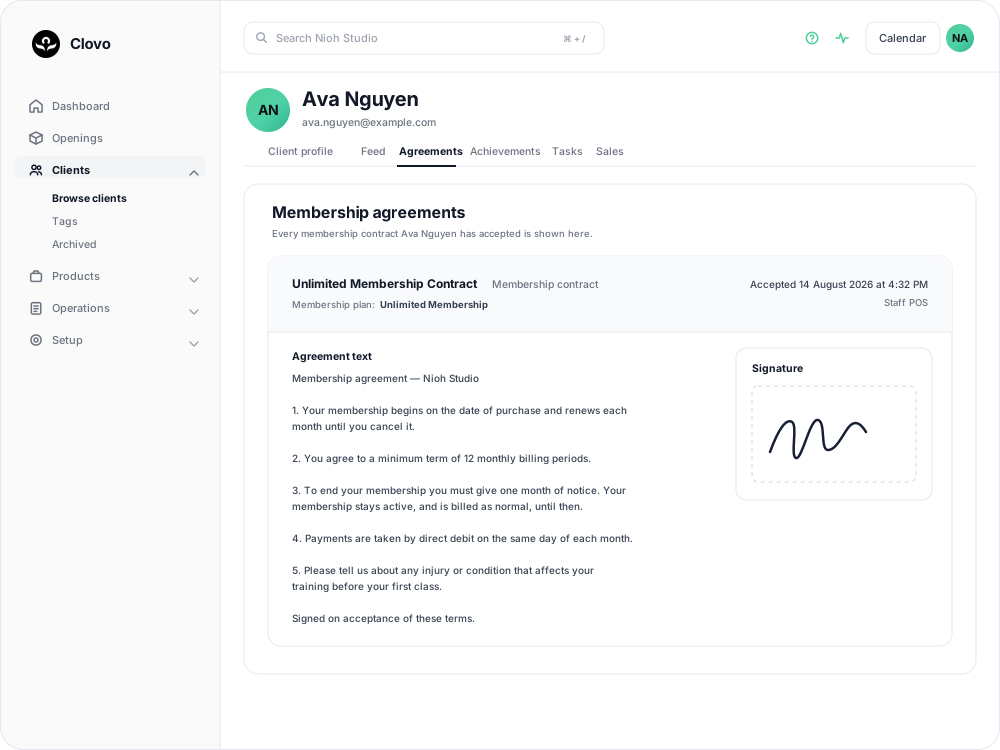
- Go to Clients and open the client.
- Select the Agreements tab.
Each accepted contract is listed with:
- The contract's title and the membership plan it was accepted for.
- The date and time it was accepted, in your studio's timezone.
- How it was accepted — for example Staff POS, App signature or Landing page checkbox.
- The full agreement text as the member saw it.
- The signature they drew, if there is one.
This is where to look when a member asks what they signed up to, or when you need to check the terms before ending a membership early.
Find everyone who accepted one contract
Go to Setup → Contracts, open the Membership Contracts tab, and select a contract. As well as its wording, the page lists the membership plans using it and, under Accepted by, every client who has agreed to it, with the date and their signature. Acceptances without a drawn signature are shown as Electronic acceptance.
A contract can only be deleted while no plan uses it. Once a plan has selected it, or anyone has agreed to it, it stays in your list as the record of what those members accepted.
Common questions
A member accepted the contract, so why is there no record on their Agreements tab? An acceptance notification does not confirm that payment succeeded. If the payment was abandoned or declined, the membership was not created and no acceptance record appears. Ask the member to purchase again.
I required a signature, so why does an acceptance show no drawing? In the app, members using VoiceOver or Switch Control can accept with the checkbox instead of drawing. The acceptance record shows how it was taken.
Does a member accept again when their membership renews? No. They accept once, when they buy the membership. A record is added each time they purchase a plan carrying a contract.
Can a member see their agreement themselves? They can read the wording at any time from the plan in the app. The acceptance record, including the signature and the date, is in your dashboard on the Agreements tab, so look it up there if they ask when and how they agreed.
I changed my terms. What happens to members on the old contract? They keep the contract they accepted. New wording applies only to members who accept it on a new plan.
Related articles
Track the usage of memberships and packs
Read the usage panel on a client’s membership or credit pack, see what each credit was spent on, and correct a balance when it needs fixing.
Cancel a client membership
Cancel a client’s membership, pack or trial from their profile, and know when their access ends, what happens to their bookings, and how to end a membership on the spot.
Change a client’s membership plan
Move a client to another recurring plan at their next renewal, and know when the new price and allowance begin.
Offer recurring memberships by creating a membership plan
Fill in the membership plan form — inclusions, price, billing period and contract — and know what changes for current members when you edit a plan later.