
Choose what times your new classes get released for booking

Tobias Gundry
Updated
By default, new class openings can become available at different times of day. Class Release Time lets you choose when clients can see and book them.
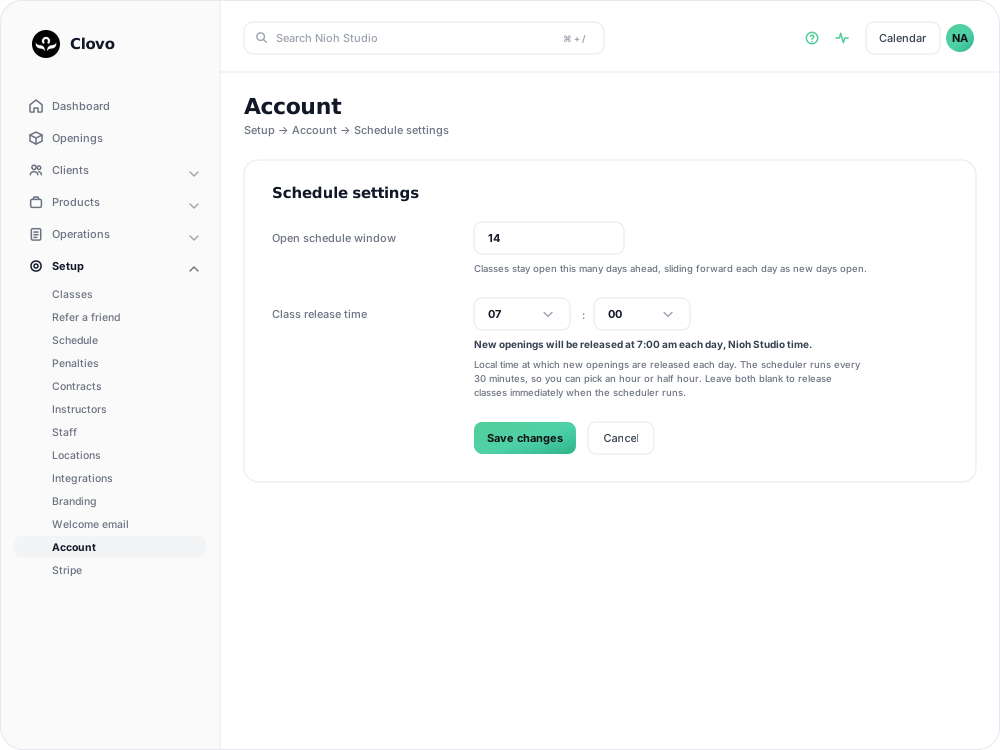
Class Release Time lets you choose a specific time of day when new openings are released to your clients. This means everyone gets a fair shot at booking, and you get to decide when that window opens.
This works hand-in-hand with the Open schedule window setting, which controls how far into the future your openings are generated.
How it works
When you set a release time, new openings become available after that time in your studio’s local timezone. For example, a 7:00am release time keeps each day’s new openings hidden until after 7:00am.
This is particularly useful if you offer priority booking because it lets the priority window start at a practical time instead of elapsing overnight.
Setting up Class Release Time
\1. In Clovo Dashboard, go to Setup > Schedule.
\2. Open the Settings tab above the schedule.
\3. Under Class release time, select an hour and minute from the dropdown menus.
\4. Click Save changes.
You can choose times on the hour or half hour (e.g. 7:00am, 7:30am, 8:00am).
A live preview will show you exactly when classes will be released based on your selection.
Changing the open schedule window
While you’re on the Settings tab, you can also adjust how many days into the future your openings are generated.
\1. In the Schedule settings section, find Open schedule window.
\2. Enter a number between 1 and 90.
\3. Click Save changes.
The default is 14 days. If you set this to 7, your clients will only ever see the next week of classes. Set it to 30 for about a month, or 90 for up to three months of openings ahead.
Clearing the release time
To return to the default behaviour, clear both the hour and minute dropdowns so they are blank, then save.
FAQs
Does changing the release time affect classes that are already open?
No. Any openings that have already been generated and are visible to your clients stay as they are. The release time only affects when new openings appear going forward.
What happens if I don’t set a release time?
Classes are released automatically. Set a release time only if you want more control over when new openings appear.
Does the release time use my studio’s timezone?
Yes. The time you set is based on the timezone configured for your studio in your business address settings.
I changed my open schedule window — why don’t I see more classes yet?
It may take up to 30 minutes for new openings to appear after you change this setting. If you have also set a release time, they will not appear before that time.
Related articles
Show your timetable on your studio’s website
Copy an embed code from Clovo Dashboard to place your live class timetable on your own website, with weekly and monthly views your visitors can switch between.
Share your timetable with clients, wherever they are
Your landing page is a public, always-current timetable anyone can open without the app. Share the whole thing, a single class, a social image, or embed it in your own website.
Hide class numbers from clients
Show clients whether a class has space, without showing how many people have booked or how many places it has.
Close the studio for a date range
Record a closure so Clovo stops opening classes at that location, then cancel the openings already on the timetable and extend or pause the memberships the closed days run through.