
Exempt a schedule from the booking cutoff

Tobias Gundry
Updated
If some classes can accept last-minute bookings, exempt their schedules from your studio booking cutoff. Bookings for those sessions stay open until class starts, while the rest of your timetable keeps the studio cutoff.
The choice is per schedule. For example, you can exempt Monday's 6:00 AM Reformer schedule while keeping the cutoff for Tuesday's Reformer schedule. You can either use the studio cutoff or exempt the schedule; there is no separate cutoff duration to enter here.
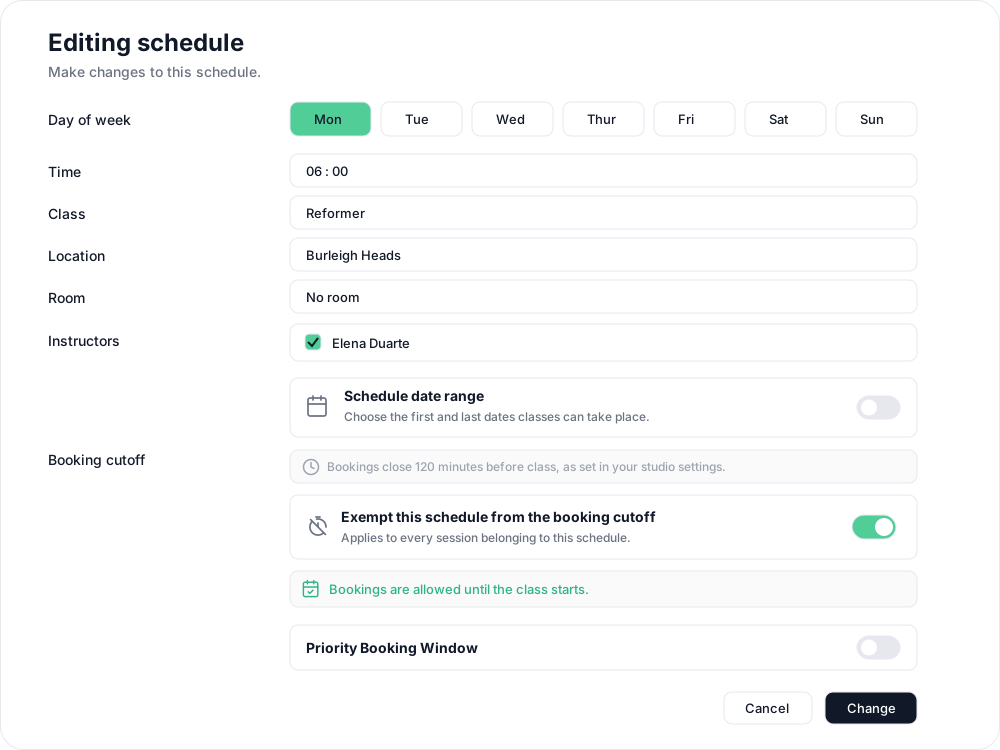
Exempt a schedule
- In Clovo Dashboard, go to Setup → Schedule and open the schedule you want to change.
- Find Booking cutoff. It shows when bookings usually close under your studio settings.
- Turn on Exempt this schedule from the booking cutoff. The usual cutoff is crossed out and Bookings are allowed until the class starts. appears below.

- Choose Change, then review the Booking cutoff row in the confirmation step.
- If existing openings are listed, leave them unselected and choose Save changes without cancelling to keep the classes and their bookings. If there are no open classes, choose Save changes.
For more on that confirmation step, see Changing class schedules with existing openings.
You can also turn on the exemption when creating a schedule, before choosing Create.
Which sessions are affected?
The exemption applies to every session belonging to the schedule, including existing openings. You do not need to cancel or recreate them. Clients can book until the class starts in the Clovo app or on your landing page, including when paying for a single class with Direct Purchase.
The exemption only removes the booking cutoff. Class capacity, plan eligibility and other booking restrictions still apply, and existing bookings keep their places. Waitlists continue to work as usual.
Restore the studio cutoff
Open the schedule again, turn off Exempt this schedule from the booking cutoff, then choose Change and save through the same review step. The studio's current cutoff applies to new booking attempts for that schedule, including its existing openings. Bookings already made are kept.
To change the cutoff for the studio instead, see Close bookings before a class starts with a booking cutoff.
Related articles
Book classes with multiple memberships and credit packs
Clients can hold multiple memberships, credit packs, or both. See how they choose which pass to use for each class in the Clovo iPhone app.
Close bookings before a class starts with a booking cutoff
Choose how long before a class starts clients can no longer book, so your team has time to prepare for the people attending.
Review, collect or waive a penalty
Review pending penalties and failed collections, retry a fee, waive a penalty or mark it uncollectible in the dashboard or iOS app.
Set up late cancellation and no-show penalties
Set late cancellation and no-show rules, choose credit forfeiture or membership-only fees, and check the penalties applied to bookings.