
Close the studio for a date range

Tobias Gundry
Updated
A public holiday, a Christmas shutdown, a week of floor repairs — when a location will not be running classes, record it as a closure. Clovo stops putting new openings on the timetable for those dates, and gives you one screen for the two things a closure affects: the classes that are already open for booking, and the memberships that run through the closed days.
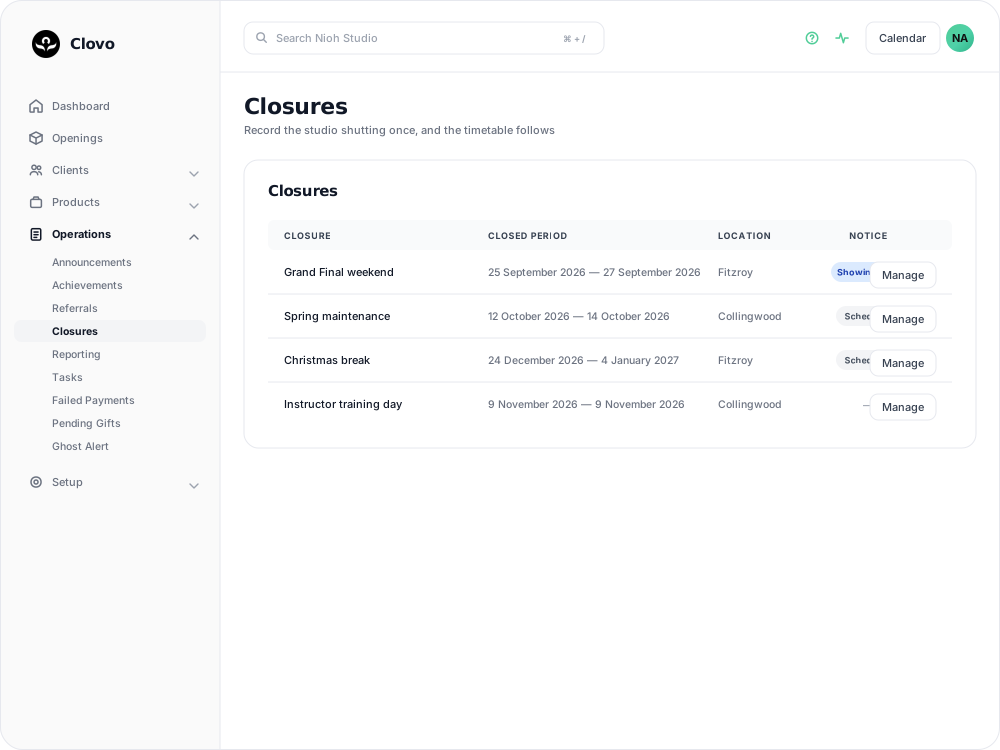
A closure covers one location. If you are closing more than one, create a closure for each.
Add the closure
Go to Operations → Closures and select New closure.
- Name — a short description such as "Christmas break". If you switch the notice on, this is the heading clients read, so write it for them rather than for staff.
- First closed day and Last closed day — both dates are part of the closure. As you set them, the Closure preview underneath reads the range back: "Your last working day will be 23 December 2026, you will be closed for 12 days between 24 December 2026 and 4 January 2027, back at it again on 5 January 2027." That line is the quickest way to catch a range that is a day short at either end.
- Location — the location that is closing.
Let clients know in advance
Display Upcoming Closure Notice shows the closure to clients in the Clovo app and on your landing pages. Left off, the closure is visible only to you and your staff.
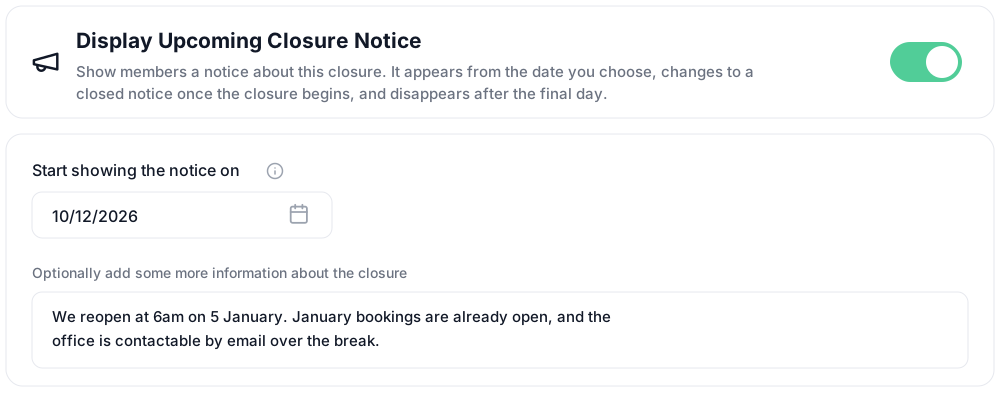
Switching it on reveals two fields:
- Start showing the notice on — Clovo fills this in as 14 days before the first closed day, or today if the closure is sooner than that. Change it to whatever notice period suits. A date you enter yourself is kept, even if you move the closure dates afterwards.
- An optional message for anything else clients need — reduced hours either side, who to contact while you are shut, when bookings reopen. Without it, clients see the closure name on its own.
The notice appears on the date you choose, changes to a currently-closed wording once the closure begins, and disappears after the final day. The Notice column on the Closures list tells you where each one has got to: Shows from with a date, Showing now, Notice finished, or a dash when the closure has no notice.
Select Create. Clovo saves the closure and opens it, so you can work through what it affects.
Cancel the classes that are already open
From this point Clovo will not add classes at that location to the timetable for those dates. Openings created before you saved the closure are a separate matter — they stay bookable until you cancel them, and Clovo leaves that decision to you.
The Affected Openings card lists every class at that location inside the closed dates that has not been cancelled. Tick the ones you are cancelling — the checkbox in the header row selects them all — then select Cancel selected openings and confirm.
Each booking on those classes goes through Clovo's normal cancellation:
- Booked clients receive a push notification and an email telling them the class is cancelled.
- A credit used to book is returned to the pack or membership it came from, and a super credit is returned to the client's account. Complimentary bookings never used a credit.
- No late-cancellation penalty is charged.
- Bookings paid for directly are not refunded by Clovo. The client is told they will be contacted about a refund, and the studio issues it separately.
Classes that have already run cannot be cancelled from here. For what a cancellation looks like to a client one class at a time, see Cancel upcoming classes.
Extend or pause affected memberships
The Affected Memberships card lists every active membership whose paid-for period overlaps the closure. These are the clients who have bought time or credits they cannot use while you are shut.
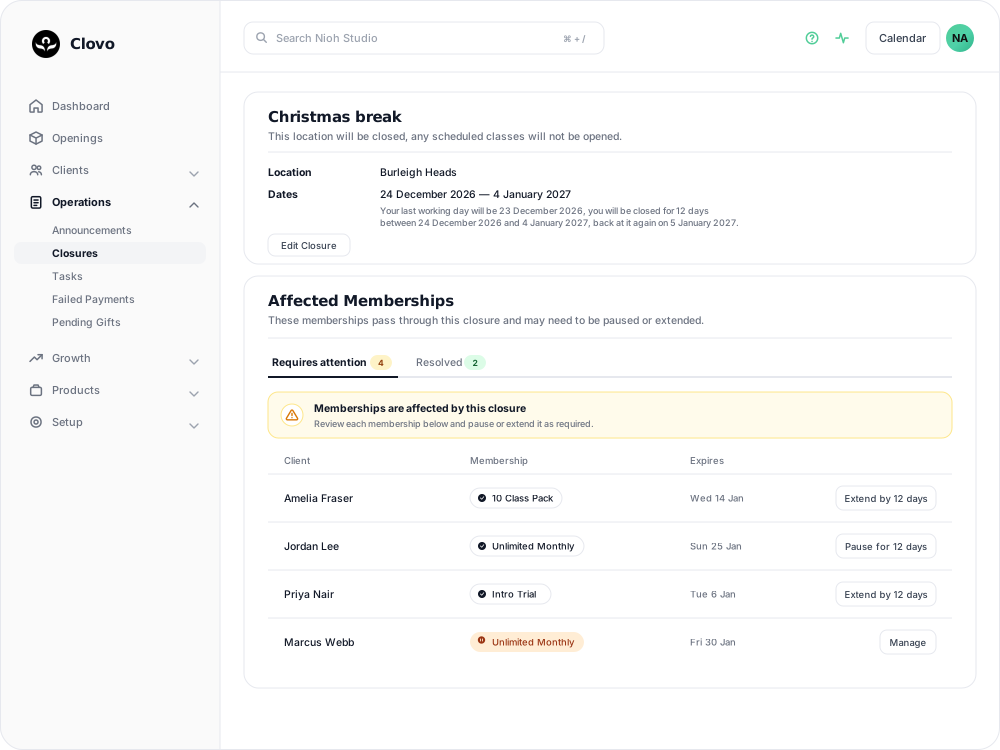
Two tabs divide the work. Requires attention holds memberships that still need a decision; Resolved holds memberships you have already handled. Each row shows the client, their membership, the date it expires, and one action:
- Extend by N days on packs and trials. Selecting it adds the closed-day count to the membership's expiry date straight away, so a ten-class pack that would have run out mid-shutdown gets those days back.
- Pause for N days on recurring plans. Selecting it schedules a pause running from the first closed day to the morning after the last, so the client is not billed for a period they cannot book in. See Pausing a membership for how a pause behaves either side of those dates.
- Manage on anything else — a plan that is already paused, has a pause scheduled, or is cancelling. Clovo opens the membership so you can review its details and decide how to handle it.

Once a membership moves to Resolved, the row records what was done, on what date and by whom, and a paused plan also shows the days it pauses and resumes.
Two deadlines worth knowing
A pause can only be scheduled before the closure starts. On or after the first closed day, Clovo declines with "This closure has already started, so the plan can no longer be paused automatically". Resolve the memberships before the closure begins if you want Clovo to pause them automatically.
Clovo will not pause a plan that has bookings inside the closure. Cancel the affected openings first, which cancels those bookings, and the pause can then be scheduled.
Fix the dates before you resolve anything
Check the Closure preview and correct the date range before extending or pausing any membership. After the first membership is resolved, the closure's dates and location cannot be changed.
Change or delete a closure
Edit Closure on the closure screen reopens the same form. The name, the notice and its message stay editable whether or not memberships have been resolved.
Delete at the bottom of the edit screen removes the closure and, with it, the record of what you resolved. It does not reverse anything already done: extensions stay on the memberships that received them, scheduled pauses stay scheduled, and classes you cancelled stay cancelled. Undo those on the memberships and openings themselves.
Deleting also stops Clovo suppressing new openings for those dates, but it will not bring back openings it already suppressed. If you delete a closure and need those classes back on the timetable, add them as one-off openings.
Related articles
Set up late cancellation and no-show penalties
Set late cancellation and no-show rules, choose credit forfeiture or membership-only fees, and check the penalties applied to bookings.
Show your timetable on your studio’s website
Copy an embed code from Clovo Dashboard to place your live class timetable on your own website, with weekly and monthly views your visitors can switch between.
Share your timetable with clients, wherever they are
Your landing page is a public, always-current timetable anyone can open without the app. Share the whole thing, a single class, a social image, or embed it in your own website.
Hide class numbers from clients
Show clients whether a class has space, without showing how many people have booked or how many places it has.