
Offer popup classes for one-off unscheduled offerings for your clients

Tobias Gundry
Updated
Sometimes you want to offer a one-off class that is outside of your normal weekly schedule. Clovo has built-in support for these occasions with pop-up classes, allowing you to use your usual booking system to run special events, workshops, or substitute classes.
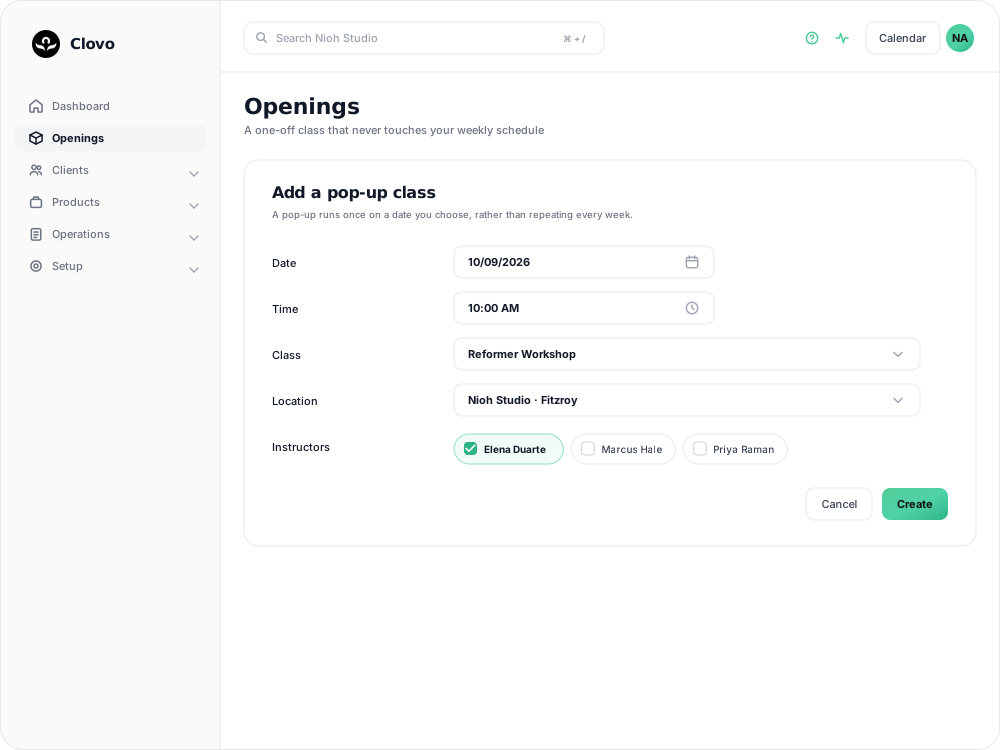
What is a pop-up class?
A pop-up class is a single class opening that occurs only once. Unlike scheduled classes that repeat weekly, a pop-up is tied to a specific date. Pop-ups are ideal for workshops, guest instructor sessions, holiday specials, or any class that doesn’t fit your regular timetable.
Creating a pop-up class
- In Clovo Dashboard, go to the Openings page.
- Click the + Add Pop-up button in the top right.
- Select a specific date for the class (this replaces the day-of-week selector used for scheduled classes).
- Set the time the class starts.
- Choose the class type from your existing class list.
- Select the location and, if needed, a room at that location.
- Assign one or more instructors.
- Click Create.
The pop-up class will immediately appear in your Openings list and be available for clients to book in the app.
Pop-up vs. scheduled classes
The key difference is that scheduled classes repeat every week on a set day and time, while pop-up classes happen once on a specific date. If you create the same pop-up class regularly, add it to your schedule instead.
Related articles
Show your timetable on your studio’s website
Copy an embed code from Clovo Dashboard to place your live class timetable on your own website, with weekly and monthly views your visitors can switch between.
Share your timetable with clients, wherever they are
Your landing page is a public, always-current timetable anyone can open without the app. Share the whole thing, a single class, a social image, or embed it in your own website.
Hide class numbers from clients
Show clients whether a class has space, without showing how many people have booked or how many places it has.
Close the studio for a date range
Record a closure so Clovo stops opening classes at that location, then cancel the openings already on the timetable and extend or pause the memberships the closed days run through.