
Create and manage your class types

Tobias Gundry
Updated
Before you can build a schedule or accept bookings, you need to define the types of classes your studio offers. Class types are the foundation of your timetable — they describe what you teach, not when or where.
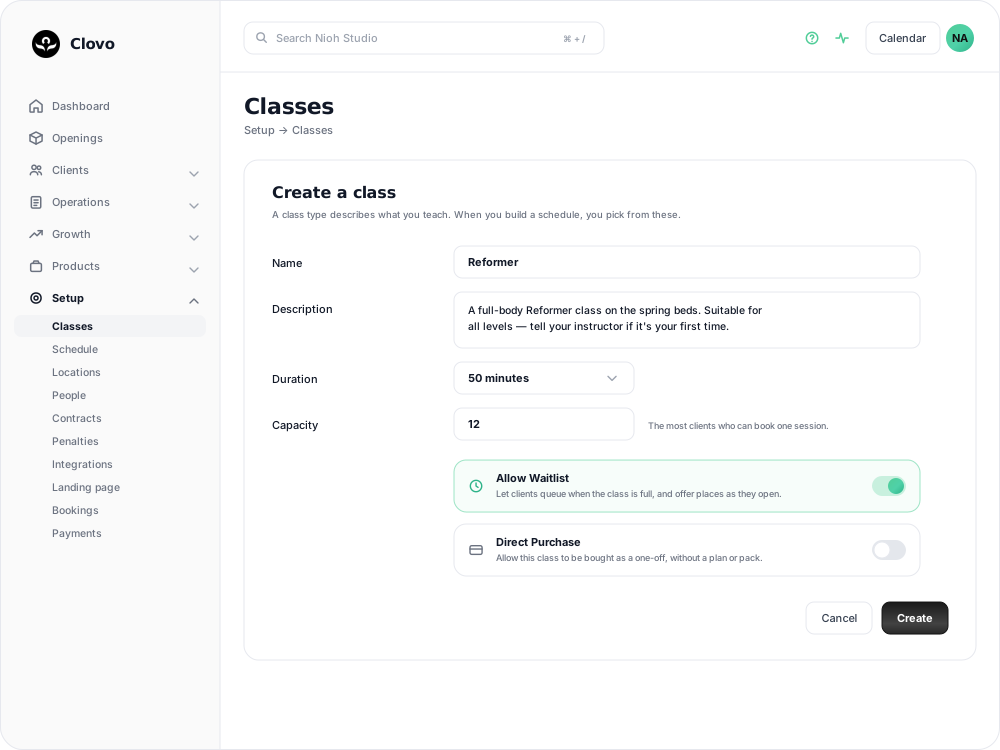
What is a class type?
A class type represents a category of class at your studio — for example, “Reformer Pilates”, “Yoga Flow”, “Cardio Barre”, or “Mat Pilates”. Each class type has its own name, description, duration, and capacity. When you build your schedule, you assign class types to specific days and times.
Creating a class type
- In Clovo Dashboard, go to Setup > Classes.
- Click Add Class.
- Enter the class name — choose something clear and recognisable to your clients.
- Add a description that helps clients understand what to expect from the class.
- Set the duration of the class in minutes.
- Set the capacity — the maximum number of clients who can book into a single session.
- Save the class.
Managing existing classes
You can edit any class type at any time from Setup > Classes. Changes to the name, description, or capacity will apply to all future openings that use that class type. Existing bookings are not affected.
Tips
- Write client-friendly descriptions — your class descriptions appear in the app, so write them for the clients who will read them
- Set realistic capacities — factor in equipment availability and studio space, not just how many people could physically fit
- Use clear, distinct names — avoid names that are too similar, as clients may confuse them when booking
Once your classes are set up, you can add them to your schedule and start accepting bookings.
Related articles
Understand the meaning of different plan statuses in Clovo
Use the status beside a client’s membership, credit pack or trial to understand whether they can use it and when their access changes.
Change the address shown on invoices
Choose your business address or a studio location as the From address on new client invoices and receipts.
Customise your dashboard layout
Turn dashboard cards on or off, put them in the order you want, and choose where the activity timeline sits — all saved to your own staff account.
Read your Studio Health Check
A scored, printable report that reviews your studio's setup, revenue, retention, growth and engagement, and links straight to the screen that fixes each finding.