
Send a custom message after a new purchase

Tobias Gundry
Updated
Clovo will automatically email your client details of their product after any new purchase. You might however want to send an additional, more personal welcome message to make them feel valued.
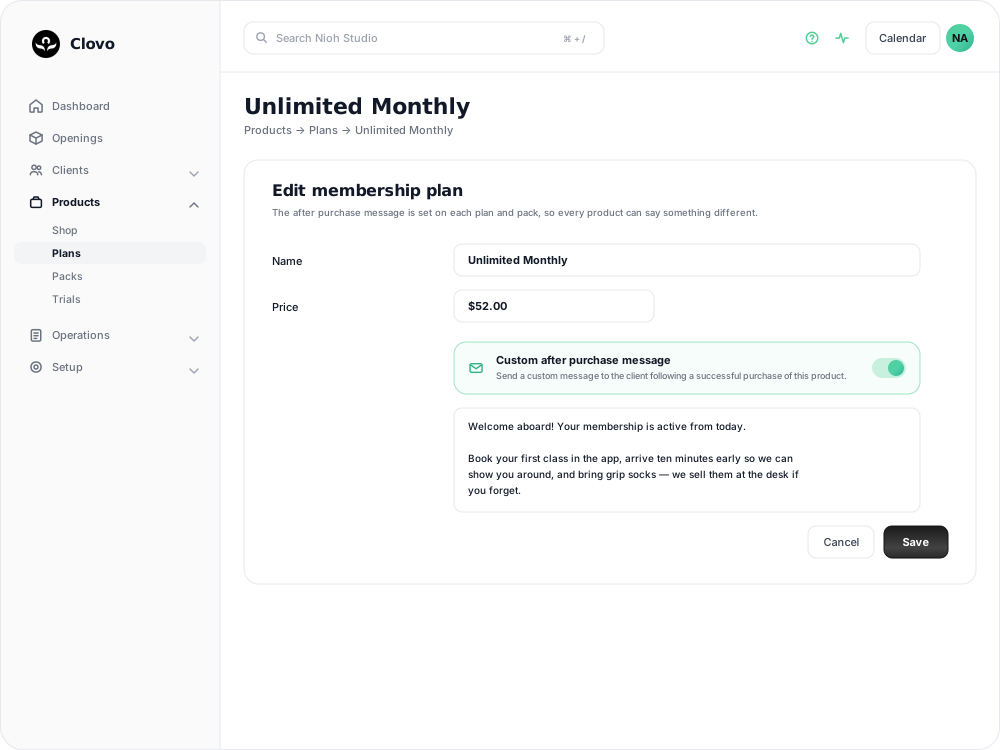
Why send a custom purchase message?
A thoughtful welcome message after a purchase sets the tone for your client’s experience. It’s a chance to thank them, share getting-started information, and make them feel part of your community.
How to set it up
The after purchase message belongs to the product, not to your studio as a whole, so each plan and pack can say something different.
- In Clovo Dashboard, go to Products and open the plan or pack you want the message on.
- Scroll to Custom after purchase message and turn the switch on.
- Write your message in the box that appears underneath.
- Save your changes.
Repeat for any other product that needs its own message. A plan and a pack bought by the same client are separate purchases, so they can each send their own note.
Tips
- Keep it warm and personal
- Include a clear next step like booking their first class
- Mention studio policies, what to bring, or parking info
- Keep it concise — a few sentences is plenty
Related articles
Change the reply to address for your studio
Choose where client replies go for announcements, bookings, purchases and other studio emails.
Customise the welcome email that is sent to new clients when they join
You can now customise the welcome email your studio sends to new clients when they join.
Give your clients branded support
Every Clovo studio has a member-facing help centre, live right now, with no setup required. It sits on your landing page, it’s written in your studio’s voice, and it wears your branding.
Set up a refer a friend program
Set up a refer a friend program that rewards both people, then let Clovo grant the benefits, monitor the minimum spend and track each referral.