
Set up a refer a friend program

Tobias Gundry
Updated
Recommendations from existing members can be an effective way for new clients to discover your studio. Because these referrals often happen in conversation, it can be difficult to connect a new sign-up with the person who referred them.
A referral program records that connection and applies the rewards you choose. Clovo gives clients a way to refer from inside the app, grants rewards automatically when they are earned, and keeps a record of who referred whom.
How a referral works
The two rewards are granted at different points:
- Your client refers someone — from Account → Refer a friend in the app, they enter their friend's email address and Clovo sends the referral link. Studio staff can also add one by hand for a word-of-mouth referral that happened offline.
- The friend joins. As soon as they register with that email address, the referral is marked accepted and the friend's benefits are granted immediately.
- The friend spends. Once their total spend reaches your minimum, the referrer's reward is granted. Set the minimum to zero and it lands as soon as the friend joins.
This lets the friend receive a joining benefit while the referrer’s reward can depend on the friend reaching your chosen spend threshold.
Set the rewards
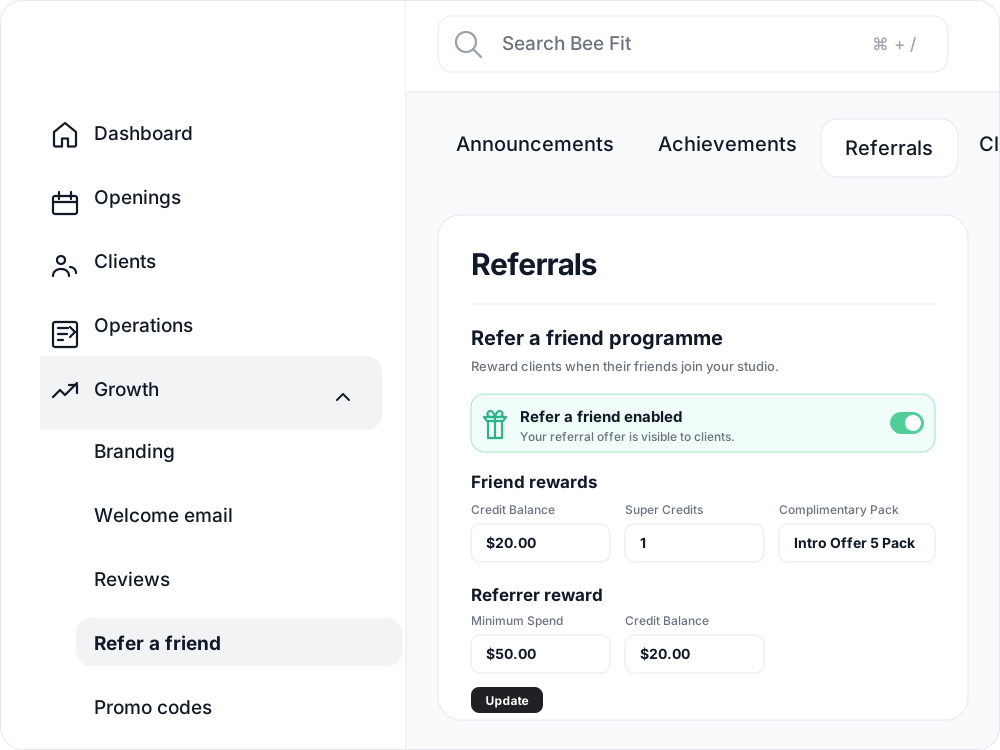
Go to Operations → Referrals and switch Refer a friend enabled on. Nothing runs until that switch is on — leave it off and no benefits are granted, even for referrals already sitting in the list.
What the friend gets
Any combination of three things, and you can use all three at once:
| Reward | What it is | Worth knowing |
|---|---|---|
| Credit Balance | A dollar credit held in Stripe | Only applies to membership payments, including renewals. It cannot pay for a class drop-in, a credit pack or a member-shop order, and it is not redeemable for cash. |
| Super Credits | Free class credits, 0–100 | Each one books any class you run, with no exclusions. See Super Credits. |
| Complimentary Pack | A credit pack, gifted outright | It must be a pack — recurring plans and trials cannot be given this way. It is granted instantly when the friend joins. |
What the referrer gets
One thing: a Credit Balance, with the same Stripe rules as above — memberships and renewals only, never cash.
The minimum spend
Minimum Spend is the amount the friend must spend before the referrer’s credit is released. Spend is measured from Clovo’s payment records, including memberships, packs, one-off class payments, and member-shop sales.
Choose a threshold that matches the goals and cost of your program:
- $0 — the referrer receives the reward when the friend registers, including when the friend does not go on to make a purchase.
- Around the price of one pack or billing period — the referrer receives the reward after the friend makes a qualifying purchase.
- Higher than a typical first purchase — reduces the reward cost relative to revenue, but may create a longer delay before the referrer receives it.
Adding a referral by hand
Not every referral goes through the app. When a new client says "Zoe told me about you", go to Operations → Referrals → Add Referral and record it so Zoe can receive the configured reward.
The screen shows your current settings while you fill it in, so you can see exactly what is about to be granted. Two behaviours to know about:
- If the referred person already has an account, only the referrer is rewarded — the friend benefits are for new joiners. That reward applies immediately if the client has already met your minimum spend, otherwise as soon as they do.
- Self-referrals are blocked. A client cannot earn the referrer reward off their own account, however the referral was created.
Tracking what the program is doing
Operations → Referrals shows who has joined and whether each benefit is pending or complete.

Open a referral to review its progress and benefits.
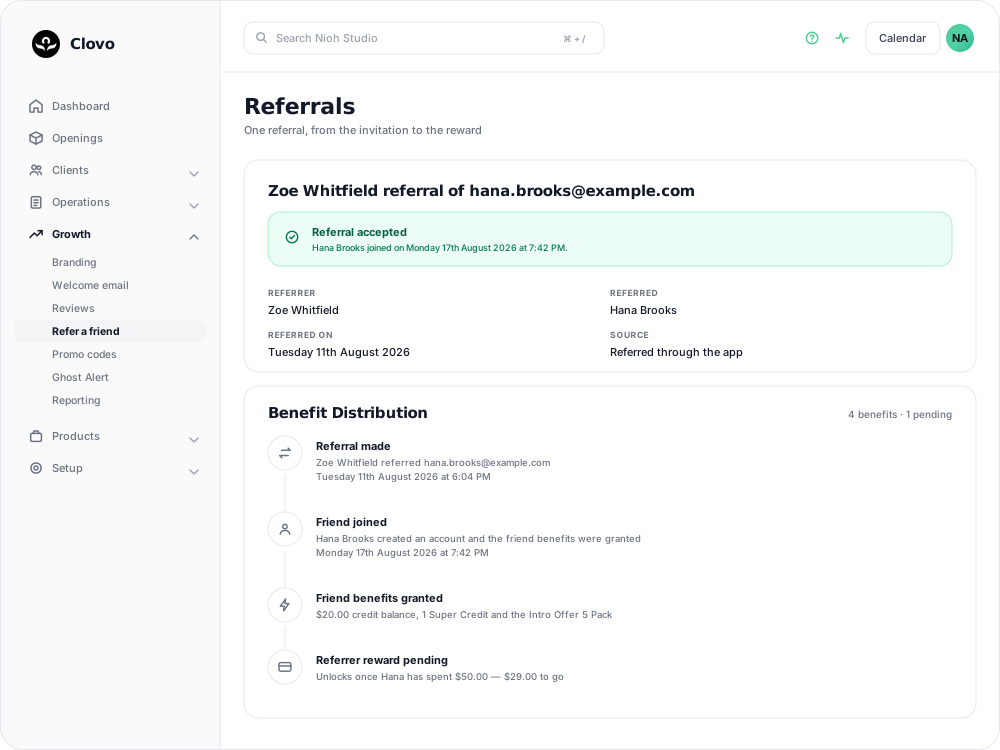
The timeline shows when the referral was made, when the friend joined, and when each benefit was granted.
When a benefit stays pending
If a benefit remains pending, open the referral to review it. Contact Clovo support if the friend has met the requirements but the benefit has not been granted.
Keeping the program visible
If referral activity is low, consider an announcement that explains the program and the benefits available to both people. You can then review participation before changing the reward amount.
Good to know
- The reward amounts your clients see in the app come straight from these settings, so updating them changes the offer everywhere at once.
- Turning the program off stops all future grants; it does not claw back anything already given.
- Credit balances apply automatically to the client’s next membership payment.
Related
Related articles
Create a paid introductory offer with a credit pack
Use a paid intro offer when you want a new client to make a small first purchase before choosing a membership.
Customise the welcome email that is sent to new clients when they join
You can now customise the welcome email your studio sends to new clients when they join.
Give your clients branded support
Every Clovo studio has a member-facing help centre, live right now, with no setup required. It sits on your landing page, it’s written in your studio’s voice, and it wears your branding.
Track your clients milestones with achievements
Celebrate client milestones with automatic tracking in Clovo’s Achievements feature, and reach out when clients reach milestones with your studio.