
What changed with achievements?

Tobias Gundry
Updated
Achievements now recognise early progress and regular attendance as well as longer-term milestones. Clovo can also let clients know automatically, so recognising a milestone no longer depends on a staff member writing and sending each message.
Why have achievements changed?
The previous class milestones started at 50 bookings. That recognised established clients, but meant someone building a new routine could wait a while for their first achievement. New milestones at 5, 10 and 25 classes recognise those earlier steps, while weekly streaks recognise consistency.
The updated system also reduces the work involved in letting clients know about their milestones. You can let Clovo send the celebration or keep control of when it goes out by sending it manually.
What is different?
| Previously | Now | |
|---|---|---|
| Class milestones | Started at 50 bookings. | Start at 5, with 10 and 25 added before the existing milestones. |
| Membership milestones | Recognised time with your studio. | Remain available under Loyalty. |
| Weekly streaks | No streak achievements. | Consistency recognises 4, 8, 12, 26 and 52 consecutive weeks with at least one qualifying class each week. |
| Client messages | Staff wrote and sent a message for an achievement. | Clovo provides a ready-made celebration, sent automatically or manually. |
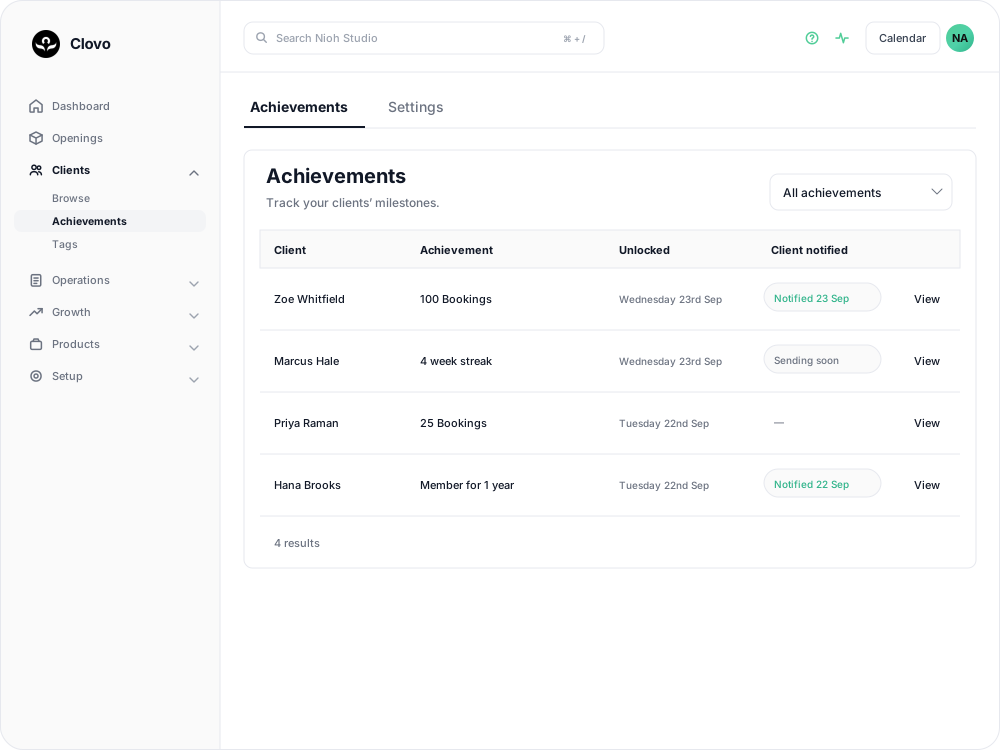
| Reviewing achievements | Staff worked through achievements to contact clients. | The list shows client notification status, with a milestone filter and a View link for details and an email preview. |
Open Clients > Achievements in Clovo Dashboard to see the updated list.
What do the achievement categories mean?
Attendance recognises class milestones, starting at 5 classes.
Loyalty recognises time with your studio.
Consistency recognises weekly streaks of classes.
Earned achievements stay on the client’s profile, even when a streak ends.
Which settings should I check?
Open Clients > Achievements > Settings.
Bookings require check-ins
When Bookings require check-ins is on, a booking needs a check-in to count towards both class and streak achievements. When it is off, qualifying past bookings count without a check-in.

If your studio does not record check-ins, leave this off. Changing the setting does not remove achievements already earned.
Send notifications
With Send notifications on, Clovo automatically sends the client a celebration by email and push notification when they unlock an achievement. The email uses your studio branding. The celebration wording is provided by Clovo and cannot be edited in the achievement screen.
With the setting off, achievements still unlock. Open an achievement using View, review the email preview, then select Send notification when you want to notify the client.
Select Save changes after adjusting either setting. Turning notifications back on applies to achievements unlocked from then on. It does not send celebrations for achievements that unlocked while the setting was off; those still need to be sent manually.
Staff subscribed to Achievements notifications can still receive milestone alerts when automatic client notifications are off.
What happens to existing achievements?
Clients keep the achievements they have already earned. The update does not require them to start again. Historical achievements are not resent to clients as a batch of notifications during the changeover.
New celebrations are not always immediate. Automatic notifications are sent between 8 am and 8 pm in your studio’s time zone. Sending soon means a celebration is waiting to be sent. A dash in the Client notified column means it is awaiting a manual send; open View for the Send notification button.
Related articles
Track your clients milestones with achievements
Celebrate client milestones with automatic tracking in Clovo’s Achievements feature, and reach out when clients reach milestones with your studio.
Keep your team's follow-ups moving with the task board
Tasks give studio follow-ups an owner, a due date and a column. Some you create yourself, some Clovo raises for you off a shop sale or a retention alert.
Review, collect or waive a penalty
Review pending penalties and failed collections, retry a fee, waive a penalty or mark it uncollectible in the dashboard or iOS app.
Set up late cancellation and no-show penalties
Set late cancellation and no-show rules, choose credit forfeiture or membership-only fees, and check the penalties applied to bookings.