
Discount Member Shop orders and class purchases with a promo code

Tobias Gundry
Updated
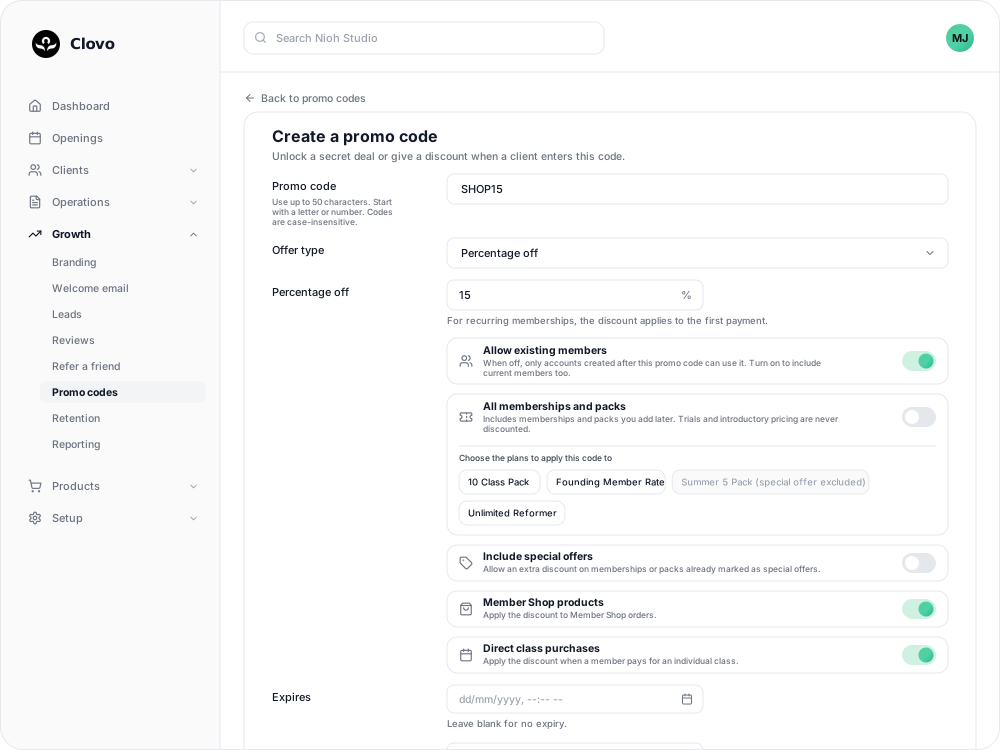
A percentage-off or dollar-amount-off code can discount more than memberships and packs. Two switches on the code add Member Shop orders and single classes a client pays for.
Turn on Member Shop orders or class purchases
- Go to Growth → Promo codes and select Add promo code, or open a code that no client has used yet and select Edit.
- Set up the code and discount as usual.
- Switch on either or both:
- Member Shop products takes the discount off a client's Member Shop order.
- Direct class purchases takes the discount off a single class a client pays for directly.
- Check the Promo code summary, then save.


A code for the shop or classes only
To keep memberships and packs at full price, leave All memberships and packs switched off and do not select anything in the plan list below it. Then switch on Member Shop products, Direct class purchases, or both.
How the discount applies
- Orders and classes are discounted in full. The first-payment rule only applies to recurring memberships.
- The discounted charge has to be at least $0.50. Shop products and casual classes are often the cheapest things a code covers, so a dollar-amount-off code can cancel itself out. $15.00 off a $15.00 class, for example, would leave nothing to charge, so the code does not apply and the client sees the regular price.
- Each client can use a discount code once, whether that is on an order, a class, a membership or a pack.
Where clients use it
Once a client has saved the code, it comes off their next eligible purchase without being typed again. When paying for a single class on your landing page, clients can also enter a code in the Promo code field and select Apply code.
How clients enter a promo code lists every place a code can be entered.
Related
Related articles
Create promo codes for discounts and secret deals
Give clients a percentage or dollar amount off, or unlock a private plan or pack, with a code they enter in the Clovo app or on your landing page.
Archive or delete a promo code
Stop a promo code from working, what happens to clients who saved it, and why most codes are archived rather than deleted.
Create a dollar-amount-off promo code
Take a fixed amount, such as $10.00, off memberships, packs, Member Shop orders or single classes for each client who enters your code.
Create a percentage-off promo code
Take a percentage, such as 20%, off memberships, packs, Member Shop orders or single classes for each client who enters your code.