
Create a percentage-off promo code

Tobias Gundry
Updated
A percentage-off code takes a set percentage off each eligible purchase. Share the code on a flyer, in a newsletter or with a partner business, and each client who enters it gets the discount on their next eligible purchase.
Create the code
- Go to Growth → Promo codes and select Add promo code.
- In Promo code, type the code clients will enter, such as
SPRING20. - In Offer type, choose Percentage off.
- In Percentage off, enter the discount as a whole number.
- Choose who can use the code and what it applies to. By default, only accounts created after the code can use it, and nothing is selected for it to apply to.
- If the offer should end, fill in Expires, Maximum redemptions, or both.
- Read the Promo code summary at the bottom of the form, then select Create promo code.
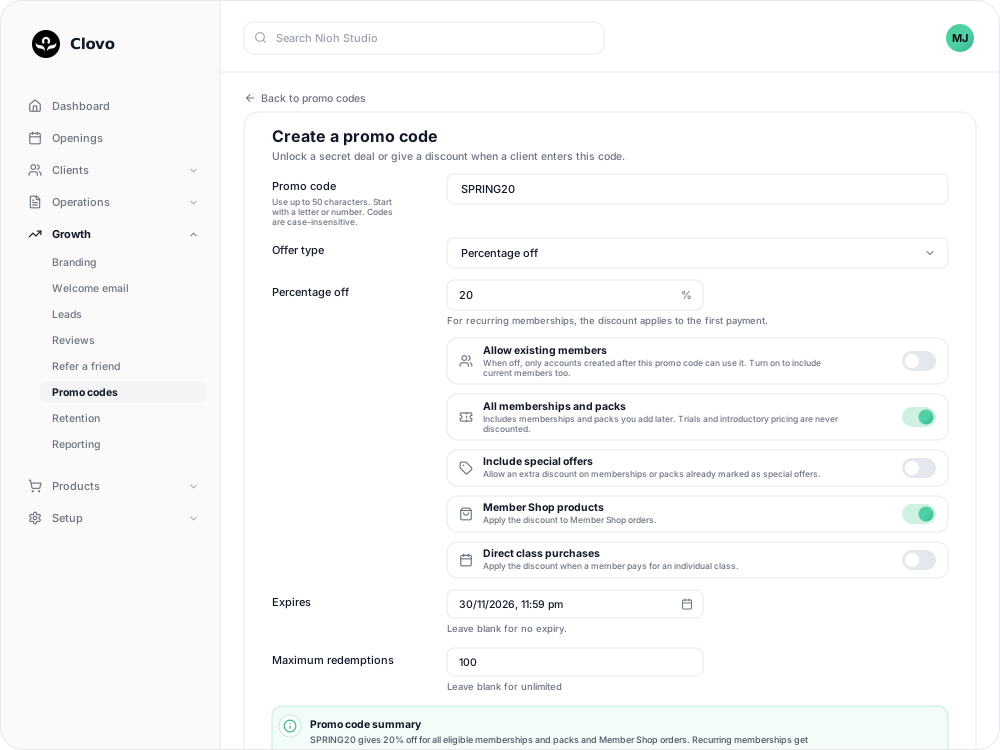
The summary describes the finished offer in plain words, so it is the quickest place to catch a wrong percentage or a missing purchase type before clients see the code.
Choose the percentage
Percentage off takes a whole number from 1 to 99.

- Recurring memberships are discounted on the first payment only. Renewals are charged at the regular price, and the client is shown that renewal price before they pay.
- Packs, Member Shop orders and single classes are discounted in full.
- The discounted charge has to be at least $0.50. If a discount would take a price below $0.50 — 99% off a $20.00 class leaves $0.20, for example — the code does not apply to that purchase and the client sees the regular price.
If the code covers cheap purchases, such as a casual class, check the percentage still leaves at least $0.50 on the cheapest one.
Name the code
- Use up to 50 characters — letters, numbers, hyphens and underscores, starting with a letter or number. Clients usually type the code on a phone, so a short one is easier to get right.
- Case does not matter.
spring20andSPRING20are the same code, and the form shows it in capitals as you type. - Each code name can be used once in your studio, including codes you have archived. Reusing one returns "That promo code already exists."
What clients see
On your landing page, eligible memberships and packs show the regular price crossed out beside the discounted one. For a recurring membership, the renewal price is shown too.
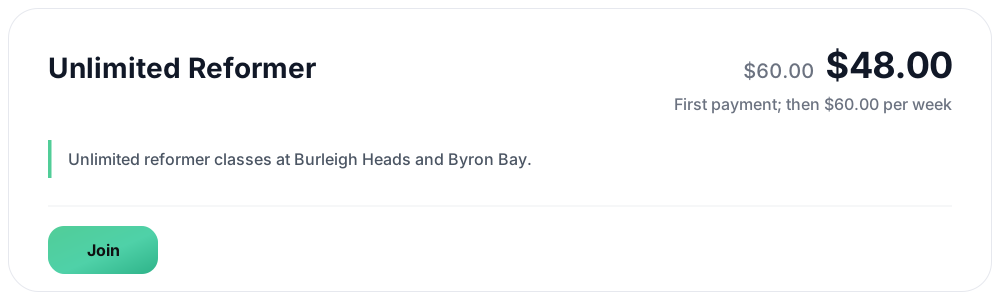
Each client can use a discount code once. What clients see when they use a promo code covers checkout in more detail.
Related
Related articles
Archive or delete a promo code
Stop a promo code from working, what happens to clients who saved it, and why most codes are archived rather than deleted.
Create a dollar-amount-off promo code
Take a fixed amount, such as $10.00, off memberships, packs, Member Shop orders or single classes for each client who enters your code.
Create a promo code that unlocks a secret deal
Let clients unlock a private membership or pack themselves by entering a code, instead of granting access one profile at a time.
Discount Member Shop orders and class purchases with a promo code
Let a discount code take money off Member Shop orders or single classes a client pays for, with or without memberships and packs.