
Set an expiry date on a promo code

Tobias Gundry
Updated
An expiry date ends a discount code automatically, which suits a seasonal sale or a launch offer with a deadline. Leave it blank and the code runs until you archive it.
Set the expiry
- Go to Growth → Promo codes. Select Add promo code for a new code, or select View beside an existing one and then Edit.
- In Expires, choose the date and time the code should stop working.
- Save the code.

The expiry uses your studio's time zone, whatever time zone you are in when you set it. To run an offer to the end of a day, set the time to 11:59 pm.
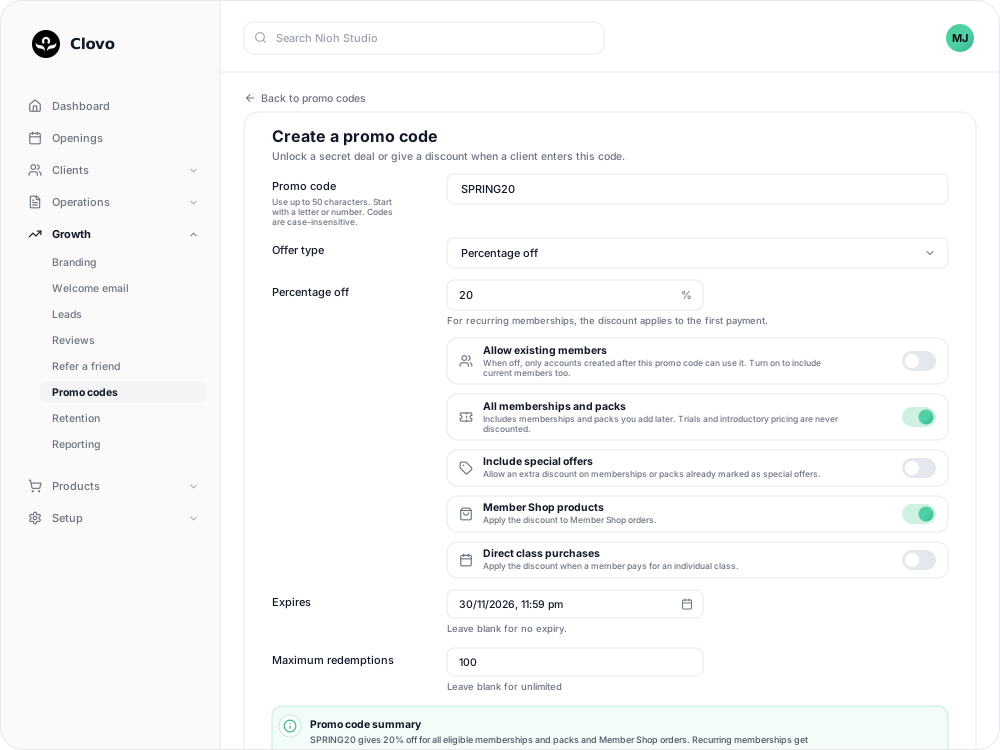
What happens when it expires
- The code stops working at that moment, and its status changes to Expired.
- Clients who saved the code but have not used it see regular prices again. In the code's Clients table, they show as Expired.
- Clients who already bought with the discount keep what they paid for. Recurring memberships renew at the regular price either way, because the discount only applies to the first payment.
Extend or remove an expiry
You can change Expires at any time, even after clients have used the code. Open the code, select Edit, then set a later date or clear the field for no expiry.
This also works after a code has expired, as long as it has not been archived. Once the new date is in the future, the code is Active again and clients who saved it get the discount on their next eligible purchase.
Secret-deal codes
Secret-deal codes have no expiry date. To end one, archive the code. Clients who already unlocked the deal keep their access.
Related
Related articles
Archive or delete a promo code
Stop a promo code from working, what happens to clients who saved it, and why most codes are archived rather than deleted.
Create a dollar-amount-off promo code
Take a fixed amount, such as $10.00, off memberships, packs, Member Shop orders or single classes for each client who enters your code.
Create a percentage-off promo code
Take a percentage, such as 20%, off memberships, packs, Member Shop orders or single classes for each client who enters your code.
Create a promo code that unlocks a secret deal
Let clients unlock a private membership or pack themselves by entering a code, instead of granting access one profile at a time.