
Edit a promo code

Tobias Gundry
Updated
Go to Growth → Promo codes, select View beside the code, then select Edit. How much you can change depends on whether clients have started using the code.
Before clients use it
You can change anything, including the code itself, the offer type, the discount and what it applies to:
- Discount codes stay fully editable until a client uses the code or starts paying with it.
- Secret-deal codes stay fully editable until a client saves the code.
After clients use it
Once a client has used or reserved a discount code — or saved a secret-deal code — the offer is fixed. The edit screen says so, and only the settings that do not change the offer remain.
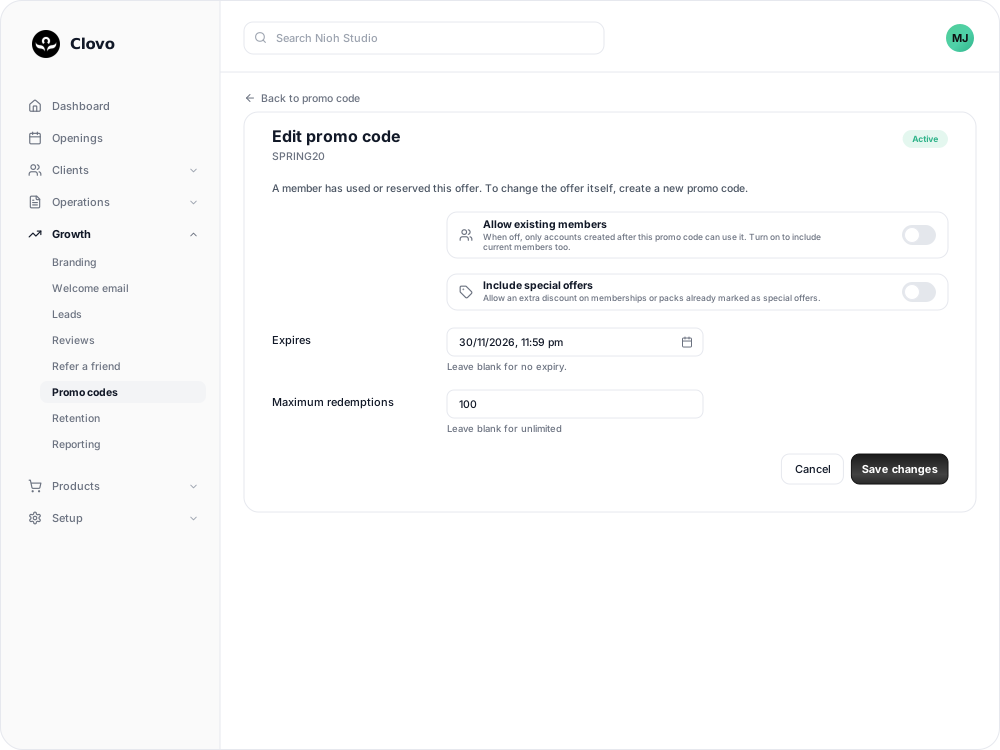
You can still:
- turn Allow existing members on or off — see Offer a promo code to new clients or existing members
- for a discount code, change Include special offers
- for a discount code, change or clear Expires — see Set an expiry date on a promo code
- for a discount code, raise Maximum redemptions or clear it for no limit. It cannot be lowered, and a code with no limit keeps no limit.
Change the offer itself
To change the discount, what it applies to or the secret deal, create a new code with the offer you want, then archive the old one. Clients who saved the old code need to enter the new one, so share it in the same places.
Once clients have saved a discount code, it also cannot be turned into a secret-deal code. The Secret deal option is shown as unavailable. Create a separate code instead.
Codes you cannot edit
Archived codes cannot be edited, and the Edit button does not appear on them.
Related
Related articles
Archive or delete a promo code
Stop a promo code from working, what happens to clients who saved it, and why most codes are archived rather than deleted.
Create a dollar-amount-off promo code
Take a fixed amount, such as $10.00, off memberships, packs, Member Shop orders or single classes for each client who enters your code.
Create a percentage-off promo code
Take a percentage, such as 20%, off memberships, packs, Member Shop orders or single classes for each client who enters your code.
Create a promo code that unlocks a secret deal
Let clients unlock a private membership or pack themselves by entering a code, instead of granting access one profile at a time.