
Change a client’s membership plan

Tobias Gundry
Updated
Use Change Plan when a client wants to upgrade or downgrade their recurring membership. The switch takes effect at the end of their current billing period. Their current plan continues until then.
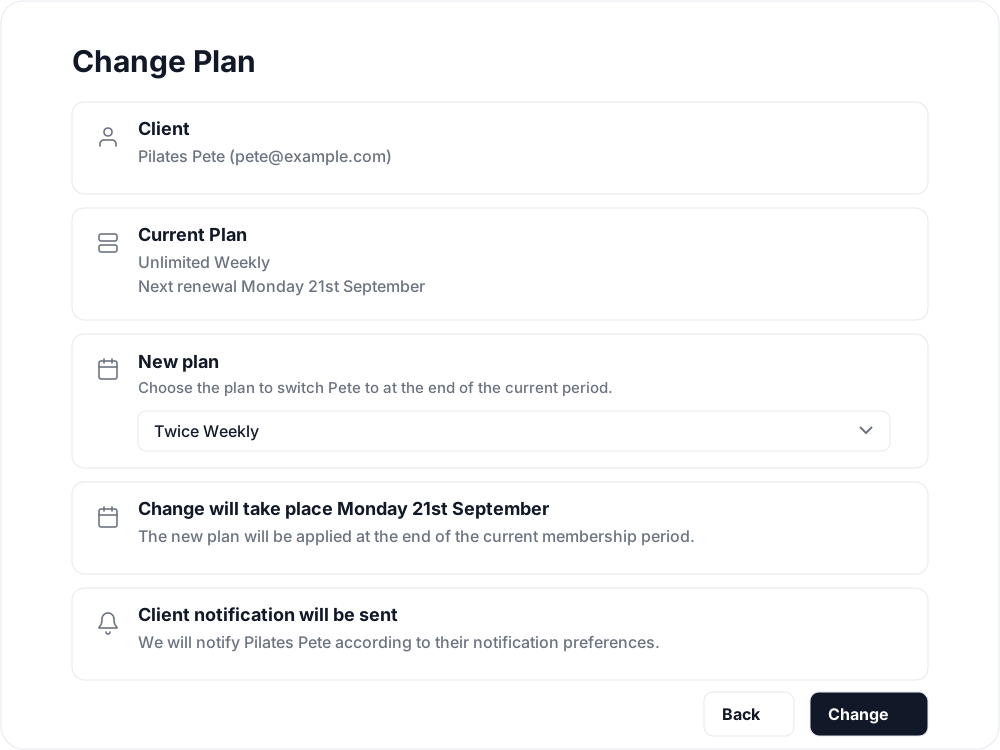
Schedule the change
- Open the client’s profile and select Make Changes on their membership.
- Select Change Plan.
- Check the Client and Current Plan cards to confirm you are changing the intended membership.
- Choose the replacement recurring membership in New plan. Plans with introductory pricing are labelled “new purchases only” and cannot be selected.
- Read Change will take place and confirm the date with the client.
- Select Change.

Before confirming, agree the new plan’s price, billing period and class allowance with the client. If you need to check those details, open the plan under Products → Plans.
When the new plan begins
The new plan and its price apply at the next renewal, rather than immediately. For example, if the membership renews on 21 September, a change scheduled beforehand takes effect on 21 September. The client continues on their existing allowance until that renewal.
Clovo notifies the client about the change according to their notification preferences. Let them know the agreed start date as well, particularly if they expected to use a larger allowance today.
Changing one client’s membership does not edit the plan for everyone else. To change the price or inclusions of the product itself, see Create and edit a membership plan.
If Change Plan is missing
The action is available for an active recurring membership billed through Clovo. It is not shown for a pack, trial, externally paid membership, a cancelling membership, or a membership with a pause in progress or scheduled. It is also unavailable while a membership is in its introductory pricing period; open the membership to see when that period ends.
You also need access to finance features: an owner account, or a staff account with the Finance role. Ask an owner if your account does not have that access.
If the client wants to stop their membership altogether, use Cancel a client membership.
Cancelling a recurring membership now asks for Reason for cancelling before confirmation. Choose the client’s reason; Other requires 10–1,000 characters. Clients answer the same question when cancelling in the app. You can view the saved reason on their membership.
Related articles
Cancel a client membership
Cancel a client’s membership, pack or trial from their profile, and know when their access ends, what happens to their bookings, and how to end a membership on the spot.
Include classes and appointments in one membership
Build a weekly Pilates membership with 3 Reformer classes, unlimited Mat Pilates and 3 massage-chair appointments of 30 minutes each.
Offer recurring memberships by creating a membership plan
Fill in the membership plan form — inclusions, price, billing period and contract — and know what changes for current members when you edit a plan later.
Automatically pause a membership after a set number of billing periods
Set a membership plan to pause its memberships on their own after a set number of paid billing periods, for a fixed number of weeks or indefinitely.