
Add GST and your ABN to client invoices

Tobias Gundry
Updated
Every payment your clients make in Clovo produces a document they can open and keep. Whether that document is a Receipt or a Tax Invoice — and whether it shows GST at all — comes down to a handful of fields under Business details.
This is usually a five-minute job you do once. It matters most at tax time, when a member asks for something their accountant will accept, or their private health fund will pay against.
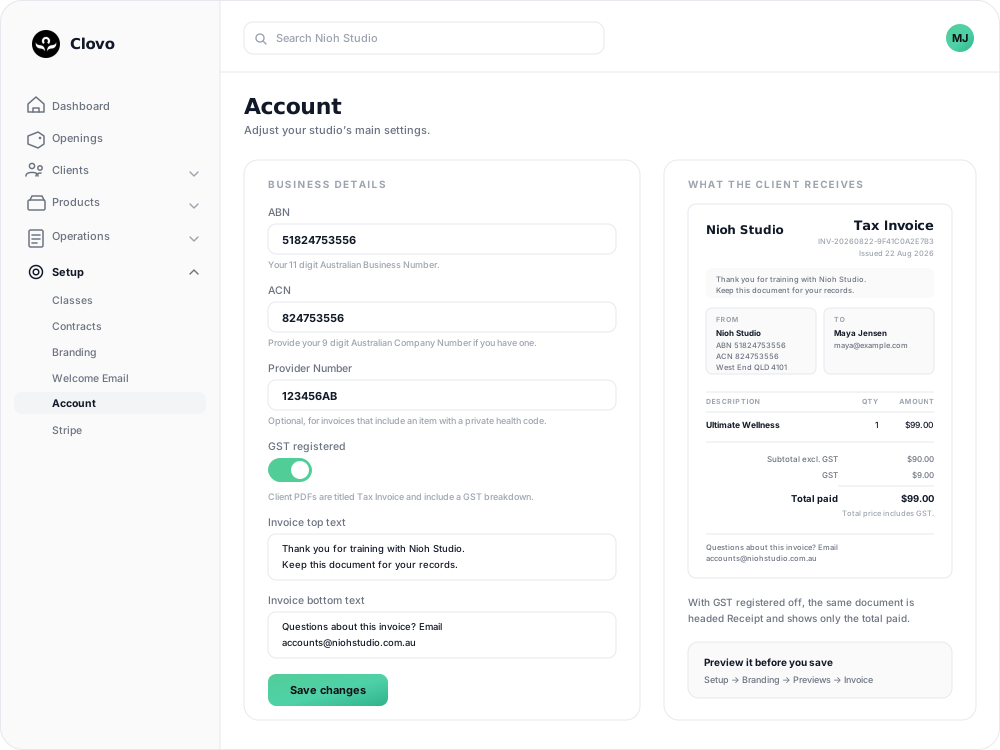
Fill in your business details
- In Clovo Dashboard, open your avatar in the top right and select Account.
- Scroll to Business details.
- Complete the fields you need (each is covered below).
- Select Save changes.
Only the account owner can open Account and change these details. Staff with Finance access can view them under Setup → Payments → Invoices, but the fields are read-only.
ABN and ACN
- ABN takes your 11 digit Australian Business Number, digits only. Spaces are removed for you.
- ACN takes your 9 digit Australian Company Number, if your studio is a company. Leave it blank if it does not apply.
Both appear in the From block of the document, under your studio name. The address defaults to your business address, but you can choose a studio location under Setup → Payments → Invoices → Invoice address. See Change the address shown on invoices for the address selector and how changes affect new documents.
If you are not sure of a number, it is fine to leave the field blank for now and come back to it.
Provider Number
This is for private health rebates rather than tax. It only appears on a document when the plan, pack or class the client bought also carries a private health code. See Add private health billing details to your invoices for how the two halves fit together.
Switch on GST registered
Turn on GST registered if your studio is registered for GST. Two things change on every document issued from that point:
- The heading changes from Receipt to Tax Invoice.
- A breakdown is added above the total: Subtotal excl. GST, GST, then Total paid, followed by the line Total price includes GST.

Your prices do not change. Clovo treats the price you charge as GST-inclusive and shows the GST already contained in it — one eleventh of the total. A $99.00 membership stays $99.00 to the client and is presented as $90.00 plus $9.00 GST. Nothing is added on top, and no client is charged more because you switched this on.
You need an ABN saved before the switch will take. Saving with GST registered on and the ABN field empty returns "Add your ABN before enabling GST tax invoices." Enter the ABN, save, then turn GST registered on.
If your studio is not registered for GST, leave this off. Clients still receive a document for every payment; it is headed Receipt and shows only the total paid.
Add your own wording
Invoice top text and Invoice bottom text each accept up to 4,000 characters of plain text, and appear on every invoice and receipt — top text just under the heading, bottom text below the totals.
To edit them, go to Setup → Payments, scroll to Invoices, enter the wording, and select Save changes. Owners and staff with Finance access can update these two fields.
They are useful for the sentence you would otherwise be typing into individual emails:
- A thank you, or a reminder to keep the document for a private health or tax claim.
- Who to contact about a charge, so billing questions reach the right inbox.
- Terms you are required to state, such as a refund policy.
Both are optional, and both are shown to every client on every document — so keep them to wording that suits all of them.
Check it before your next payment
You do not have to wait for a real purchase to see the result. Go to Growth → Branding, scroll to Previews, and open the Invoice tab. It renders a sample document with your current logo, colours, selected invoice address, business details and wording, so you can see the heading, the GST lines and your own text in place.
Where clients get the document
- By email. The document is attached to the confirmation email for a purchase, a renewal, a gift purchase, a direct class booking or a shop sale.
- In the Clovo app. Under Account settings, each payment in their history has an Invoice button.
You can also fetch a copy yourself: open the client's payments, use the actions menu on the payment, and choose Download Invoice. This needs a role with finance access.
Common questions
I just turned GST on. Do my old receipts become tax invoices? No. Each document keeps the details it was issued with, so anything already sent stays as it was. Documents issued from now on carry the new settings.
A client says their accountant will not accept the document. What should I check? Confirm your ABN is saved and GST registered is on if your studio is registered. Then ask for the document's date — if it was issued before you made the change, it will still be the older version.
Can I set different wording for memberships and class purchases? Not from here. The top and bottom text apply to every document. Use wording that reads sensibly for any purchase.
Do I need to send an invoice for a payment taken at the point of sale? No. A point-of-sale purchase produces the same document as any other, so the client's confirmation email carries it and it appears in their app.
We are not registered for GST yet. Can I fill in everything else now? Yes. Save your ABN, ACN and wording, and leave GST registered off. Switch it on the day your registration starts and it applies from your next payment.
Related articles
Change the address shown on invoices
Choose your business address or a studio location as the From address on new client invoices and receipts.
Change the reply to address for your studio
Choose where client replies go for announcements, bookings, purchases and other studio emails.
Understand the meaning of different plan statuses in Clovo
Use the status beside a client’s membership, credit pack or trial to understand whether they can use it and when their access changes.
Customise your dashboard layout
Turn dashboard cards on or off, put them in the order you want, and choose where the activity timeline sits — all saved to your own staff account.