
Wait for BECS Direct Debit payments to clear before issuing plans

Tobias Gundry
Updated
BECS Direct Debit payments do not clear immediately. They usually take a few business days to reach your studio and can still fail after the client has checked out.
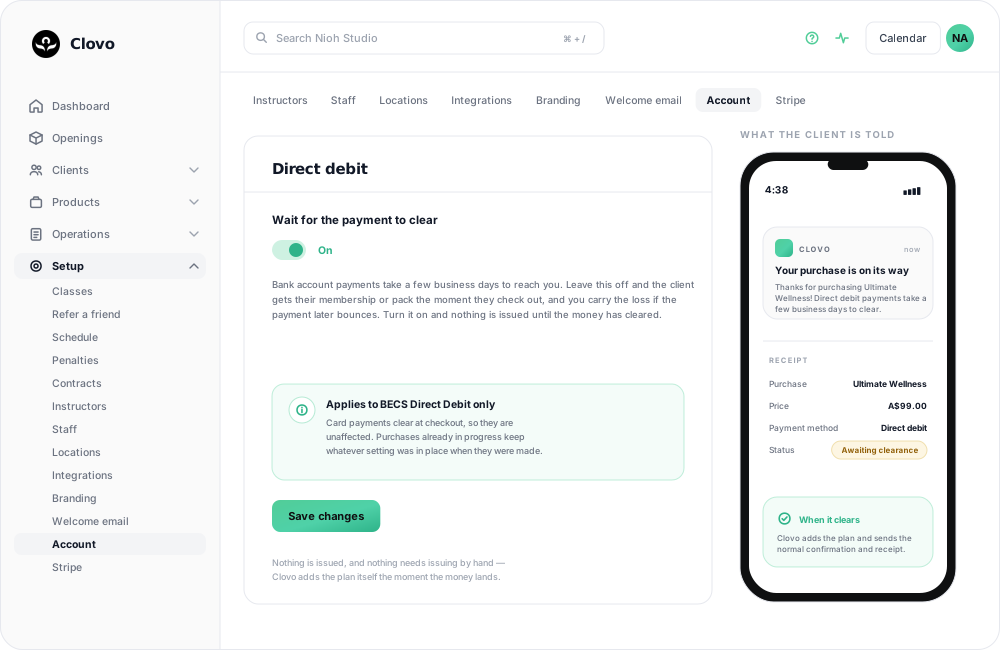
The “Wait for the payment to clear” setting lets you choose whether a membership or credit pack is issued at checkout or only after the payment clears.
Who can change this setting
Studio owners and staff with access to setup settings can change when BECS Direct Debit purchases are issued.
Before you begin
BECS Direct Debit must already be enabled under Setup → Payments before clients can use it at checkout. The switch and this setting sit in the same BECS Direct Debit card.
The “Wait for the payment to clear” setting controls when plans are issued. It does not enable or disable BECS Direct Debit as a payment method.
How the setting works
Off (default)
The membership or credit pack is issued as soon as the client checks out. The client can use it while the payment is still clearing, but your studio carries the risk if the payment later fails.
On
The membership or credit pack is issued only after the payment clears. The client may need to wait a few business days before they can use it. Nothing is issued if the payment fails.
This setting only changes the fulfilment of memberships and credit packs bought using BECS Direct Debit. Card payments clear at checkout and are not affected.
Turn on “Wait for the payment to clear”
- Go to Setup → Payments in the Clovo dashboard.
- Scroll to the BECS Direct Debit card and find Payment clearance.
- Turn on Wait for the payment to clear.
- Click Save changes.

To return to issuing plans immediately at checkout, follow the same steps and turn the setting off.
What happens after a client checks out
When “Wait for the payment to clear” is on:
- The membership or credit pack is not added to the client’s account yet.
- The client receives an email and push notification explaining that the purchase is awaiting clearance.
- Staff who receive new-purchase notifications are also notified.
- When the payment clears, Clovo issues the membership or credit pack and sends the usual purchase confirmation and receipt.
No manual issue step is needed while the payment is clearing. Clovo issues the membership or credit pack automatically when the payment clears.
If the payment fails, the plan is not issued. Clovo notifies the client and the relevant studio staff so the failed purchase can be followed up.
Changing the setting while a payment is clearing
Changing this setting only affects future purchases.
A purchase that is already processing keeps the fulfilment choice that applied when it was made. For example, turning the setting off will not immediately issue a plan that is already waiting for clearance.
Turn “Wait for the payment to clear” on if you do not want clients to receive access before your studio has received the money.
Which option should I choose?
Leave it off if immediate access is more important to your studio and you are comfortable issuing the plan before the payment has cleared.
Common questions
How long does a BECS Direct Debit payment take to clear?
It usually takes a few business days. The client can see that their purchase is awaiting clearance during this time.
Does this affect card payments?
No. Card payments clear at checkout, so the membership or credit pack continues to be issued immediately.
Does this setting enable BECS Direct Debit?
No. Enable or disable BECS Direct Debit with the switch at the top of the same card — see How to disable direct deposit. This setting only controls when eligible BECS Direct Debit purchases are issued.
Will a client think their purchase is missing?
Clovo sends the client an email and push notification explaining that the purchase is being processed. When the payment clears, the client receives the normal purchase confirmation and the plan appears on their account automatically.
Does the client hear anything when the setting is off?
Yes. Even when the plan is issued immediately, Clovo tells the client “Your purchase is ready” and notes that the direct debit may leave their bank a little later — so the delayed debit on their statement is never a surprise.
Do I need to issue the plan manually after payment?
No. Clovo issues the membership or credit pack automatically when the payment clears.
What happens if the payment fails?
When the setting is on, no membership or credit pack is issued. The client and relevant studio staff are notified of the failure.
Does turning the setting on change existing purchases?
No. It applies to future purchases. Any purchase already in progress keeps the setting that applied when it was made.
What happens with renewals?
A recurring membership can remain active while its renewal payment is still clearing. This is expected with direct bank debit payments. If that timing does not suit your studio, consider using credit packs or not accepting direct debit.
Related articles
Change the address shown on invoices
Choose your business address or a studio location as the From address on new client invoices and receipts.
Record an external payment for a client
Use Offline Purchase to record a membership or credit pack paid for outside Clovo, and set when that access expires.
Let clients book a class without a membership or pack
Turn on Direct Purchase when you want a client to book one class without first buying a membership or credit pack.
Help a client update their payment method
Guide a client through adding a replacement payment method in the iPhone app, removing an old card, and following up an unpaid renewal.