
How to disable direct deposit

Tobias Gundry
Updated
If you do not want customers to pay by direct debit, you can turn off the BECS Direct Debit switch in Setup → Payments. Once saved, direct debit will no longer be offered as a payment option at checkout for your studio.
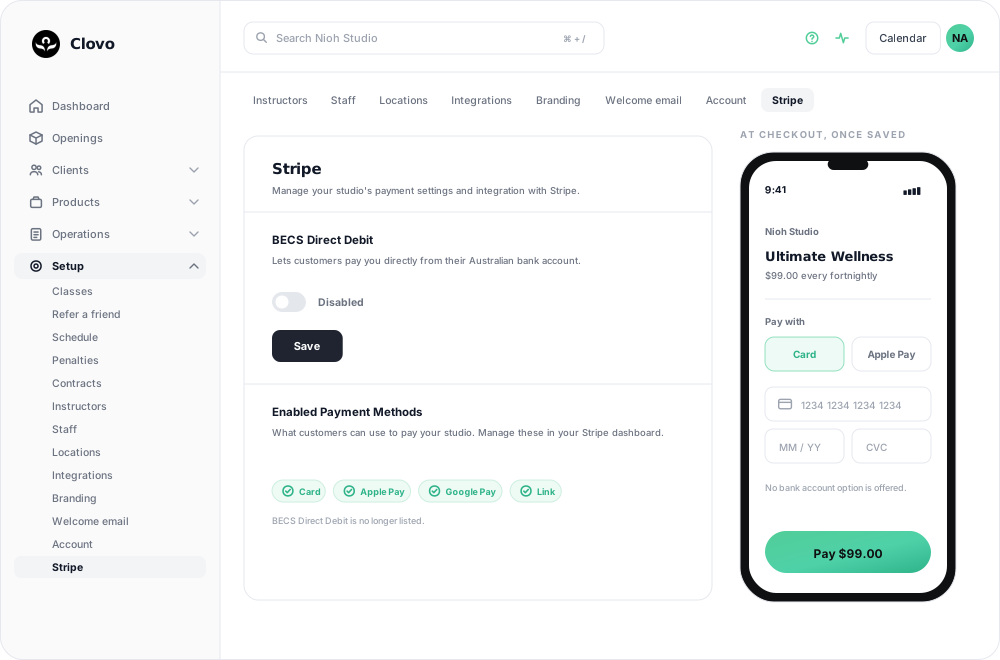
Who Can Change This Setting
This setting is available to studio users with Owner or Finance access.
Your Stripe onboarding must also be fully completed before the direct debit switch can be changed.
How To Disable Direct Debit
- Go to Setup → Payments.
- Find the BECS Direct Debit card.
- Turn the switch off so it shows Disabled.
- Click Save.

What Happens Next
After you save:
- you should see a confirmation message that BECS Direct Debit disabled
- the switch should remain in the Disabled position
- BECS Direct Debit should no longer appear in the Enabled Payment Methods list on the same page
If You Cannot See Or Change The Switch
Check the following, in this order:
- Stripe onboarding is complete. An unfinished connection blocks the switch outright — see Connect Stripe and check your payment settings.
- You have Owner or Finance access. Other roles can see the screen but not change this.
- Your own email address is verified. Clovo will not accept a payment-method change from an unverified account, and offers a Resend verification email button.
- Stripe payment methods are loading. If the Enabled Payment Methods list says it couldn't load, Clovo cannot confirm the change either. Try again shortly.
If Stripe has not finished onboarding, complete that first and then return to Setup → Payments.
What This Does Not Change
Disabling BECS Direct Debit stops it being offered from now on. It does not touch:
- Direct debit payments already clearing. A bank payment made before you switched this off keeps going, and still succeeds or fails on its own timetable.
- Existing memberships already billing by direct debit. Their renewals continue on that payment method.
If the timing of bank payments is your concern, you can keep direct debit available and delay issuing plans until payment clears: wait for the payment to clear before issuing the plan.
Related articles
Change the address shown on invoices
Choose your business address or a studio location as the From address on new client invoices and receipts.
Wait for BECS Direct Debit payments to clear before issuing plans
BECS Direct Debit payments do not clear immediately. They usually take a few business days to reach your studio and can still fail after the client has checked out.
Record an external payment for a client
Use Offline Purchase to record a membership or credit pack paid for outside Clovo, and set when that access expires.
Let clients book a class without a membership or pack
Turn on Direct Purchase when you want a client to book one class without first buying a membership or credit pack.