
Give chosen members first access to a class with a priority booking window

Tobias Gundry
Updated
For classes that fill quickly, you may want to give selected clients or membership groups time to book before general access opens.
A priority booking window fixes that. For a set number of hours after a class is published, only the people on that schedule's priority list can book it. When the window closes, the class opens to everyone as normal.
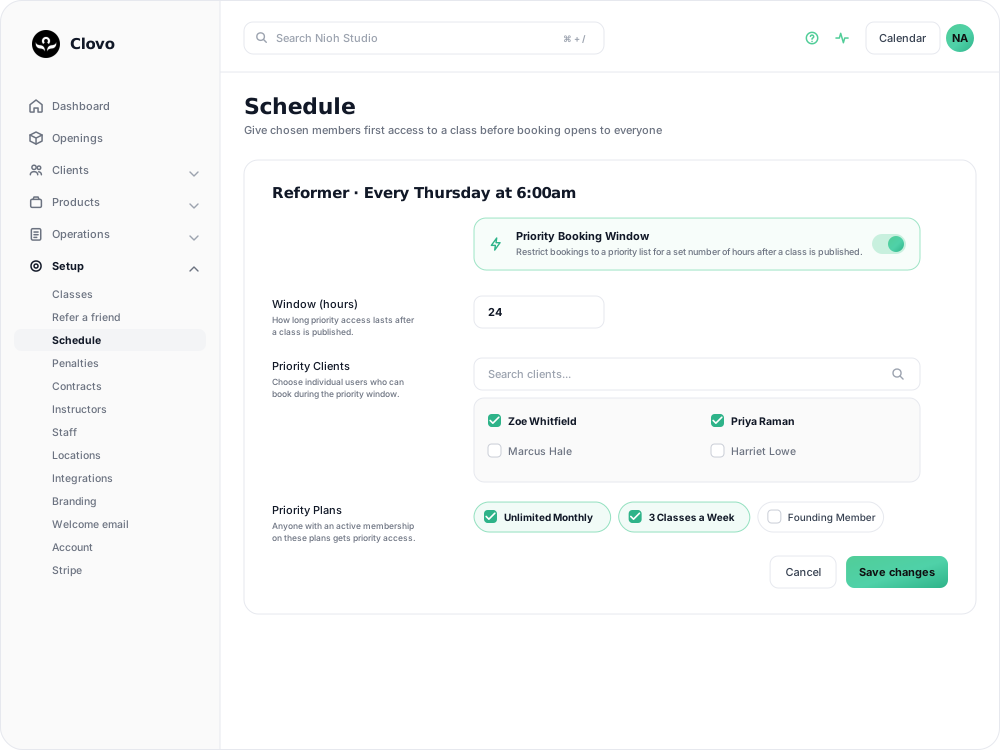
Where the setting lives
Priority booking is set per schedule, not per studio and not per class. Go to Setup → Schedule, open the schedule you want to configure, and turn on Priority Booking Window.
That means your 6am Reformer can run a priority window while your 9:30am Mat Pilates does not, even though both use the same class type.
Set the window
Window (hours) is how long priority access lasts, from 1 to 168 hours — up to a full week. Twenty-four hours is the usual choice.
The clock starts when the opening is created, not at any point relative to the class itself. Keep these two details in mind:
- It pairs with your class release time. If openings are released at 7:00am, a 24-hour window runs from 7:00am to 7:00am the next day. Setting a release time makes the full priority window easier to predict. See choose what times your new classes get released.
- Editing the schedule does not reset openings that already exist. Change the window from 24 to 48 hours and openings already published keep the timing they were created with. The new setting applies to openings generated from then on.
Choose who gets priority
Four ways onto the list, and a client only needs one of them:
| Route | How it works |
|---|---|
| Priority Clients | Individually chosen clients. Use the search box to find them. |
| Priority Plans | Anyone holding an active membership on the plans you pick. This is the one to use if the point is to reward members. |
| Priority Tags | Anyone carrying the tags you pick — handy for a cohort you already track, like a beginners course intake. See tags. |
| Regulars | Anyone set as a regular on this schedule is on the list automatically. They are already guaranteed a spot, so the window never gets in their way. See automatically book regular clients. |
Membership priority is checked against active memberships, so a client whose plan has lapsed or been paused loses priority until it is active again.
What everyone else sees
A client who is not on the list and tries to book inside the window is told when they can:
This class is currently open to priority members only. General booking opens Thu, 27 Aug 2026 at 7:00am.
What the window does not block
Two exceptions:
- Direct purchases go through. A client paying for a single class one-off can book during the window.
- Staff bookings go through. Booking a client from the dashboard bypasses the priority window.
Choosing a window that works
Short windows may offer little usable time. For example, a two-hour window that falls overnight may not give priority clients a practical opportunity to book.
Long windows delay general access. If the priority list fills only part of a class, a 72-hour window leaves the remaining places unavailable to other clients for three days. Match the window to typical booking behaviour; if priority clients usually book within a day, a 24-hour window may be sufficient.
Start with one class. Apply a window to a class where priority access would be most useful, then review the booking pattern before expanding it to other schedules.
Priority booking vs waitlist priority
These are two different features:
- Priority booking window — covered here. Controls who can book first when a class is published, on a schedule you choose.
- Membership waitlist priority — a studio-wide setting that controls who gets offered a spot first when a place opens on a full class's waitlist. See give members priority on the waitlist.
You can run both. They act at opposite ends of the same problem: one at the moment the class opens, the other at the moment someone drops out.
Related articles
Show your timetable on your studio’s website
Copy an embed code from Clovo Dashboard to place your live class timetable on your own website, with weekly and monthly views your visitors can switch between.
Share your timetable with clients, wherever they are
Your landing page is a public, always-current timetable anyone can open without the app. Share the whole thing, a single class, a social image, or embed it in your own website.
Hide class numbers from clients
Show clients whether a class has space, without showing how many people have booked or how many places it has.
Close the studio for a date range
Record a closure so Clovo stops opening classes at that location, then cancel the openings already on the timetable and extend or pause the memberships the closed days run through.