
Send a custom message to your client after booking

Tobias Gundry
Updated
Clovo will always send a booking confirmation and optional booking reminders to your clients in line with their communication preferences. But sometimes you might want to send an additional message after a client books a class — perhaps to share what to bring, parking info, or a personal note.
Why send a custom booking message?
Custom booking messages let you share information that’s specific to your studio and wouldn’t normally appear in a standard booking confirmation. This is especially useful for new clients who may not know what to expect on their first visit.
How to set it up
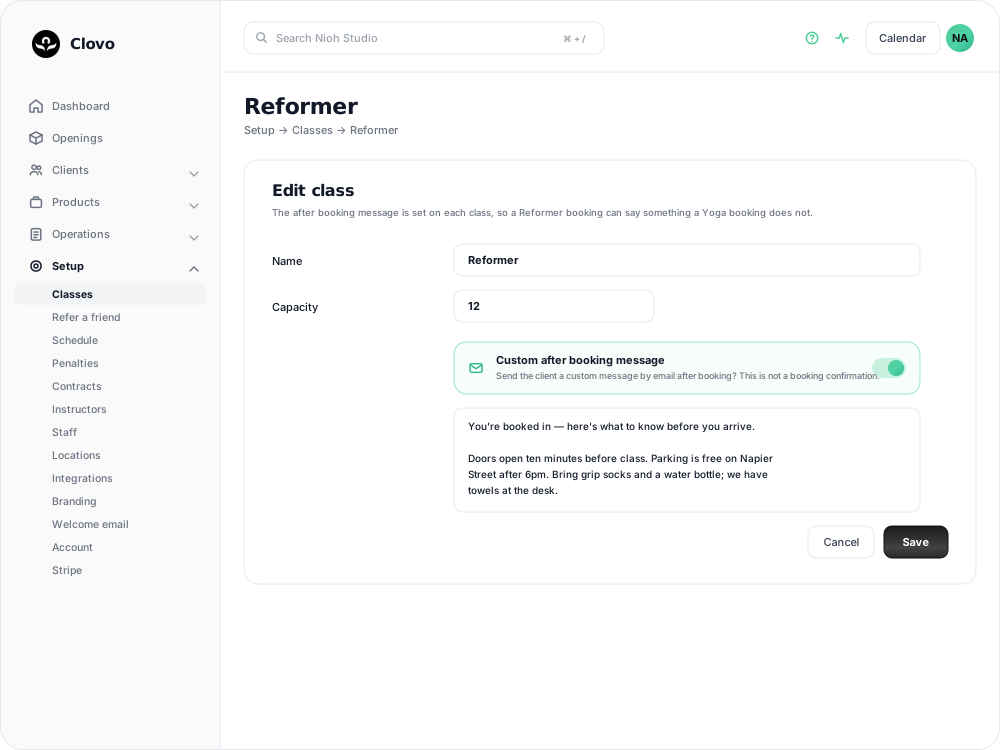
The after booking message belongs to the class, so a Reformer booking can say something a Yoga booking does not.
- In Clovo Dashboard, go to Setup > Classes and open the class you want the message on.
- Scroll to Custom after booking message and turn the switch on.
- Write your message in the box that appears underneath. Consider practical details like what to wear, where to park, or studio access instructions.
- Save your changes.
Repeat for any other class that needs its own message. This is not a booking confirmation — Clovo already sends that — it is an extra note on top.
Ideas for your booking message
- Arrival time — remind clients to arrive 5-10 minutes early
- What to bring — towel, water bottle, grip socks, etc.
- Parking or public transport details
- Studio entry instructions (e.g. door codes or buzzer info)
- Cancellation policy reminder
This message is sent in addition to the standard booking confirmation, so focus on the extra details rather than repeating booking information. You can also set up a similar message after a new purchase.
Related articles
Change the reply to address for your studio
Choose where client replies go for announcements, bookings, purchases and other studio emails.
Customise the welcome email that is sent to new clients when they join
You can now customise the welcome email your studio sends to new clients when they join.
Give your clients branded support
Every Clovo studio has a member-facing help centre, live right now, with no setup required. It sits on your landing page, it’s written in your studio’s voice, and it wears your branding.
Set up a refer a friend program
Set up a refer a friend program that rewards both people, then let Clovo grant the benefits, monitor the minimum spend and track each referral.