
Change a membership start date

Tobias Gundry
Updated
Sometimes a client trains before their purchase is finished — they come to a class on Monday and the membership is only set up on Thursday. Moving the start date back brings those classes inside the period the client actually attended, so their usage matches what happened in the studio.
It can only be moved backwards, to a date that is today or earlier, and only before the membership renews for the first time.
When you can use this
- The membership has not renewed yet. Once the first renewal has been taken, the start date is fixed and the Change start date link is no longer offered.
- The new date is earlier than the current start date. You cannot push a start date forward or set one in the future.
- On a recurring membership, the renewal date moves earlier by the same number of days, and that adjusted date has to still be in the future.
If you want to move a renewal date without touching the start date, use Change billing schedule on the Next renewal row of a recurring membership instead.
Move the start date back
Open the client’s profile, then select Make Changes on their current plan or pack to open the membership.
On the Purchased row, select Change start date.

The New membership start date card shows the current start date above the date field. Choose the earlier date, then select Update start date.
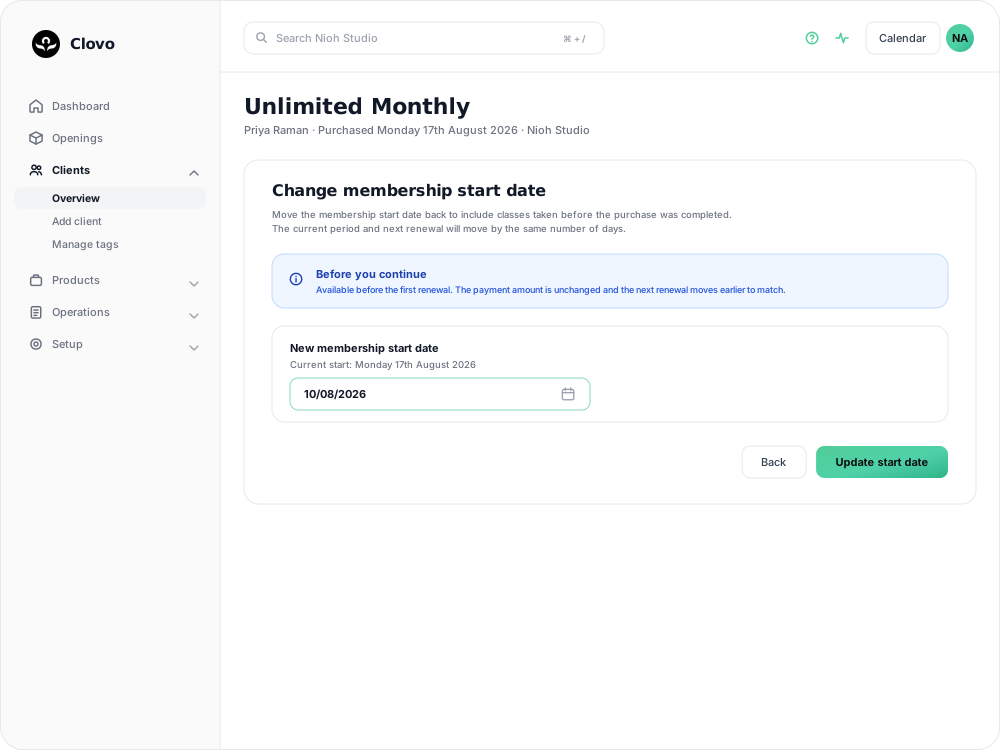
You are returned to the membership, and the Purchased row now shows “started” with the new date.
What moves with the date
The current period keeps its length and shifts earlier. If you move the start back four days, the period ends four days sooner and the next renewal is four days sooner as well. On a pack, the Expires date moves earlier by the same amount.
The amount charged does not change. Nothing is billed at the time of the change, and the next payment is the normal amount — it lands earlier than it would have. On a recurring membership the Next renewal row shows the new date marked Scheduled.
Classes the client already took on this membership that now fall inside the period are counted against that period’s allowance. Open the Usage card on the membership to see it: the viewing period starts on the new date, and Detailed usage lists the classes now counted. Where a plan has a class limit, those bookings use credits that were previously outside the period, so check the remaining allowance before the client books again. See Track the usage of memberships and packs for how the panel reads.
The client is emailed to say the renewal date for their membership has changed, and owners and staff with the Finance role are notified as well. The change is recorded on the client’s activity feed with the old and new dates and who made it.
If the date is refused
Clovo shows a message at the top of the screen and leaves the membership as it was:
- The membership start date can only be changed before the first renewal — the membership has already renewed. The start date cannot be corrected after that point.
- The new membership start date must be earlier than the current start date — the date you chose is the same as, or later than, the current start.
- The new membership start date must be today or in the past — a start date cannot be set in the future.
- The adjusted renewal date must remain in the future for a recurring membership — moving the start back that far would put the next renewal in the past. Choose a date closer to the current start, or leave the start date alone and let the membership renew.
Related articles
Track the usage of memberships and packs
Read the usage panel on a client’s membership or credit pack, see what each credit was spent on, and correct a balance when it needs fixing.
Cancel a client membership
Cancel a client’s membership, pack or trial from their profile, and know when their access ends, what happens to their bookings, and how to end a membership on the spot.
Change a client’s membership plan
Move a client to another recurring plan at their next renewal, and know when the new price and allowance begin.
Offer recurring memberships by creating a membership plan
Fill in the membership plan form — inclusions, price, billing period and contract — and know what changes for current members when you edit a plan later.