
Understand the meaning of different plan statuses in Clovo

Tobias Gundry
Updated
Use the status beside a client’s membership, credit pack or trial to understand whether they can use it and when their access changes.
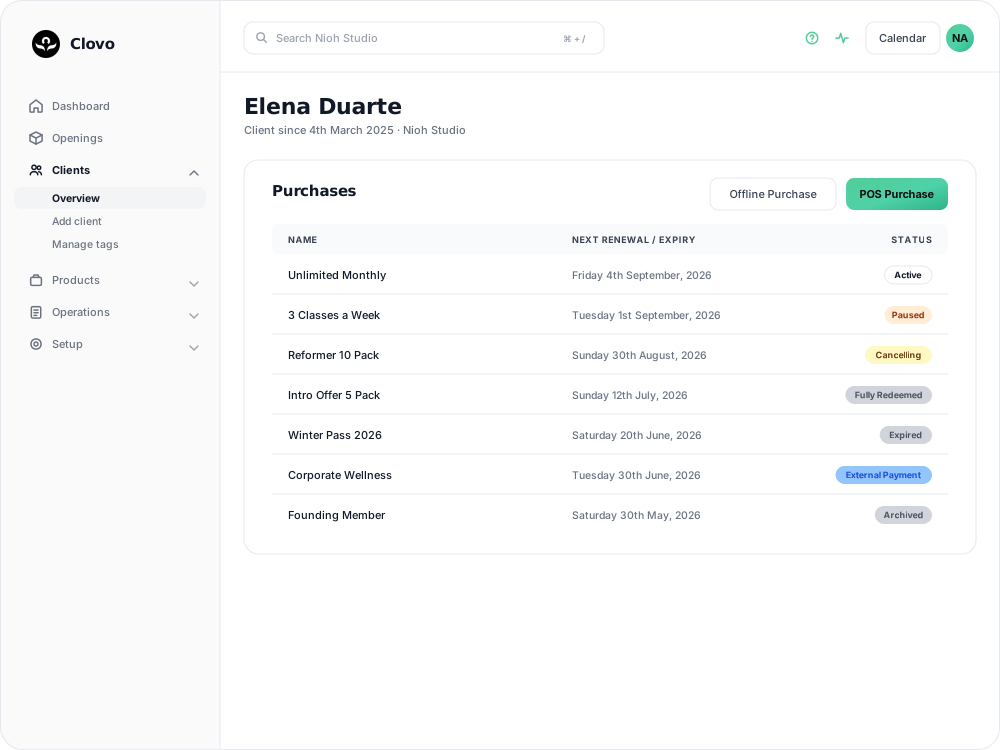
Open the purchase on the client’s profile for its dates, remaining credits and available actions.
| Status | Description | Applies to |
|---|---|---|
| Active | The membership, pack or trial is currently active and can be used by the client for booking. | Memberships, Packs and Trials |
| Payment Hold | A renewal payment failed and the membership is on hold. The hold is released automatically when payment succeeds. | Memberships |
| Pauses [date] | A pause is scheduled to begin on the date shown. The client can use the membership for classes outside the pause period. | Memberships |
| Paused | Classes during the pause period cannot be booked with this membership. If a resume date is set, the client can still book classes from that date onward. | Memberships |
| Cancelling | Cancellation is scheduled. The client can use the membership until its displayed expiry date. A client cancellation may include a notice period; check the membership for the end date. | Memberships |
| Cancelled | The membership has been cancelled and is no longer able to be used for booking. | Memberships |
| Expired | The time given to use the pack has elapsed and it can no longer be used, regardless of whether or not there are unused credits available. Pack expiries can be extended at any time, even post purchase. | Packs |
| Trial Expired | The trial has expired and can no longer be used by the client. | Trials |
| Fully Redeemed | All credits on the pack have been used. The client needs another eligible payment option to book. | Packs |
| External Payment | The membership or pack was recorded through Offline Purchase. Access lasts until its expiry date and does not renew automatically. | Memberships and Packs |
| Archived | The service has been archived for studio administration purposes and can no longer be seen on client apps. | Memberships, Packs and Trials |
A Gift badge can also appear beside a purchase received as a gift.
The client list includes these other indicators:
| Status | Description |
|---|---|
| No services | The client has no active memberships, packs or trials. Check their profile before arranging their next booking. |
| Plan name with a lock icon | The client has private access to purchase that plan but has not yet bought it. |
When cancelling a recurring membership, clients choose Reason for cancelling in the final app step before tapping Confirm. Choosing Other requires 10–1,000 characters. Staff can view the reason on the membership.
Related articles
Track the usage of memberships and packs
Read the usage panel on a client’s membership or credit pack, see what each credit was spent on, and correct a balance when it needs fixing.
Change the reply to address for your studio
Choose where client replies go for announcements, bookings, purchases and other studio emails.
Cancel a client membership
Cancel a client’s membership, pack or trial from their profile, and know when their access ends, what happens to their bookings, and how to end a membership on the spot.
Change a client’s membership plan
Move a client to another recurring plan at their next renewal, and know when the new price and allowance begin.