
Refund a payment when a direct booking failed

Tobias Gundry
Updated
A Direct Purchase normally completes the payment and booking together. A rare exception can occur when the card payment is captured but the booking cannot be created because the last place became unavailable, the class was cancelled, or another booking rule prevented it.
The payment is not refunded automatically, so a team member needs to refund it from the client's payment record in Clovo.
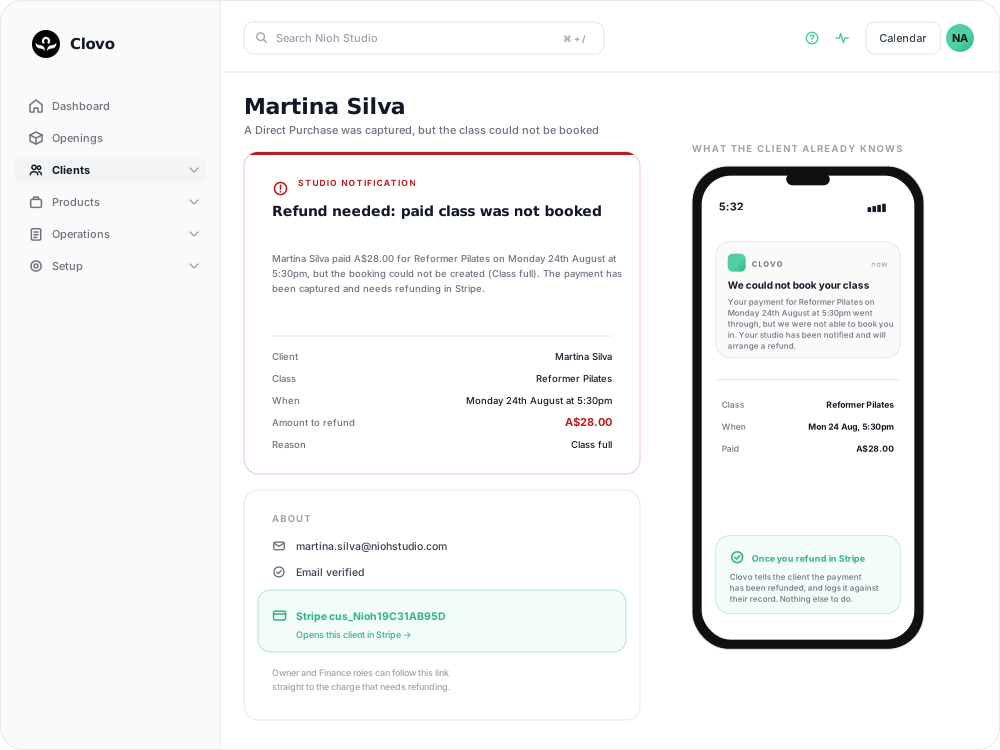
How you find out
Clovo sends your team a notification headed "Refund needed: paid class was not booked" — Refund needed on a phone. It names the client, the class, the amount, and the reason the booking was refused:
- Client — who paid
- Class and When — what they thought they were buying
- Amount to refund — the figure to give back
- Reason — Class full, Class cancelled, Already booked, and so on
The client already knows
Clovo has already sent the client "We could not book your class", telling them the payment went through, that they were not booked in, and that your studio will arrange a refund.
This confirms that the client does not have a booking and sets the expectation that the studio will arrange a refund. Process the refund and keep the client informed if there is any delay.
Refund it in Clovo
Open the payment from the client's record and issue the refund there:
- Open the client's record in Clovo.
- Open Payments.
- Find the payment matching the amount and date from the notification.
- Open the payment's actions menu and choose Refund Payment.
- Confirm the full refund.
Refunding a payment requires finance access. If the action is not available, ask an Owner or a team member with finance access to process it.
Refund the full amount because no class booking, credit, or pass was issued for the payment.
What happens after the refund
After the refund:
- The client is sent "Your payment for a class booking has been refunded."
- Your team gets a Payment refunded notification with the client, item and amount.
- The refund is logged against the client's record.
The refund is recorded in Clovo, so no further update is needed there.
Use the payment record for this situation
Operations → Failed Payments does not apply to this situation. That queue is for membership renewals that did not clear, while this payment was captured successfully without creating a booking. Sending a payment request from that queue would incorrectly ask the client to pay again.
Reduce future occurrences
The usual cause is the last place going between the moment the client starts paying and the moment the payment settles. A few things reduce it:
- Review classes that regularly fill. A waitlist gives clients another option when those classes reach capacity. A full class with an open waitlist cannot be purchased directly, reducing the chance of a place becoming unavailable during payment.
- Cancel openings early. A class cancelled after someone has paid produces this same failure. See Cancel upcoming classes.
- Assign the notification for prompt follow-up. The refund remains outstanding until a team member processes it in Clovo.
Related articles
Let clients book a class without a membership or pack
Turn on Direct Purchase when you want a client to book one class without first buying a membership or credit pack.
Book a client into a class from the studio dashboard
Book a client into a class from Clovo Dashboard when they call, walk in, or ask your team to make the booking for them.
Set up late cancellation and no-show penalties
Set late cancellation and no-show rules, choose credit forfeiture or membership-only fees, and check the penalties applied to bookings.
Use a waitlist to fill a cancelled place
Turn a waitlist on for a class, choose how it processes, give members priority, and read the queue when a place comes free.