
Close bookings before a class starts with a booking cutoff

Tobias Gundry
Updated
A booking cutoff closes bookings a set time before each class starts. It gives your instructors a settled class list to prepare for, whether that means setting up equipment, planning for the people attending, or deciding whether a quiet class goes ahead.
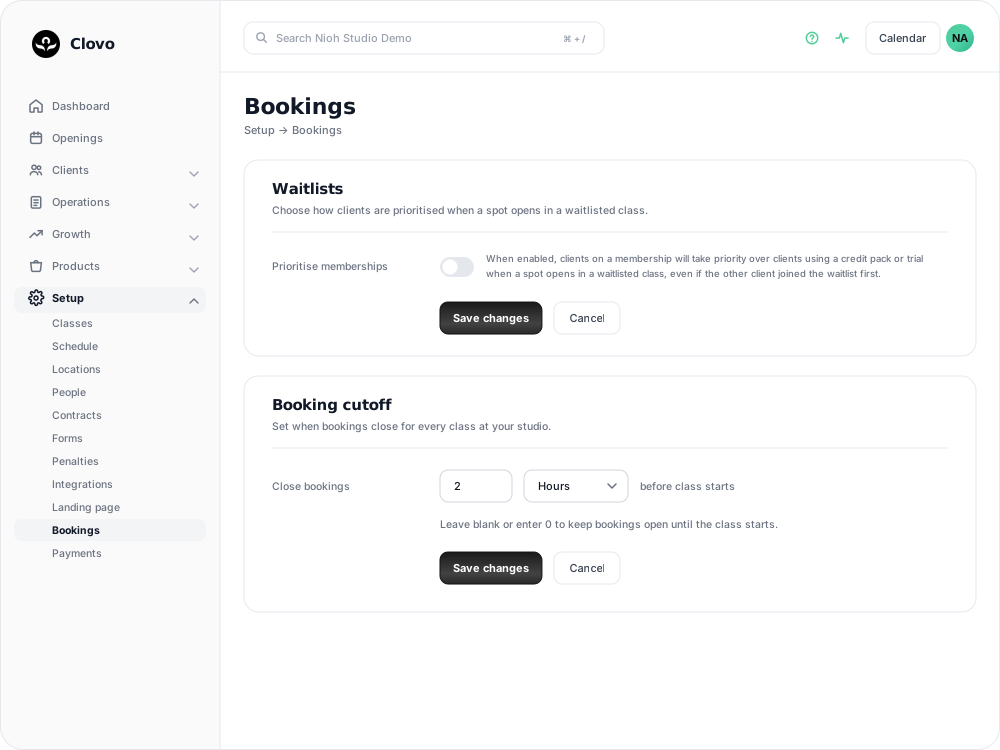
The cutoff is a studio setting. It applies to every class at every location, measured from each class's own start time. With a 2 hour cutoff, bookings for a 6:00 PM class close at 4:00 PM, and bookings for a 7:00 AM class close at 5:00 AM.
Set a booking cutoff
- Go to Setup → Bookings.
- In the Booking cutoff card, enter an amount beside Close bookings.
- Choose Minutes or Hours.
- Click Save changes.

The cutoff can be anything up to 7 days (168 hours). The change applies to booking attempts from the moment you save. Bookings clients have already made are not affected.
Turn the cutoff off
Clear the Close bookings amount, or enter 0, then click Save changes. Bookings stay open until each class starts, which is how Clovo behaves when no cutoff is set.
What clients see after the cutoff
Once the cutoff has passed, clients cannot book the class in the Clovo app or on your landing page. This includes paying for a single class with Direct Purchase and booking with a super credit.
When a client tries to book, Clovo explains that bookings for the class aren't accepted within the cutoff of the class starting time. The message always gives the cutoff in minutes, so a 2 hour cutoff appears as 120 minutes. If a client contacts you about that message, the cutoff is the reason their booking didn't go through.
The cutoff only affects new bookings. Clients who are already booked keep their place, and cancellations follow your usual late cancellation and no-show rules.
Book a client in after the cutoff
Staff are held to the cutoff too. If a client asks to join a class after bookings have closed, book them in from the class opening and turn on Force booking? before you confirm.
Force booking ignores the cutoff, and it also ignores class size limits and your other booking restrictions. Before you confirm, check that the class has room for the client and that the plan you selected covers the class. See Book a client into a class from the studio dashboard.
Waitlists keep working after the cutoff
The booking cutoff does not apply to waitlists, so a place that opens close to class time can still go to someone who is waiting. Clients can join a waitlist after the cutoff, Auto waitlists still book the next client, and clients notified by an Offer waitlist can still take the place.
Your other waitlist rules still apply. The client's plan must cover the class, and the class must still have room. See Use a waitlist to fill a cancelled place.
If a booking attempt was blocked
Attempts stopped by the cutoff appear in the class's Failed bookings with the reason Bookings closed before class. This includes clients who tried to pay for a single class with Direct Purchase. Open the attempt to see who tried to book and when. See Find out why a booking failed and what to do next.
Related articles
Find out why a booking failed and what to do next
Use the failed booking details to find the reason a booking did not complete, then decide whether you need to free allocation, contact the client, or refund a payment.
Use a waitlist to fill a cancelled place
Turn a waitlist on for a class, choose how it processes, give members priority, and read the queue when a place comes free.
Cancel an individual client booking
Cancel one client’s place from the dashboard and understand credits, penalties and direct-payment refunds.
Let clients book for children, family members, and friends
Allow clients to add profiles for the people they book for, then manage those profiles and their class bookings from one account.