
Schedule a fortnightly class

Tobias Gundry
Updated
Schedules repeat every week unless you change them. Turn on Run fortnightly for a class that should run every second week instead. The class repeats every 14 days from the first class date you choose.
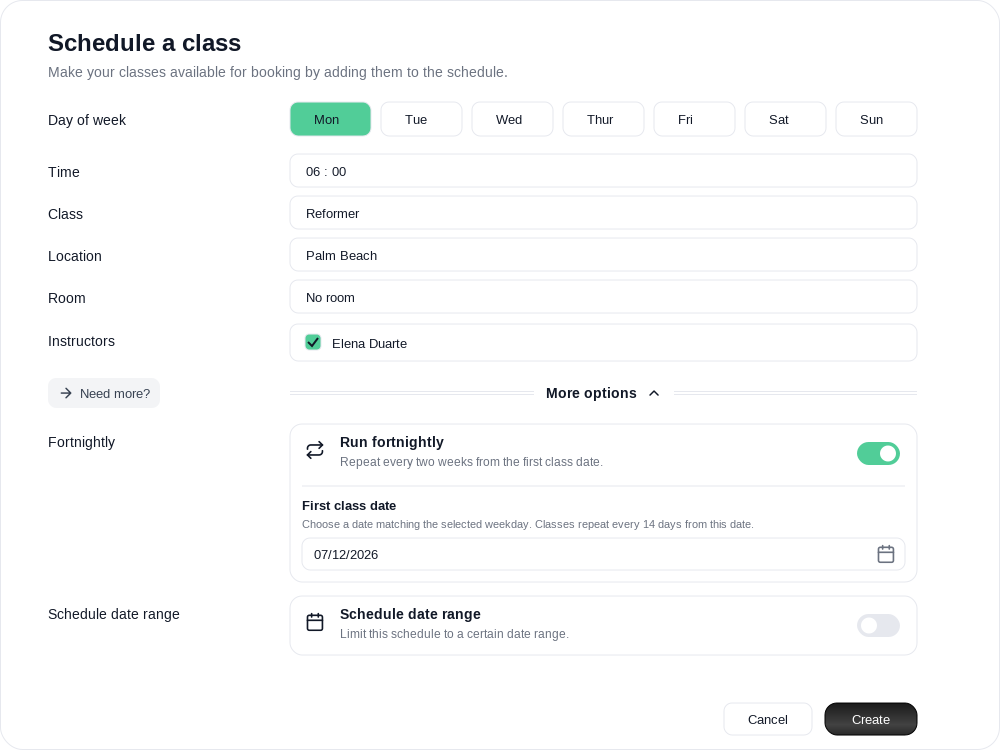
Create a fortnightly schedule
- Go to Setup → Schedule and choose Schedule a class in List view. In Visual view, you can select an empty time slot instead.
- Set the day of week, time, class, location, room if needed, and instructors.
- Select More options.
- Turn on Run fortnightly. First class date appears below it.
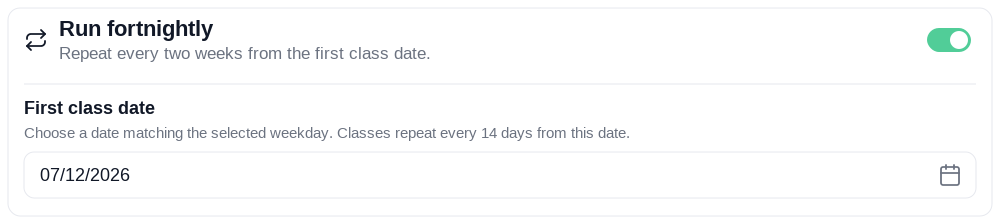
- Choose the date of the first class. It must fall on the day of week you selected.
- Choose Create.
A Monday class with a first class date of Monday 7 December 2026 runs on 7 December, 21 December, 4 January and every second Monday after that. It does not run on 14 or 28 December.
If the date is missing or falls on a different day, Clovo shows Choose the first class date for this fortnightly schedule. or The first class date must match the selected day of week. under the field, and the schedule is not saved until you choose a matching date.
If you duplicate a fortnightly schedule in Visual view, the copy is also fortnightly, and its first class date moves forward to the copy's day.
Booking and regulars
Each class becomes bookable once it falls inside your studio's Open schedule window, the same as a weekly class. With a 14-day window, clients will see one or two upcoming dates from a fortnightly schedule at a time. See choose when new classes are released for booking to change the window.
Your booking cutoff, waitlists and plan eligibility apply in the usual way. Regulars are booked into each fortnightly class and nothing is booked in the weeks in between. Your shared timetable shows the class only in the weeks it runs.
Cancelling or moving one class, or a studio closure, does not shift the pattern. The schedule keeps counting fortnights from the first class date.
Alternate two classes in the same time slot
To run one class one week and another the next, create two fortnightly schedules on the same day and time, with first class dates one week apart. For example:
- Reformer, Mondays at 6:00am, first class date 7 December 2026
- Barre Flow, Mondays at 6:00am, first class date 14 December 2026
Both schedules can also use the same class, such as Reformer with a different instructor each week.
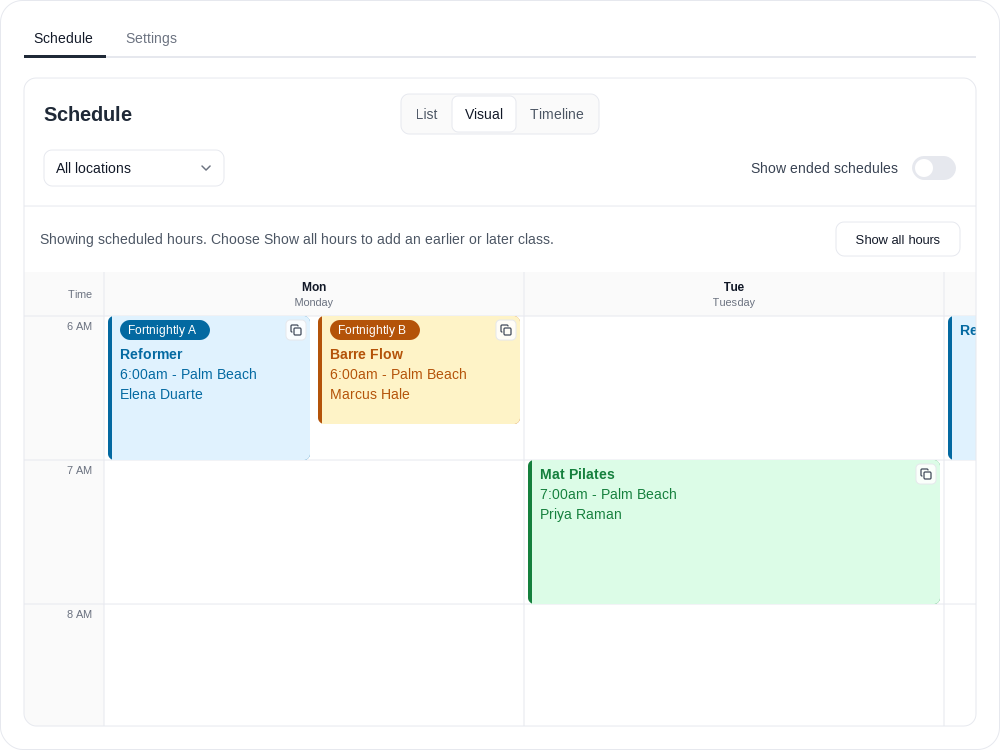
In Visual view, each fortnightly class shows Fortnightly A or Fortnightly B. Schedules that run in the same weeks share a letter, so an alternating pair shows one of each. Visual view lays your schedules out on a single week, so the pair appears side by side even though each class runs in a different week.
If the same class is already scheduled at that location, day and time in the same weeks, including by a weekly schedule, Clovo shows This class is already scheduled at this location and time within the selected dates. For an alternating pair, move one first class date forward by a week so the two run in opposite weeks.
Set an end date
To finish a fortnightly class on a set date, turn on Schedule date range and enter an End date. Only the end date is shown, because the first class date already sets when the class starts. A class can still take place on the end date itself.
Change an existing schedule
- Open the schedule and choose Change schedule.
- Select More options, turn on Run fortnightly and set First class date to the next date the class should run.
- Choose Change and review the changes.
Openings that already exist stay open unless you select them in the review. When you move a weekly class to fortnightly, select the openings in the weeks it should no longer run, then choose Cancel selected classes and save changes. Any you leave unselected stay bookable. See changing class schedules with existing openings for how booked clients are notified.
The same review applies when you change the first class date or switch the class back to weekly. To go back to weekly, turn off Run fortnightly. The first class date then only limits when the class starts if Schedule date range is on.
Find fortnightly classes on the Schedule screen
- List shows the day as Monday · Fortnightly, with Starts 7 Dec 2026 underneath until the first class.
- Visual shows Fortnightly A or Fortnightly B above the class name.
- Timeline shows Monday · Fortnightly on the row. The bar covers the dates the schedule is active, not each individual class.
- The schedule's details show Day of week as Monday · Fortnightly from 7 Dec 2026.
Related articles
Change the class type of an opening that already has bookings
Run a different class in place of one booked opening. Clients keep their bookings, and Clovo tells everyone who is booked or waitlisted.
Exempt a schedule from the booking cutoff
Keep bookings open until class starts for selected schedules while the rest of your timetable follows your studio booking cutoff.
Cancel upcoming classes that have already been scheduled
Cancelling an opening cancels every booking on it and returns credits automatically, but direct purchases are not refunded for you.
Change the date and time of existing openings
Move a single class opening to a new date or time. Clovo keeps the bookings, tells the clients who hold them, and leaves the schedule the class came from unchanged.