
Delete your studio account

Tobias Gundry
Updated
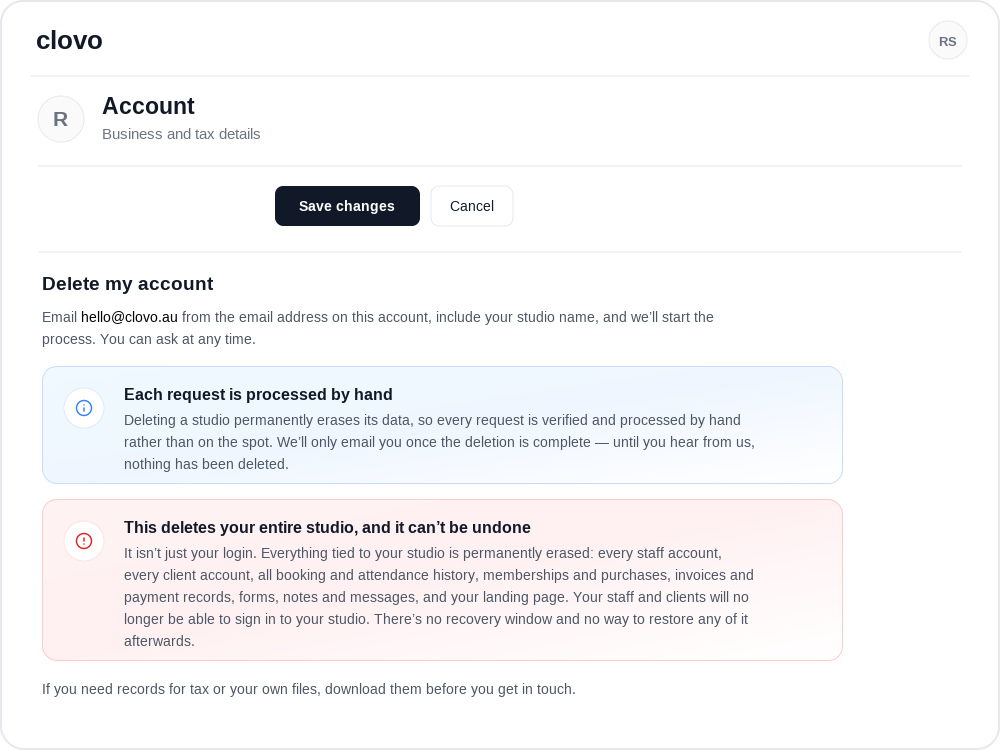
You can ask us to delete your studio from Clovo at any time. Email hello@clovo.au from the email address you sign in with as a studio owner, include your studio name, and we’ll start the process.
The same details are at the bottom of Account in the dashboard. Open it from your avatar in the top right. Only studio owners can open Account, so other staff won’t see this section.
What gets deleted
Deleting your account deletes your whole studio, not only your own login. Everything tied to it is permanently erased:
- every staff account, including yours and any other owners
- every client account
- all booking and attendance history
- memberships, credit packs and purchases
- invoices and payment records
- forms, notes and messages
- your landing page
Once it’s done, your staff and clients can no longer sign in to your studio.
Before you get in touch
- Download anything you need to keep. If you need records for tax or your own files, save them first. Export your client data covers your client list.
- Let your staff and clients know. They’ll lose access to your studio in Clovo once the deletion is complete.
Request the deletion
- Email hello@clovo.au from the email address you sign in with as a studio owner.
- Include your studio name so we can find it.
- Wait for our confirmation email.
What happens next
Each request is processed by hand. Deleting a studio permanently erases its data, so we verify every request rather than completing it on the spot.
We’ll only email you once the deletion is complete. Until you hear from us, nothing has been deleted.
Common questions
Can I delete one client instead of the whole studio? Yes. See Deleting a client from your studio. That removes a single client and leaves the rest of your studio in place.
Can a staff member ask for this on the studio’s behalf? Send the request from a studio owner’s email address, so we can verify it’s coming from the studio.
I’ve changed my mind. Can I stop it? Reply to your original email as soon as possible. If you haven’t received our confirmation yet, nothing has been deleted. Once the deletion is complete, it can’t be reversed.
Can you restore my studio after it’s deleted? No. Your studio and everything in it is gone for good, and we can’t recover any of it.
Related articles
Staff roles and permissions
A detailed reference for Staff, Setup, Finance, Client Records and Owner access, including role combinations for forms, payments and staff management.
Create and manage your class types
Before you can build a schedule or accept bookings, you need to define the types of classes your studio offers. Class types are the foundation of your timetable — they describe what you teach, not when or where.
Change the reply to address for your studio
Choose where replies go for client emails and staff onboarding emails.
Customise your dashboard layout
Turn dashboard cards on or off, put them in the order you want, and choose where the activity timeline sits — all saved to your own staff account.