
Export your client data

Tobias Gundry
Updated
You can download client data as a CSV. Choose the export that suits your task:
- Attendance, memberships or spending: owners and Finance staff can open Clients → Client Insights, filter the list, choose columns and select Export CSV. See Find clients with Client Insights.
- Contact details and marketing preferences: use the Export clients screen, described below. Staff without Client Insights access still see Export on the Clients screen.
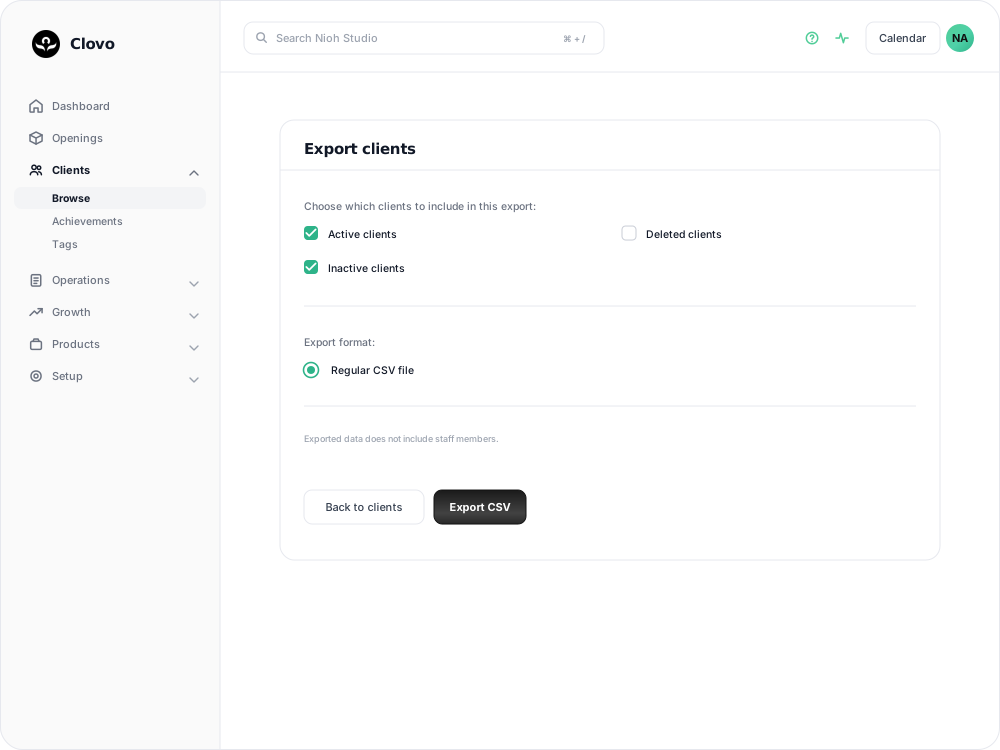
Export the list
- In Clovo Dashboard, go to Clients.
- Select Export, or open Export clients directly if you see Client Insights instead.
- Tick the client groups you want to include.
- Select Export CSV.
The CSV file downloads to your device.
Regular CSV file is the only export format, and it is already selected for you.
Choose which clients to include
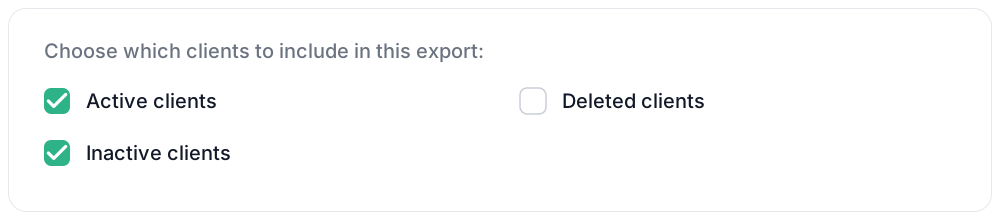
Three tick boxes decide who ends up in the file:
- Active clients is ticked for you. A client counts as active while they hold a running membership, or have paid directly for a class in the past fortnight or one still to come.
- Inactive clients is also ticked for you. That is everyone else on your current list.
- Deleted clients is left clear. These are the people on the Archived clients tab of your client list: anyone you have archived, and anyone whose deletion is still inside its grace period.
Leaving the first two ticked gives you your whole current list. Include Deleted clients if you are moving to another system or keeping a records backup. Otherwise, archived clients and clients still inside a deletion grace period are left out, and a client cannot be exported after permanent deletion.
Select at least one client group.
What the file contains
The contact export has the same columns, whichever groups you include.
| Column | What it holds |
|---|---|
| First Name, Last Name, Email | The client's name and the email address they sign in with. |
| Tags | Every tag on the client, gathered into one column and separated by a vertical bar. |
| Phone Number | Blank if you have not recorded one. |
| Date Joined | The date and time the client was added, in your studio's timezone. |
| Opted In To Marketing | Yes or No. |
| Booking Reminders (Push) | Yes or No. |
| Booking Reminders (Email) | Yes or No. |
| Stripe Customer ID | The client's reference in Stripe. Blank for a client who has never been set up for payment. |
What the file leaves out
Staff are never included. The export screen says so under the format options: Exported data does not include staff members. Admins and instructors are not in the file, whatever you tick.
This export contains contact details only. It does not include membership, pack, booking or payment columns, so it cannot show who is on which plan or what anyone has spent. For a list with those details, use Client Insights.
The file is a snapshot of the moment you download it and does not update afterwards. Export again when you need current details.
Before you import it into a mail tool
Opted In To Marketing is the column that governs whether a client may be added to a newsletter list. Map it when you import, and leave the No rows out. The two Booking Reminders columns are a different thing — they are how each client has chosen to be reminded about their classes, not marketing consent.
If you plan to bring your tags across, they arrive in a single column — a client tagged Beginner and Reformer reads as Beginner | Reformer. Most tools can split a column on that character during import, so map it to your tag field. See Make client management a breeze with tags for how tags are set up in Clovo.
Common questions
Can I export from the Clovo app? No. The export lives in Clovo Dashboard.
Can I choose the columns, or export only the clients I have filtered? Use Client Insights to choose columns and export matching clients. The contact export described here has fixed columns; filters on the Clients screen do not carry through to it.
Does exporting change anything for my clients? No. Nothing is sent to them and nothing on their record changes. You can export as often as you like.
Related articles
Archive a client without deleting their history
Archive a client to hide them from day-to-day lists and stop them signing in, while keeping their record so you can bring them back later.
Deleting a client from your studio
Schedule a client for permanent deletion, cancel it while the grace period is still running, and understand when immediate deletion is available.
Track attendance by checking-in clients on your phone or desktop
Check clients in to record who attended a class in addition to who booked.
Answer questions about your clients with Client Insights
Explore attendance, memberships and spending to answer questions about your clients, then save or export the results.