
Read your Studio Health Check

Tobias Gundry
Updated
Reports answer one question each. The Studio Health Check reviews several parts of your studio at once, groups what it finds by priority, and gives you a button beside each item that opens the screen where you can act on it.
It is the screen to open on a quiet Monday, or before a planning session, when you want to know what to work on rather than how one number is tracking.
Open the report
Select your avatar in the top right of Clovo Dashboard, then Health Check. You will need the Owner or Setup role.
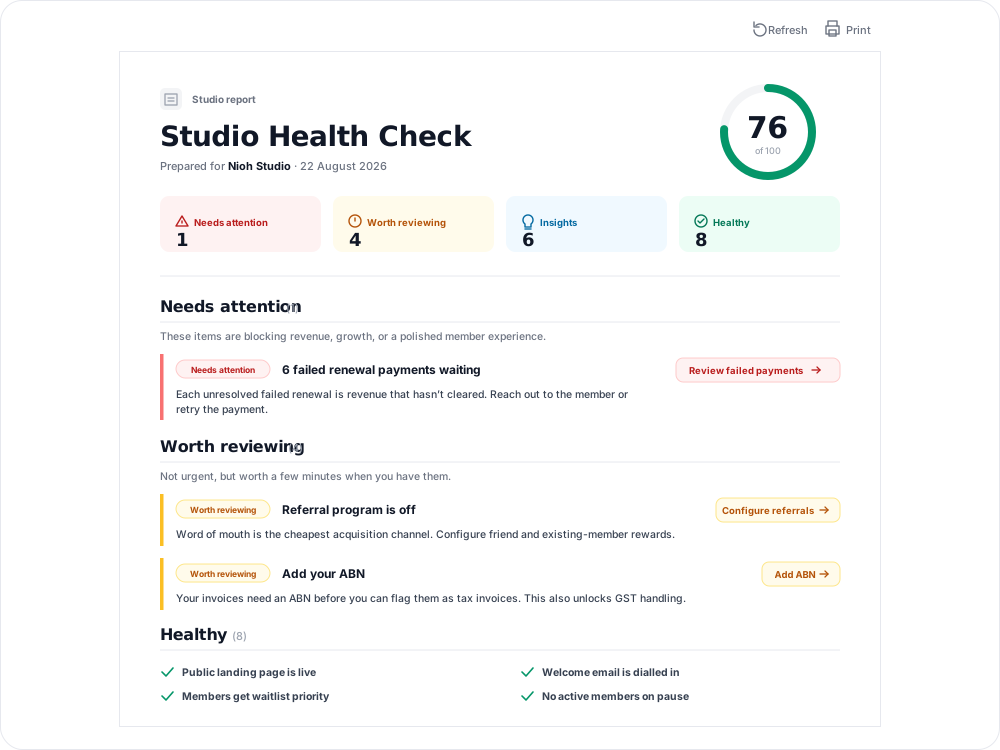
The report is headed with your studio name and the date it was prepared. Clovo prepares reports automatically, and Print gives you a clean copy without the app around it — useful if you review it with a business partner or a coach.
If your studio does not have a report ready yet, Health Check shows a preparation message. The report becomes available once Clovo has enough data for your studio.

Read the score
The ring at the top is a single number out of 100. It summarises how much is flagged in this report; it is not a pass-or-fail measure.
Under the ring, four counts tell you the shape of the report at a glance: Needs attention, Worth reviewing, Insights and Healthy.
Working through the findings
Findings are grouped by how urgent they are, most urgent first. Each one states what was found, explains why it matters, and offers a button that takes you to the screen where you can act on it.
A linked screen can require an additional role. For example, Setup lets you read the Health Check, but Review failed payments needs Finance or Owner access. Ask an owner or a staff member with Finance to follow up if you do not have that access.
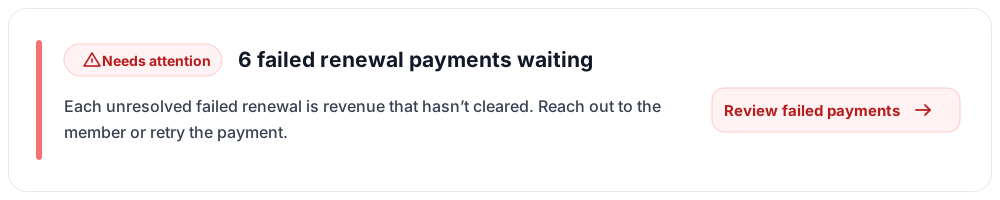
- Needs attention — things blocking revenue, growth or a polished member experience. Start here.
- Worth reviewing — not urgent, but worth a few minutes when you have them.
- Insights — patterns in the last month or so that are useful to know as you plan. Some carry a second link to the full report behind the number.
- Healthy — a short list of what is already in good shape, so you can see what you do not need to touch.
What it looks at
The checks span the parts of your studio that Clovo can see:
- Setup — whether the details clients and accountants rely on are filled in, such as your ABN and GST settings.
- Revenue and payments — unresolved failed renewals, and how your recurring revenue is trending.
- Retention — churn, and members sitting on pause.
- Growth — your public landing page, your referral program, trials and intro offers, and waitlist priority for members.
- Operations — class fill rates, late cancellations and no-shows, how concentrated your timetable is on one instructor, tasks that have gone stale, and whether you are using client tags.
- Engagement — your welcome email, and how often clients are visiting.
It reflects the latest report prepared for your studio. After you change a setting or your activity changes, a finding can remain listed until the next report is prepared.
Features you have not switched on
You may also see Not switched on yet below the findings. It contains a short list of Clovo features that are not active for your studio, with a reason to consider each one and a link to its setup screen. These are suggestions, not findings, and they do not change your health score.
Treat it as a prompt, not a verdict
The report says so itself, and it is worth repeating: the findings are written with a typical boutique studio in mind. They are suggestions, not business advice.
Some will not apply to you. If you deliberately run one class type with one instructor, a note about instructor concentration is telling you something you already decided. Read the findings, take what fits, and leave the rest — the score is not a grade.
Common questions
I fixed something. Why is it still listed? The report shows the version prepared on the date in its header. Your change will appear when the next report is prepared.
Why can't my front desk staff open it? Health Check is limited to the Owner and Setup roles, because most of what it recommends is changed on screens only those roles can reach.
My score dropped and I did not change anything. The checks include activity as well as settings, so a run of failed renewals or a quiet month for referrals can move the score when the next report is prepared. Open the findings to see which one changed.
Can I hide a finding I have decided not to act on? Not currently. A finding stays listed while the condition that raised it is true. It is reasonable to leave items you have consciously ruled out — they are suggestions, and the score has no consequence attached.
Is this the same as Reporting? No. Reports answer a specific question in depth. The Health Check scans broadly and points you at what to look into, sometimes linking to the report that goes deeper.
Related articles
Set up late cancellation and no-show penalties
Set late cancellation and no-show rules, choose credit forfeiture or membership-only fees, and check the penalties applied to bookings.
Change the reply to address for your studio
Choose where client replies go for announcements, bookings, purchases and other studio emails.
Understand the meaning of different plan statuses in Clovo
Use the status beside a client’s membership, credit pack or trial to understand whether they can use it and when their access changes.
Change the address shown on invoices
Choose your business address or a studio location as the From address on new client invoices and receipts.