
Credit packs in Clovo

Tobias Gundry
Updated
Credit packs let clients book into classes with your studio without committing to a recurring subscription.
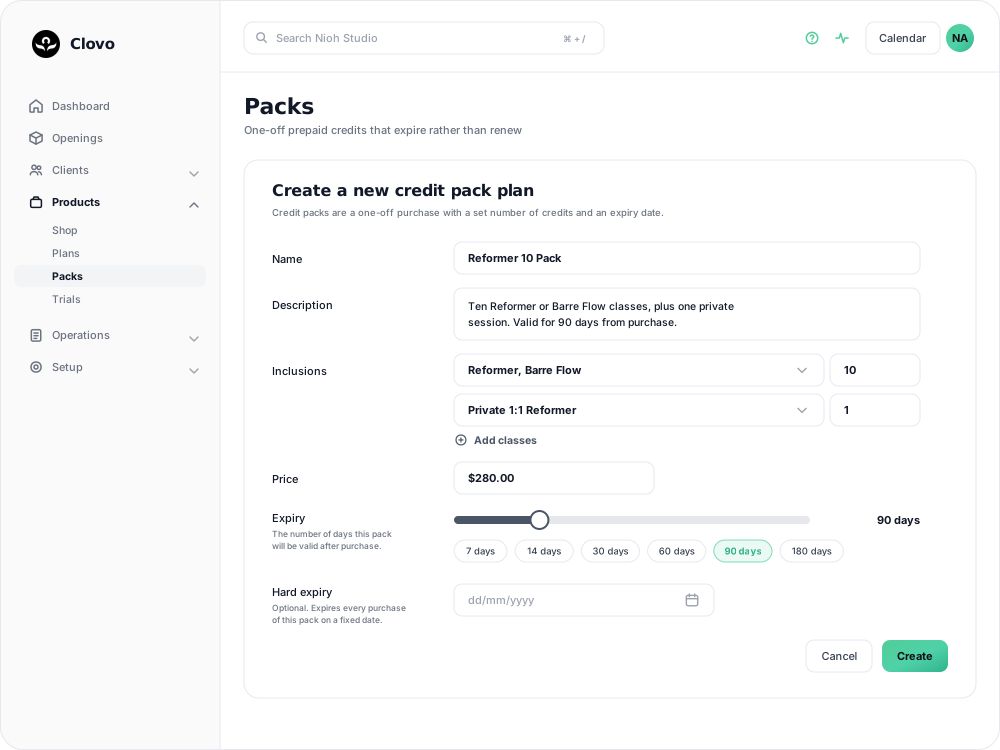
Credit packs are prepaid credits for selected classes to be used within a specified period with your studio. Unlike memberships which renew at set intervals, credit packs don’t renew or automatically refill. Which makes them a great option for casual members who may not be able to commit to the regular schedule that memberships cater for.
Clients who already have a membership subscription can also use packs to buy additional services, such as private one-on-one classes alongside their weekly membership.
Creating a Credit Pack in Clovo
To create a credit pack in Clovo, from your studio dash at https://studio.clovo.au, expand the ‘Products’ dropdown in the lefthand side navigation menu, click into ‘Packs’, then ‘Add Pack’.
Basic Details
Give your pack a name and description, and set a price including GST if applicable.
Expiry
Set when new purchases of this pack should expire. The expiry is calculated starting from the date of purchase. If a client needs more time, you can extend the expiry date for that client after purchase.
You can optionally set a hard expiry date. This gives you an option to expire all credit packs of this type on a given date, rather than a relative number of days from the purchase date. This is a great option for special deals such as opening specials. If you set hard expiry, the pack will also be removed from sale on the expiry date, in addition to all purchases being expired.
Setting inclusions
Group classes under a shared allowance. Select Add class allowance row, tick the classes it covers, then choose how many bookings the pack includes. New rows show Choose allowance until you make a selection.
For a pack of 10 regular classes plus one private session:
- Add a row for your regular classes and choose 10 of any. Clients can mix and match those classes for a total of 10 bookings across the pack.
- Add a second row, tick only Private 1:1 Reformer, and choose 1 of any. This gives the client one private session in addition to the 10 regular classes.
Keep each class on one row. Choose Unlimited only when you want no booking limit for that group during the pack's validity.
Duplicate a credit pack
If a new pack is similar to one you already sell, such as a larger version of a class pack or a seasonal offer you run each year, you can start from a copy of the existing pack.
- Expand Products in the lefthand menu, click Packs, and open the pack you want to copy.
- Click Duplicate.
- Update the details that should be different, including the name, so your team and clients can tell the two packs apart.
- Click Create.

The Create a new credit pack plan form opens with the original pack's details already filled in: its description, price, expiry, hard expiry date, class inclusions, and the options below. Nothing is saved until you click Create, and the original pack is not changed.
Only the pack's settings are copied. Clients who bought the original keep it, and nobody is given the new pack. If the original is a secret deal, give clients access to the new pack separately. If the original has a hard expiry date, check that the date still suits the new pack.
Other credit pack options
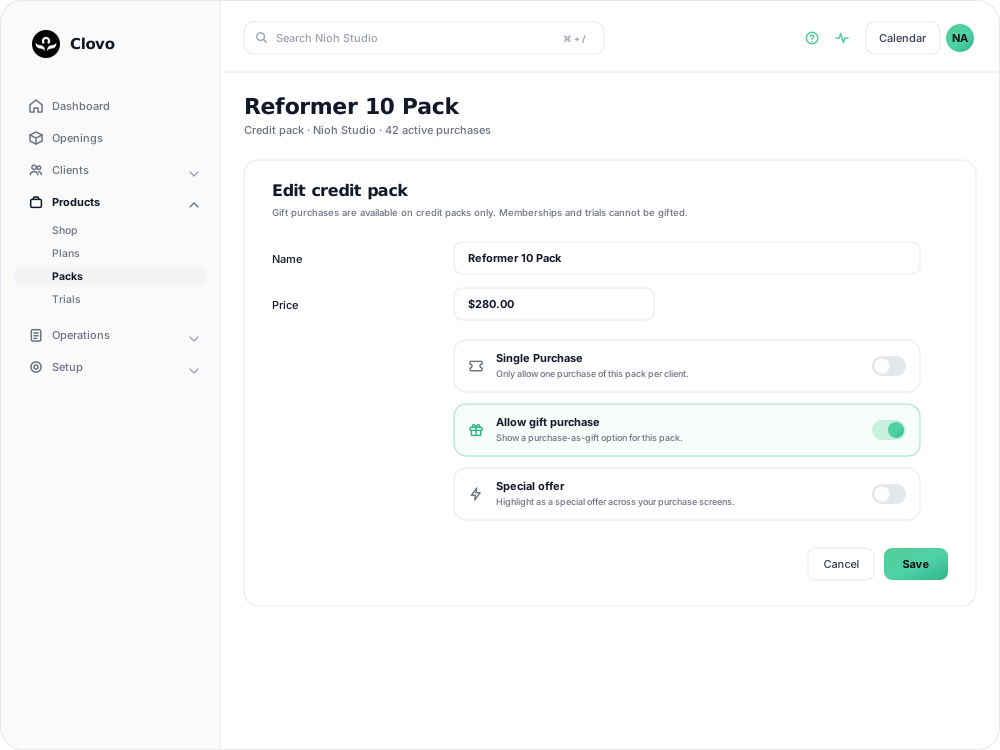
The pack form includes a few optional settings that control who can see the pack, how often a client can buy it, and how it is presented to clients. Turn on the settings that match the way you want to sell the pack.
Secret deal
Keep the pack off your public purchase screens and make it visible only to clients you choose. You can give access from a client profile or share the deal with a promo code. See How to offer secret deals on your plans and packs for the full setup.

Single Purchase
Limit each client to one purchase of this pack. This is useful for an introductory offer that should not be bought repeatedly by the same client. See Create a paid introductory offer with a credit pack for an example.
Allow gift purchase
Let an existing client buy the pack for someone else. When this is turned on, a Purchase as gift option appears on your landing page. Gift purchases require Stripe, an enabled landing page, and an active pack. See How to set up gift purchases for credit packs.
Special offer
Highlight the pack across your purchase screens. In the Clovo app, a Special offer appears above pinned products, so this is useful for an introductory or limited-time offer that you want clients to notice first. See Create a paid introductory offer with a credit pack for an example.
Custom after purchase message
Send a message of your own after a client buys the pack. You could use it for arrival instructions, door access, parking information, or what to bring. See Send a custom message after a new purchase.
Credit Pack FAQs
Credit Pack Expiry
- Credit packs expire the number of days from the purchase date that you specify or when all credits have been redeemed, whichever comes first.
- You can extend the expiry date of a purchased credit pack.
- Hard expiry sets a date that all packs of that type will expire regardless of purchase date. Packs with a hard expiry will also be removed from sale on that date.
- Clients cannot book for classes past the expiry date of their pack.
Related articles
Prevent repeat intro purchases with Blocked Purchasers
Block a client from buying a credit pack, including clients who bought your intro offer on another platform before moving to Clovo.
Track the usage of memberships and packs
Read the usage panel on a client’s membership or credit pack, see what each credit was spent on, and correct a balance when it needs fixing.
Give your clients free credits to book any of your classes, with Super Credits
Give clients free classes with Super Credits. Use them for rewards, make-goods, or other studio-approved credits.
Deactivate a pack or membership plan
Remove a credit pack or membership plan from future sales while letting clients who already have it keep using it.