
Start a class on a future date

Tobias Gundry
Updated
Set a future Start date when you want to prepare a new weekly class before it begins. Clovo will only create openings for class dates on or after that date.
Set the start date
- Go to Setup → Schedule and choose Schedule a class in List view, or Create schedule if this is your first entry.
- Fill in the weekday, time, class, location, room or facility if needed, and instructors.
- Turn on Schedule date range.
- Enter the first date the class can run in Start date. Leave End date blank if it will continue indefinitely.
- Choose Create.
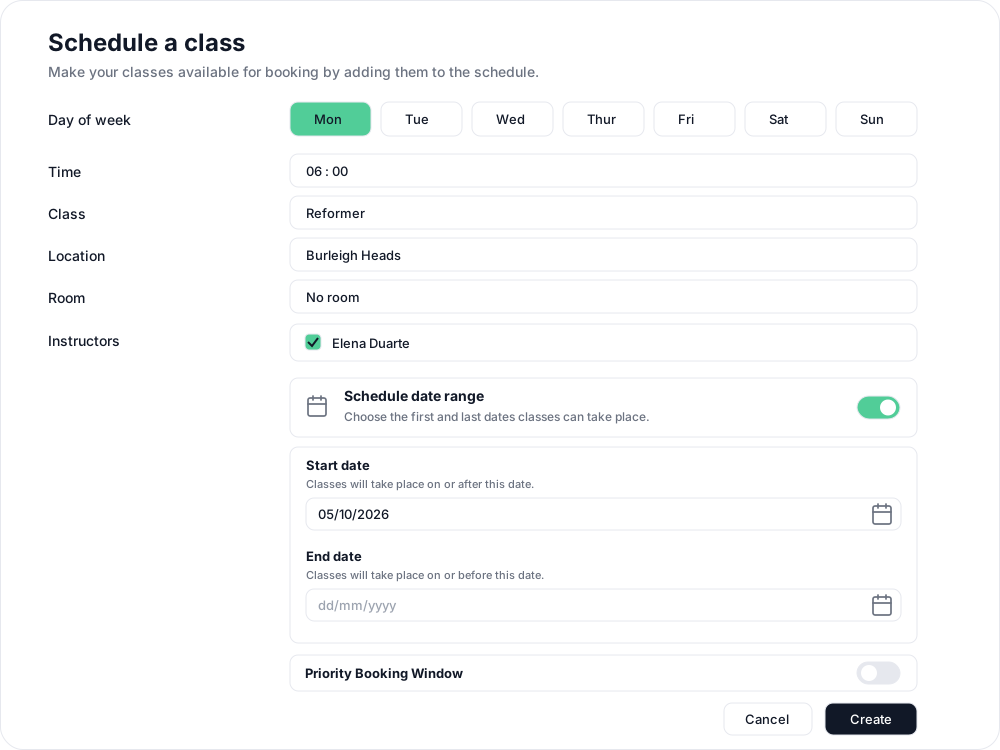
The first opening falls on the selected weekday on or after your start date. A Monday class with a start date of Thursday 1 October will first run on Monday 5 October.

When can clients book?
Start date controls when the class can take place. Clients can book before that date once the class falls inside your studio's Open schedule window. If it is already inside that window when you save, its openings can appear straight away. If it is further away, they appear as the booking window reaches those class dates.
To control how far ahead bookings open and the daily release time, see choose when new classes are released for booking.
Postpone a class that is already scheduled
Open the existing schedule, choose Change schedule, enable Schedule date range and set the later Start date. Choose Change to review it. Existing openings before that date stay open unless you select them for cancellation in the review. Follow changing class schedules with existing openings to decide which to keep.
For a class with a finish date too, see run a class for part of the year, including how to view its dates on the Timeline.
Related articles
Exempt a schedule from the booking cutoff
Keep bookings open until class starts for selected schedules while the rest of your timetable follows your studio booking cutoff.
Cancel upcoming classes that have already been scheduled
Cancelling an opening cancels every booking on it and returns credits automatically, but direct purchases are not refunded for you.
Change the date and time of existing openings
Move a single class opening to a new date or time. Clovo keeps the bookings, tells the clients who hold them, and leaves the schedule the class came from unchanged.
Close the studio for a date range
Record a closure so Clovo stops opening classes at that location, then cancel the openings already on the timetable and extend or pause the memberships the closed days run through.