
Why is a promo code not working?

Tobias Gundry
Updated
When a client says a code is not working, the code's details screen usually shows why. Go to Growth → Promo codes, select View beside the code, and work through the checks below.
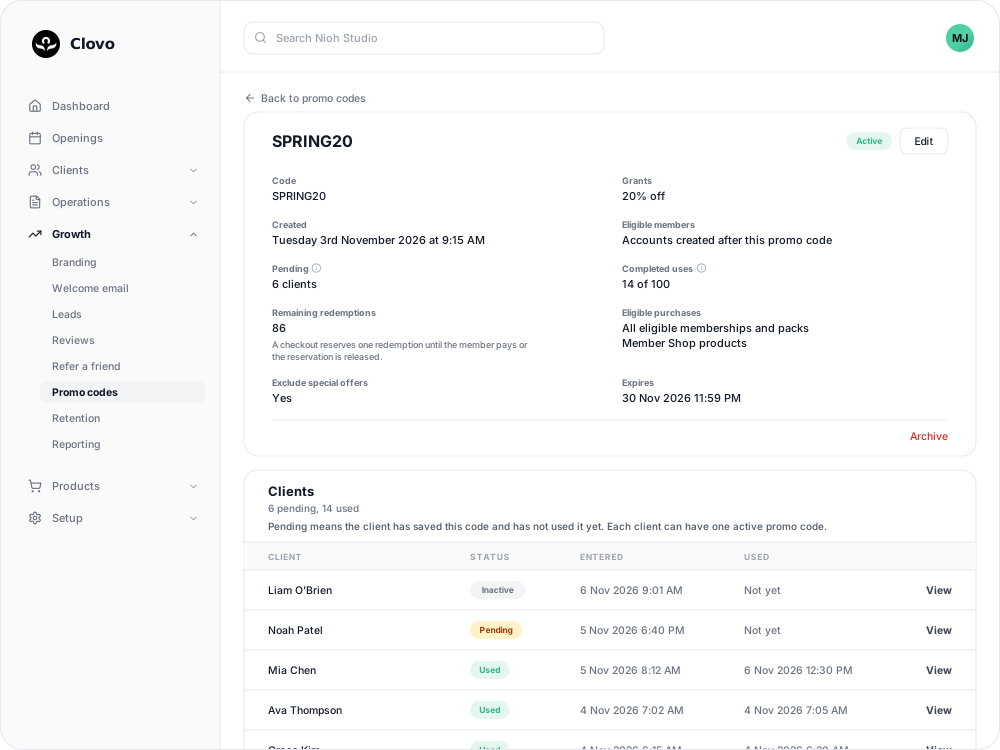
1. Check the code is active
The status beside the code name should be Active.
- Expired — the expiry date has passed. Set a later date if the offer should continue.
- Limit reached — every redemption has been used. You can raise the limit.
- Archived — the code has been stopped and cannot be restored. Create a new code if needed.
A client who tries a code that has ended, or has been archived or mistyped, sees "That promo code is invalid or no longer available."
2. Check who can use it
Look at Eligible members. If it says Accounts created after this promo code, a client who joined before the code was created cannot use it, and sees "This promo code is only available to members who joined after it was created." Turn on Allow existing members to include them — see Offer a promo code to new clients or existing members.
3. Check what it applies to
Look at Eligible purchases and compare it with what the client is buying.
- Special offers are excluded unless Include special offers is on. Exclude special offers on the details screen shows the current setting.
- Trials and plans with introductory pricing are never discounted.
- Member Shop orders and single classes are only discounted when the code has those switched on.
- The discounted charge has to be at least $0.50. If the discount would bring a cheap purchase below that, the code does not apply and the client sees the regular price.
Limit a promo code to certain memberships and packs explains these settings.
4. Find the client in the Clients table
The client's status in the Clients table narrows it down:
- Used or Claimed — they have already used the code. Each client can use a discount code once.
- Inactive — they have since saved a different code, which replaced this one. A code a client has saved before cannot be saved to their account again. For a secret deal, you can grant the deal on their profile instead.
- Unavailable — their account is older than the code and Allow existing members is off, or, for a secret-deal code, the deal is no longer active and private.
- Pending — the code is saved and ready. The discount comes off their next eligible purchase.
If the client is not listed, they have not saved the code. Ask them to check the spelling and enter it again — How clients enter a promo code lists where.
5. Other things clients run into
"My promo code is reserved." The client started a checkout with the code and did not finish it. They can select Cancel reserved checkout to free the code, or the hold is released automatically within a day.
"My renewal was charged the full price." Discounts on recurring memberships apply to the first payment only. The renewal price was shown at checkout.
"I can't see the secret deal." Check the plan or pack is still active and marked as a secret deal. If the client saved a different code before buying, the deal is hidden from them again, and you can grant it on their profile instead.
"Can I use two codes?" No. A client has one saved code at a time, and codes cannot be combined.
Related
Related articles
Archive or delete a promo code
Stop a promo code from working, what happens to clients who saved it, and why most codes are archived rather than deleted.
Create a dollar-amount-off promo code
Take a fixed amount, such as $10.00, off memberships, packs, Member Shop orders or single classes for each client who enters your code.
Create a percentage-off promo code
Take a percentage, such as 20%, off memberships, packs, Member Shop orders or single classes for each client who enters your code.
Create a promo code that unlocks a secret deal
Let clients unlock a private membership or pack themselves by entering a code, instead of granting access one profile at a time.