
Offer recurring memberships by creating a membership plan

Tobias Gundry
Updated
A membership is a recurring subscription to your classes. The member is billed on a fixed cycle, and each cycle gives them a set number of classes they can book. The one-off alternative is a credit pack, where a client buys a fixed number of credits that expire rather than renew — see Credit packs in Clovo.
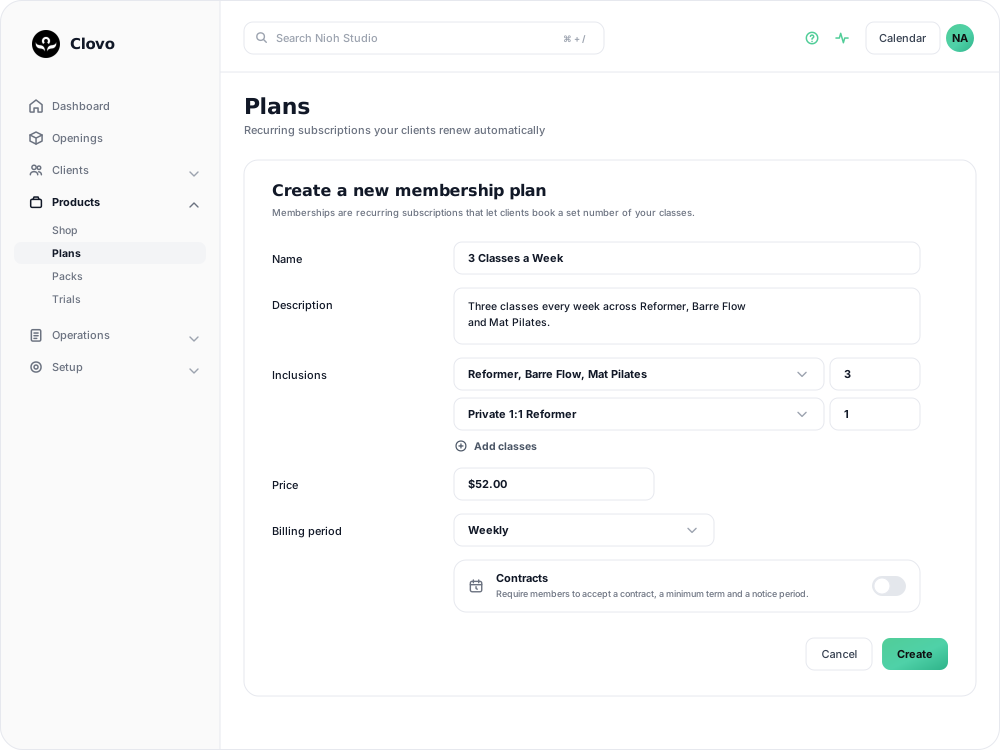
Before you start
Two things are settled before or at the moment you create the plan, so it is worth deciding them first.
A plan requires at least one class. Until your studio has a class, Clovo shows Setup your classes first in place of the plan form, because a plan is built out of the classes it includes.
Contracts are optional terms attached to a membership plan. They let you ask members to accept contract wording and, if needed, set a minimum number of billing periods and a cancellation notice period. These settings determine when the membership can end and whether further payments are due after cancellation. Turn on Contracts while creating the plan if you want to use them. Every field in that section becomes read-only once the plan is saved, even if nobody has bought it. See Create and manage membership contracts to write the agreement, then Set a minimum membership term and cancellation notice period to set its plan terms.
Fill in the plan form
Go to Products → Plans and select Add Plan, or Create membership plan if this is your first one.
Name and description
Name is between 3 and 50 characters and is what members see in the app and on your purchase screens.
Description is required and needs at least ten characters. Members read it when they are choosing between your plans, so say what the plan includes in your own words.
Private health code
Optional, and only useful if your studio's services attract a private health rebate. Enter letters and numbers only — no spaces or punctuation. The code is added to purchase emails and PDF receipts so members can claim.
Inclusions
Inclusions decide which classes the membership can book and how many of them. Select Add classes to add a row, tick the classes that row covers, and choose the number of classes.
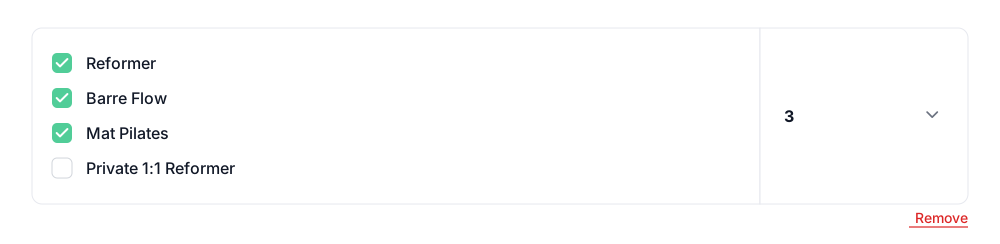
A plan needs at least one row, and can have as many as you need:
- Each row is a separate pool of classes. A row covering Reformer and Mat Pilates with 3 classes means three classes per cycle shared between those two, not three of each. To give a member three Reformer classes and one Private session, use two rows.
- A class can only appear on one row. If you add the same class twice, Clovo asks you to remove it from one of them before saving.
- Choose Unlimited instead of a number for an unlimited row. Classes on that row never run the member out of credit, and their usage shows as a count against an infinity symbol rather than a percentage.
Price
Prices are in Australian dollars and include GST if your studio charges it.
The minimum is based on the weekly rate rather than a flat amount, so the same floor applies however often the plan bills:
| Billing period | Lowest price |
|---|---|
| Weekly | $10.00 |
| Fortnightly | $20.00 |
| Monthly | $40.00 |
| Quarterly | $130.00 |
| 6 monthly | $260.00 |
| Yearly | $520.00 |
A price under the floor is declined with a message naming both figures — for a yearly plan, "Price must be at least $520.00. Plans must work out to at least $10.00 a week." The highest price a plan can carry is $10,000.00.
Billing period
Choose how often the membership renews.
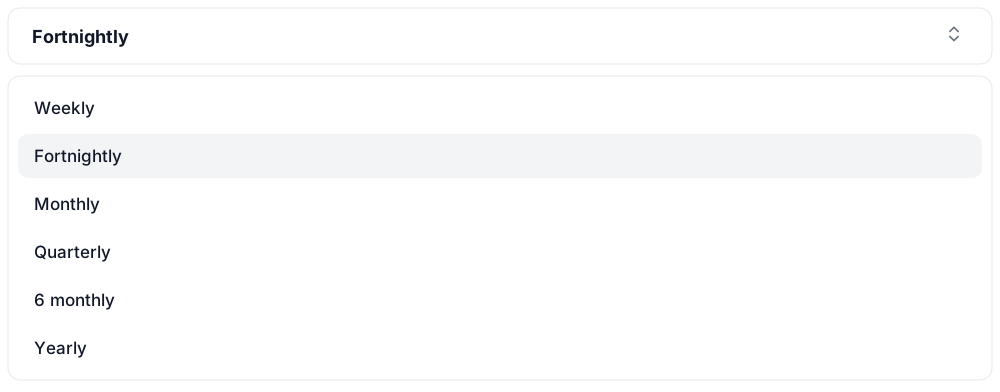
Set the billing period before you turn on Contracts. Minimum terms and notice periods are counted in billing periods, so those controls stay unavailable until a period is chosen.
Secret deal
Turn on Secret deal to keep the plan off your public purchase screens. It is then visible only to members you grant access to from their client profile. See How to offer secret deals on your plans and packs, or Share a secret deal with a promo code to let clients unlock it themselves.
Custom after purchase message
Turn this on to send your own message to a client when they buy this plan — studio door codes, what to bring, where to park. See Send a custom message after a new purchase.
Select Create to finish.
Editing a plan members are already on
Name, description, price, inclusions and billing period can all be edited after the plan exists. When the plan has purchases behind it, the plan page opens with Existing purchases will be affected, because those edits reach current members and not only future buyers.
Changing the price, the billing period or the inclusions takes you to a Review plan update screen before anything is saved. It lists every membership each change touches, with the member's next renewal date, so you can see the size of the change before committing to it.
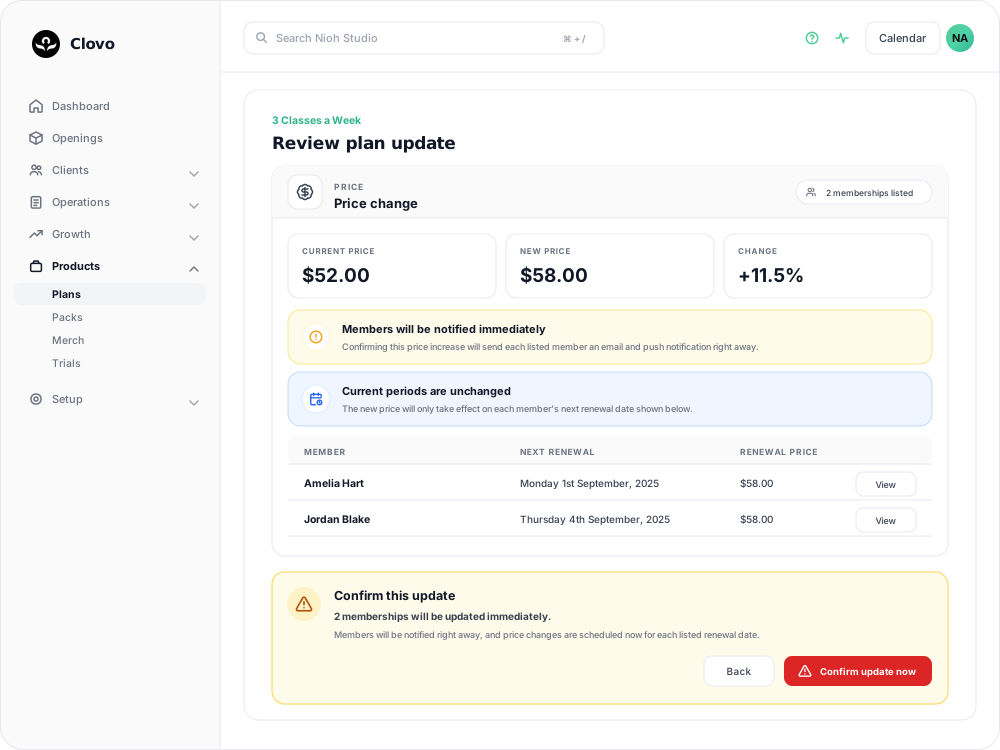
Two different timings apply, and the screen states both:
- Price and billing period changes take effect at each member's next renewal. Nobody is charged the new amount mid-period, and the current period is left alone.
- Inclusions change immediately. As soon as you confirm, current members are on the new class list and the new numbers.
Either way, members are emailed and sent a push notification straight away, at the point you select Confirm update now — not when the change reaches their renewal. Tell your team before you confirm a price rise, so they are ready for the questions.
Two things to watch for:
- Price and billing period are locked while any member is paused. If the plan has a paused membership or a scheduled pause, Clovo declines the change and asks you to resume or cancel the pause first. See Pausing a membership.
- A member who already has another billing change scheduled is skipped. Clovo tells you how many were skipped after you confirm. Those members keep their current price, are not notified, and will not move to the new price on their own — handle them individually.
If you want different terms for future members, create a second plan and deactivate the old one. Members stay on what they bought.
How class allowances are counted
Classes count against the window the class takes place in, not the day the booking was made. A member can book ahead, but each window still has its own limit.
- Weekly plans use Monday to Sunday windows. Fortnightly plans use two-week windows running Monday to Sunday across both weeks, and longer billing periods follow the same pattern.
- Unused classes do not roll into the next window.
- A member can book into future windows while the current one is full, as long as the future window has room.
The first period is more generous. A member who joins part-way through a week would otherwise have only a few days to use a full allowance. Their first allowance instead runs from the day they join until their first renewal date. After that first renewal the membership settles onto the regular Monday-based windows.
For a member on a weekly plan with three classes:
- Three classes already scheduled in one Monday-to-Sunday week means no fourth class that week.
- A class booked today for next Tuesday uses next week's allowance, not this week's.
- With this week used up, next week's classes can still be booked.
For a member on a fortnightly plan with six classes, a window might run Monday 4 May to Sunday 17 May, with the next running Monday 18 May to Sunday 31 May. Six classes between 4 and 17 May fills the first window, and a seventh has to fall on or after 18 May.
If a booking is refused and the reason is not obvious, Find out why a booking failed and what to do next breaks down which pool ran out.
Bookings made into a future window
A booking for a class in a window the member has not reached yet is held against that future allowance. No extra payment is taken at the time of booking — the place is reserved on the basis that the membership will still be running when the class comes around.
If the membership is cancelled, those future bookings go. Bookings for classes on or before the date the member has paid up to stay in place. Anything after that is cancelled, which returns the space to your other clients.
So if a member cancels on the 15th and their membership is paid through to the 18th, classes on the 17th and 18th stay booked, and a class on the 19th or later is cancelled.
Let the member know that classes beyond their paid-through date will be cancelled, as they may have booked ahead. See Cancel a client membership.
Related articles
Track the usage of memberships and packs
Read the usage panel on a client’s membership or credit pack, see what each credit was spent on, and correct a balance when it needs fixing.
Deactivate a pack or membership plan
Remove a credit pack or membership plan from future sales while letting clients who already have it keep using it.
Change a client’s membership plan
Move a client to another recurring plan at their next renewal, and know when the new price and allowance begin.
Create and manage membership contracts
Write a membership contract, choose whether it needs a hand-drawn signature, and see which plans and members use it.