
Spot members leaving before it shows in your revenue with the Churn Rate report

Tobias Gundry
Updated
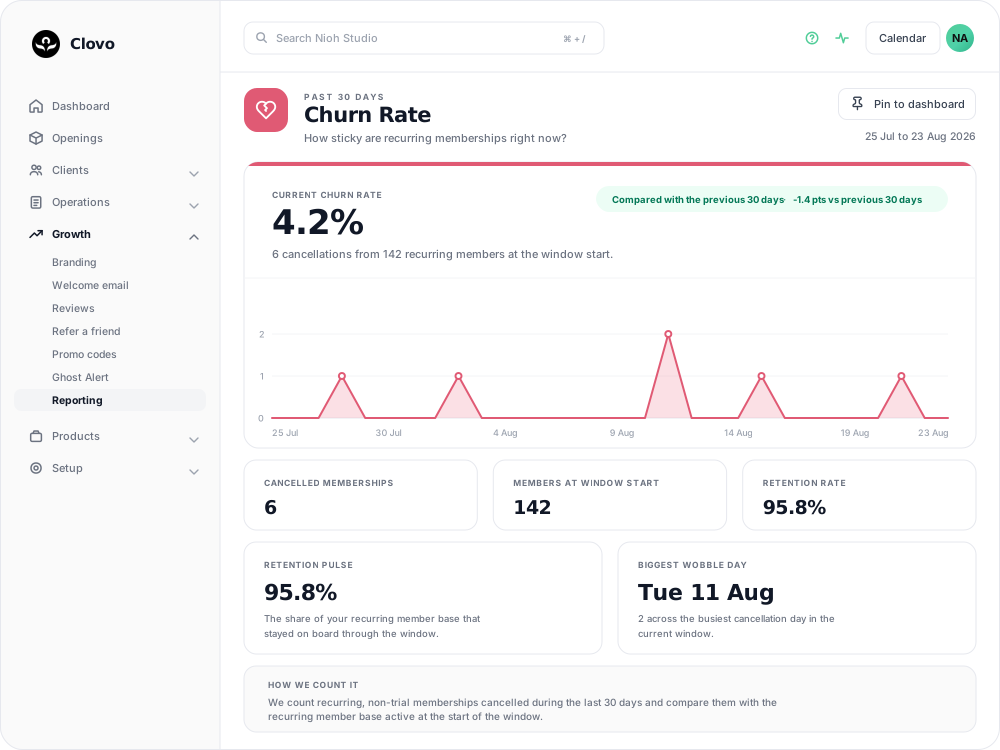
The Churn Rate report shows how often recurring memberships are being cancelled. It counts the cancellations requested in the past 30 days, measures them against the recurring member base you had at the start of that window, and compares the result with the 30 days before it.
A cancellation counts from the day it is requested
This is the part that changes how you read everything else on the page. A membership joins the churn count on the day the cancellation is requested, not the day the member loses access.
The members behind today's figure may still be booking, still be billed, and still be in the room for weeks. On a plan with a cancellation notice period the gap runs longer again: the member serves out the period they are in, is billed for each further period of notice, and only then does the membership end. See Set a minimum membership term and cancellation notice period for how those dates are worked out.
Cancellations your team makes behave the same way — the count moves on the day you confirm it, not on the end date shown on the screen.
That is what makes this an early-warning report. The Recurring Revenue report keeps counting those memberships until their paid periods run out, so churn moves first and the money follows.
What each number tells you
Current churn rate is the headline percentage, with the line beneath it showing the two figures it came from — the cancellations, and the recurring members at the window start.
The comparison chip states the difference against the previous 30 days in percentage points, so a move from 5.6% to 4.2% reads as 1.4 points lower.
The chart plots cancellations by the day they were requested, and Biggest wobble day names the busiest of those days. A single tall day is often traceable to one event — a price change, a timetable change, a closure — while a flat scattering across the month usually is not.
Cancelled memberships and Members at window start are the numerator and denominator of the headline. The base counts memberships rather than people, so a client on two recurring plans is counted twice.
Retention rate, and the Retention pulse card that repeats it, is the churn rate subtracted from 100. It is the same measurement stated the other way around, not a second opinion on it.
Read the percentage against the size of your base. On 142 members each cancellation is worth about 0.7 points; on 20 members it is worth five, so one cancellation can move the rate sharply. To see whether recent joiners in particular are dropping off, use the Cohort Retention report.
Who is counted, and who is not
- Renewing membership plans only. Trials and credit packs appear nowhere in this report — not as cancellations, and not in the base. If most of your clients buy packs or drop in, this report describes a slice of your business rather than all of it. The Member/Casual Ratio report shows that mix.
- Paused memberships count as staying. A paused member remains in the base and is not counted as a cancellation, so a pause does not move this number. See Pausing a membership.
- Archived clients leave both sides of the sum. Archiving removes a client's membership from the cancellation count and from the base, in the current window and the previous one. Because a membership has to be cancelled before the client can be archived, archiving someone soon after they leave takes the cancellation you were measuring back out of the report. See How to archive clients.
- Memberships paid for outside Clovo end without being recorded here. Cancelling one from the dashboard ends it immediately and no cancellation date is kept, so it drops out of the base without ever counting as churn.
Clients whose deletion you have requested are also left out.
Pin the report to your dashboard
Pin to dashboard, at the top right of the report, adds a Churn Rate card to your dashboard so the current figure is there without opening the report. The button then reads Unpin from dashboard.

Dashboard cards are saved to your own staff account, so pinning a report shows it to you and not to your colleagues. See Customise your dashboard layout for arranging the cards once they are there.
Common questions
Churn has gone up, but nobody has actually left. Is the report wrong? No. Cancellations are counted from the day they are requested, so the number rises while those members are still attending and still paying out their remaining periods.
A member cancelled recently and I cannot find them in the count. Check what they were on and what happened to their record. Trials and credit packs are outside this report, and archiving the client removes their cancellation from it.
If someone re-joins, does the cancellation come back off? No. The cancellation stays in the window it happened in, and the new membership joins the base from the day it starts.
The Studio Health Check shows a different churn percentage. The Health Check uses a separate retention insight with a slightly different member base, so its percentage can differ from this report. See Studio Health Check.
Cancelling a recurring membership now asks for Reason for cancelling before confirmation. Choose the client’s reason; Other requires 10–1,000 characters. Clients answer the same question when cancelling in the app. You can view the saved reason on their membership.
Related articles
Find where booked places are being lost with the Cancellations & No-Shows report
Read the Cancellations & No-Shows report: what its 30-day window really covers, why the 24-hour late-cancel split is not your penalty policy, and what the Leakiest classes list leaves out.
Answer questions about your clients with Client Insights
Explore attendance, memberships and spending to answer questions about your clients, then save or export the results.
Work out what a client is worth over their whole time with you
The Customer Lifetime Value report shows the average amount a paying customer has spent across their whole relationship with your studio.
See what each client spends with you every month with the Spend per Customer report
The Avg Spend per Customer report shows how much each paying customer has spent on average during the past 30 days.